
Best Android TV Boxes can rescue your lagging streaming and cluttered apps, giving your TV new life. Our experts tested top streaming devices to find fast, reliable 4K playback and simple setup so you waste less time and watch more. Say goodbye to frustration and enjoy amazing picture quality and the freedom to stream what you love. Read on to see our top picks and smart buying tips.
Contents
- Top 7 Android TV Boxes:
- 7: TiVo Stream 4K
- 6: Amazon Fire TV Stick 4K Max
- 5: onn 4K Pro Streaming Device
- 4: Xiaomi TV Box S 3rd Gen
- 3: Ugoos AM6B Plus
- 2: Amazon Fire TV Cube
- 1: Google TV Streamer 4K
- Things to Consider Before Buying a Android TV Boxe:
- Official Google-Certified Devices
- Open-Source Generic Models
- Processor and RAM Requirements
- Storage Capacity and Expandability
- Connectivity and Port Options
- Advantages of Open Ecosystems
- Common Limitations and Security Risks
- Physical Connection and Network Pairing
- Account Integration and App Installation
- Managing Background Applications
- Routine Firmware and Security Updates
- To Wrap Up
Top 7 Android TV Boxes:
7: TiVo Stream 4K

One of the greatest ways to upgrade an older TV on a tight budget is using the TiVo Stream 4K.Years ago, the built-in apps on your TV stopped receiving updates. You may get them back with the Stream 4K by connecting it to an available HDMI port.The smallest gadget here supports 4K UHD with Dolby Vision HDR and Dolby Atmos.Afterward, a unified home screen for all applications. Use a single search and create a single watch list for all of your apps.
At last, an Android TV with a voice remote that works with Google Assistant. It plays when you say the title.Compared to modern boxes, the menus move more slowly due to the outdated technology. Large app libraries have limited storage space. No Ethernet port; only Wi-Fi.Considered ideal for first-time streamers, TVs in bedrooms and guest rooms. App users or residences with wired connections may not benefit from this.
6: Amazon Fire TV Stick 4K Max

The most cost-effective option for Alexa-enabled homes and cloud gaming is the Amazon Fire TV Stick 4K Max.If the stick is inexpensive, you should expect buffering and limited app support. Avoiding both is the 4K Max.The first is 4K UHD with HDR10+, Dolby Vision, and Dolby Atmos. We support all of the main HDR formats.The next topic is Wi-Fi 6E. When using a suitable router, streaming is redirected to a less congested band, resulting in smoother 4K.
Lastly, you get 16 GB of storage, which is twice as much as Amazon’s other sticks, and you can play games in the cloud with Xbox Game Pass and Luna.Sadly, it does not support the Google Play Store and instead runs on Fire OS. There is a heavy emphasis on Amazon content on the home screen. Both the controller and the subscription are available independently for cloud gaming.Alexa homes, casual gamers, and vacationers are the ideal target audience. Viewers seeking Google TV and Play Store applications should not use this.
5: onn 4K Pro Streaming Device

The finest value box with a wired Ethernet port—the one and only 4K Pro streaming device.Sticks rely solely on Wi-Fi and have little memory. You will not see your show as the signal weakens.First, for quicker app switching, you’ll get 3 GB of RAM and 32 GB of storage.Be followed by Wi-Fi 6 and an Ethernet connector integrated right in. Buffering is no longer caused by Wi-Fi when a cable is inserted.
Google TV now supports Dolby Vision and Dolby Atmos, at long last. When you slip the illuminated remote into the couch, it will ring.Con: it’s a set-top box, not a stick, thus it will take up valuable shelf space. A simple plastic construction. Online inventory fluctuates.Individuals looking to save money or whose home Wi-Fi signal is spotty near the television might consider this option. No shelf wall-mounted televisions are not compatible with this.
4: Xiaomi TV Box S 3rd Gen

The greatest all-around Google TV box for most living rooms—the Xiaomi TV Box S 3rd Gen.The majority of boxes subtly exclude one HDR format. Both your TV and your box are compatible with it. Xiaomi sidesteps the catch-22.To start, 4K with 60 fps with Dolby Vision and HDR10+. It sends whichever one your TV likes.Following that, we will go into DTS:X and Dolby Audio. When paired with a soundbar, movie nite becomes an immersive experience.
At last, a device with less than four inches of width, 32GB of storage, and HDMI 2.1. You can hide it behind nearly any screen.A USB adaptor is required for wiring because it does not have built-in Ethernet. At 2 GB, memory is out. One USB port only.The ideal audience for certified Google TV is casual streamers. Caveat: houses with wired networks or those who multitask extensively should not use this.
3: Ugoos AM6B Plus

For serious movie buffs with a local collection, nothing beats the Ugoos AM6B Plus.Apps, not your personal stuff, are the focus of mainstream streamers. Even a massive 4K file causes them to stutter.The most powerful microprocessor in this rundown so far is the Amlogic S922X-J, a six-core device with four gigabytes of random access memory (RAM).After that, we have dual-band Wi-Fi 6 and gigabit Ethernet, so big 4K files may travel over your home network at lightning speed.
At long last: an open Android system with a USB 3.0 port. Insert a disk and set up your preferred media player.Negatives: It is an older version of Android and is not Google-certified, so it might not be able to run all of the popular streaming apps in 4K. It takes time to set up. The control is simple.Who this is ideal for: home theater enthusiasts, tinkerers, and owners of media servers. Users looking for a subscription app exclusively should not use this.
2: Amazon Fire TV Cube
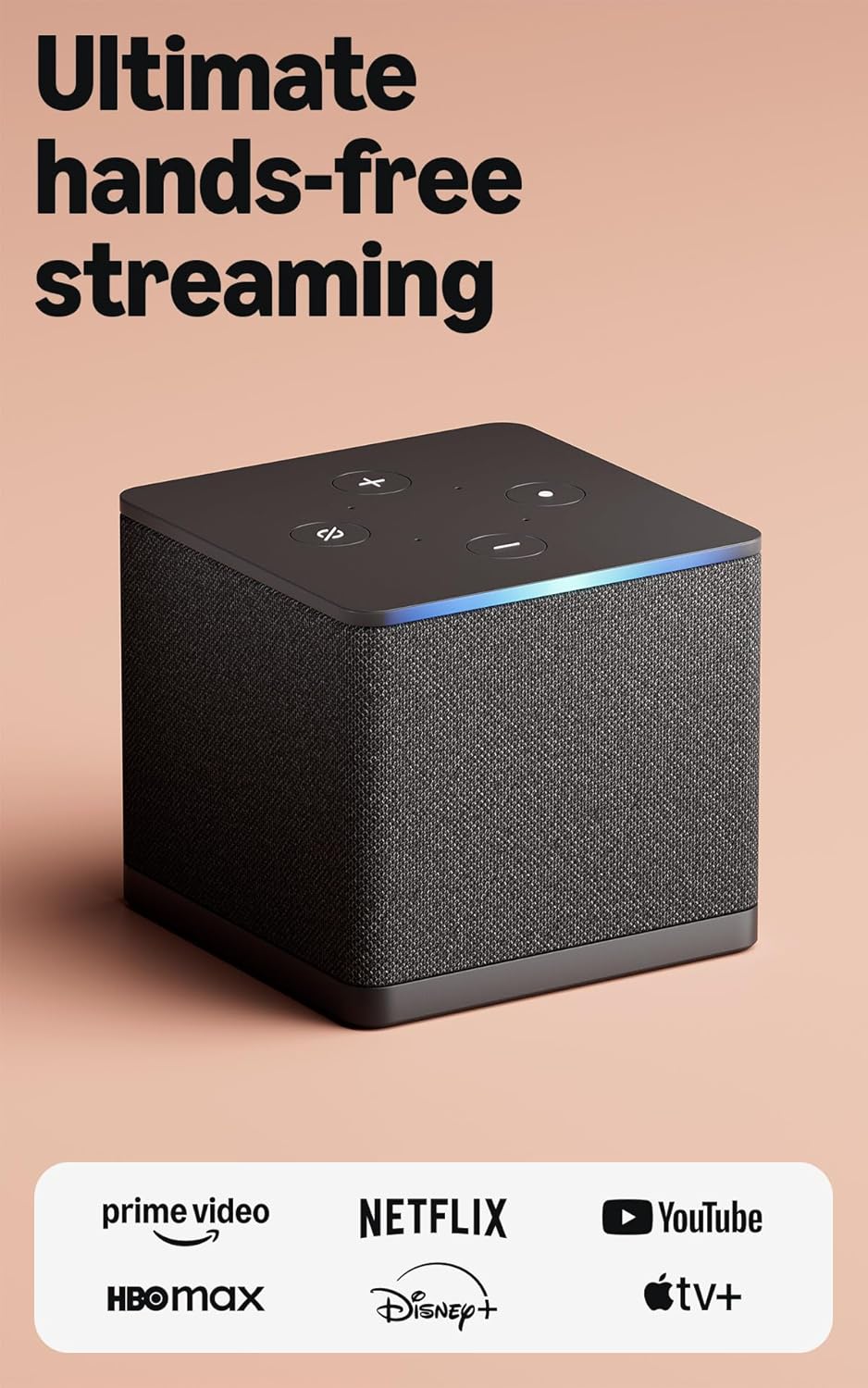
For complete hands-free TV control, nothing beats the Amazon Fire TV Cube.There are three remote controls, but whenever you need one, it’s gone. In their place, the Cube will record your voice.First up: a speaker and microphones integrated inside Alexa so you can use her hands-free. When someone asks from across the room, your performance begins.After that, it turns on the TV and soundbar, and you can connect a cable box or game console through the HDMI port so you can switch between them with the voice command.
Lastly, Wi-Fi 6E and an octa-core processor, which is twice as powerful as the Fire TV Stick 4K Max.Downside: The Alexa app store will not be available on Fire OS. Amazon content is prioritized on the home screen. So that the mics can pick you up, it needs to be out in the open.People who are sick of managing many remote controls will love Alexa homes. Does not work with Google TV or concealed installations.
1: Google TV Streamer 4K

For those who want to have a single device that serves as the hub of their home theater system, the Google TV Streamer 4K is the best Android TV box currently available.Here, every other box ends at the television. The apps that control your smart home’s lighting, security, and cameras are still distinct.First, a smart home hub that is integrated. No additional hub is required for direct connection of compatible lights, locks, and sensors. Your cameras will be shown on a panel on the TV during the show. Absolutely no other box on this page accomplishes what this one does.Second, if your speakers are suitable, you may enjoy 4K HDR with Dolby Vision and Dolby Atmos.
Thirdly, it has an Ethernet connector and 32GB of storage. Sufficient space for all applications and reliable wired 4K.Pure Google TV comes in fourth. Over 800 free live channels are accessible from a single home page that pulls content from all of your subscriptions.Discouraging point: you have to buy the HDMI cable separately. No support for HDR10+. Only with Google Home will the smart home functions be useful.Perfect for: People who have cut the cord and live in homes with smart speakers like Google Home. Those who own HDR10+ TVs or have Alexa-enabled houses will not experience this.
Things to Consider Before Buying a Android TV Boxe:
Choosing the right Android TV box requires careful consideration of several factors. Each model on the market comes with its unique features, specifications, and potential limitations. Understanding what suits your entertainment needs can significantly enhance your viewing experience, whether it’s streaming shows, playing games, or browsing apps.
Official Google-Certified Devices
Official Google-certified devices ensure a wide range of functionalities, providing access to premium streaming apps like Netflix and Hulu in addition to Google Play services. Such devices come with guaranteed software updates and security patches, enhancing performance and security over time. Popular choices, such as the NVIDIA Shield TV and Chromecast with Google TV, exemplify top-quality options that keep users satisfied with their viewing experience.
Open-Source Generic Models
Open-source generic models offer flexibility and customization but often come with significant drawbacks. Many of these boxes run on modified versions of Android, which can lead to an inconsistent user experience. While they may support a wider range of file formats and applications, the lack of official certifications often results in limited access to top-tier streaming services. User reviews frequently highlight concerns about stability and ongoing support, making research essential before commitment.
Processor and RAM Requirements
Processor and RAM requirements play a central role in ensuring excellent performance. Modern Android TV boxes typically come with quad-core processors, which are capable of handling 4K content effectively. A minimum of 4GB RAM is recommended for optimal operation, particularly if you plan to run multiple apps or games. Meeting these specifications can enhance user experience, minimizing lag and streaming issues.
Storage Capacity and Expandability
Storage capacity is another factor worth considering. Many Android TV boxes offer varying storage options, ranging from 16GB to 128GB. For individuals who prefer to install multiple apps or store downloaded content, larger storage is more accommodating. Some models even provide expandable options via microSD slots, allowing you to easily increase storage as your needs grow.
Connectivity and Port Options
Connectivity options enhance the versatility of your Android TV box. Essential ports include HDMI, USB, and Ethernet, which facilitate various connections like external drives and wired internet. Additionally, many models support Wi-Fi connectivity and Bluetooth, making it easy to connect headphones or other peripherals. Ensuring compatibility with your existing devices enhances your overall viewing setup.
Advantages of Open Ecosystems
Open ecosystems provide flexibility and greater choice in applications. Users can easily install third-party apps not available in official stores, enhancing the device’s functionality. Such versatility is appealing, particularly for tech-savvy individuals who want to customize their viewing experience. Many popular streaming services support these platforms, ensuring access to a wide range of content beyond traditional offerings.
Common Limitations and Security Risks
Streamlining functionality often comes with security concerns. Open ecosystems may expose users to malware or unauthorized applications, particularly if not managed properly. While the ability to sideload apps can be a boon, it raises potential risks. Protecting personal data and maintaining device security is essential, particularly when streaming sensitive content or connecting to home networks. Awareness of these limitations can inform your selection process.
Physical Connection and Network Pairing
Start by connecting your Android TV box to the display using an HDMI cable. Ensure that all required peripherals, such as a remote control or keyboard, are paired effectively. Proceed to establish a network connection; selecting between wired or wireless options can affect performance. For Wi-Fi connectivity, input the network password accurately to guarantee stable streaming. Checking the connection once the settings are finalized will confirm a successful setup.
Account Integration and App Installation
Linking your Google account is essential for optimizing app access and recommendations. This account serves as a gateway to the Play Store, allowing you to install desired applications swiftly. Consider downloading popular streaming services like Netflix or Hulu to enhance entertainment options. Once apps are installed, personalize settings according to your preferences for a tailored viewing experience. Revisit your app library periodically to keep your content fresh and relevant.
Managing Background Applications
Closing unnecessary background applications can improve performance and conserve resources on your Android TV box. Each app running simultaneously consumes CPU and RAM, potentially leading to sluggish performance. Utilize the task manager to regularly check for and close apps that you are not actively using. By managing these applications effectively, you can enjoy a smoother streaming experience without interruptions.
Routine Firmware and Security Updates
Scheduling routine firmware and security updates is essential for maintaining your Android TV box. Regular updates not only enhance features but also patch vulnerabilities that could be exploited by malware. Many users overlook automatic updates, which can lead to outdated software and potential security risks. Enabling automatic updates ensures that your device remains protected and performs optimally with the latest enhancements.
To Wrap Up
Choosing the right Android TV box requires careful consideration of various factors, such as compatibility with your existing devices, available streaming services, and hardware specifications. Evaluating user reviews can provide valuable insights into performance and reliability. Consider your viewing habits, whether you prioritize gaming or streaming content, which will guide your selection. Prioritizing long-term usability and support from the manufacturer ensures a more satisfying experience, ultimately leading to better entertainment options tailored to your needs.
Leave a Reply