
Finding the best gaming keyboards is essential because a bad board can truly ruin your match. Stop letting input lag and mushy keys destroy your competitive edge. We tested models with fast mechanical switches to help you crush the competition effortlessly. This guide delivers the ultimate gear to boost your speed and precision right now. Ready to upgrade your battle station? Let’s find your perfect match.
Contents
- Top 5 Gaming Keyboards:
- 1. ASUS ROG Strix Scope II 96 – Best Gaming Keyboard Overall
- 2. Corsair K100 RGB – Best Premium Full-Size Gaming Keyboard
- 3. SteelSeries Apex Pro TKL – Best Adjustable Actuation Gaming Keyboard
- 4. Razer Huntsman V3 Pro TKL – Best Esports Gaming Keyboard
- 5. Redragon K552 – Best Budget Gaming Keyboard
- Things to Consider Before Buying a Gaming Keyboard:
- Mechanical Keyboards
- Membrane Keyboards
- Hybrid Keyboards
- Key Switch Type
- Keyboard Size and Layout
- Build Quality and Durability
- Advantages of Mechanical Keyboards
- Disadvantages of Membrane Keyboards
- Assessing Your Gaming Style
- Testing Keyboards in Store
- Online Reviews and Recommendations
- Cleaning and Upkeep
- Troubleshooting Common Issues
- Summing up
Top 5 Gaming Keyboards:
1. ASUS ROG Strix Scope II 96 – Best Gaming Keyboard Overall

The ASUS ROG Strix Scope II 96 is an excellent choice if you’re looking for a gaming keyboard that provides a premium feel, has a polished sound, and can adapt to any setup you have. You can keep the keys you use for gaming, streaming, and regular work while enjoying a cleaner desk because to its compact 96% layout.
By utilizing tri-mode connectivity, you are granted genuine versatility. If you’re looking for a stable wired connection, you may connect via USB, or switch to low-latency 2.4GHz wireless with ROG SpeedNova for competitive gaming. You can also attach up to three devices over Bluetooth. You won’t have to worry about charging it all the time because it’s compatible with both Macs and PCs and has an exceptionally long battery life when using 2.4GHz mode.
The keyboard’s sound design enhances both the typing experience and the gaming environment. Your keystrokes will have a cleaner, more pleasant sound profile thanks to the built-in sound-dampening foam and switch-dampening pads that eliminate ping and hollow echoes.Personalization is a huge benefit. If you want a more linear push or a more tactile feedback, you may change the hot-swappable, pre-lubed mechanical switches to suit your needs without having to replace the entire board.
A multi-function wheel allows for quick control of media and lighting, and there are pre-programmed hotkeys for recording and Xbox Game Bar for your convenience. You can modify it to fit your playing style thanks to its complete macro programmability. Comfort for long sessions without strain is yours with the detachable wrist rest and adjustable tilt.
2. Corsair K100 RGB – Best Premium Full-Size Gaming Keyboard
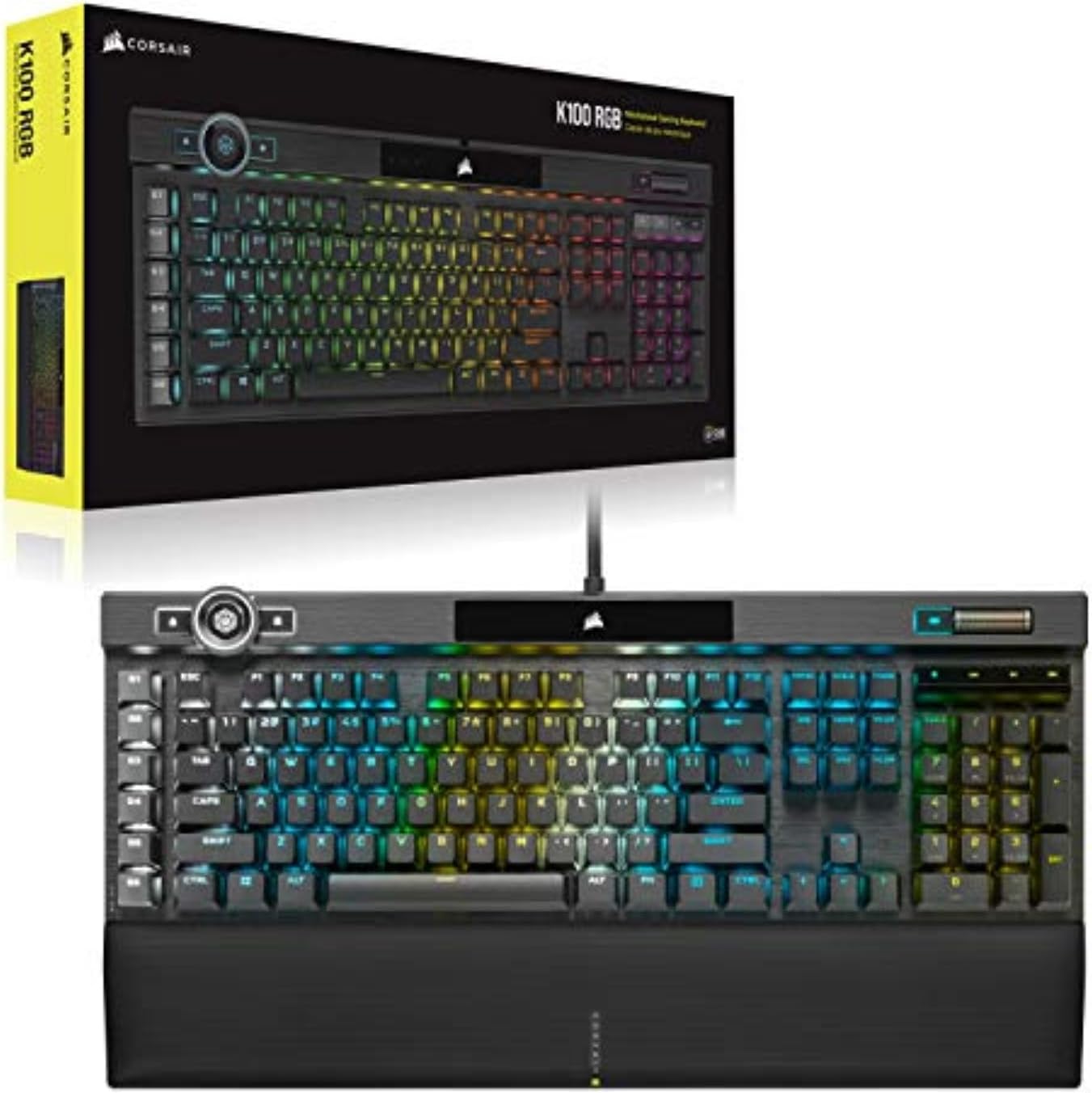
The Corsair K100 RGB is an excellent choice if you’re looking for a full-size gaming keyboard that is both aesthetically pleasing and functionally top-tier. A sturdy metal frame supports the sleek design, while the three-sided 44-zone LightEdge illuminates the keys and provides dynamic per-key RGB lighting for an upscale look that isn’t gimmicky.
This board truly lives up to its “premium” designation when it comes to performance. When timing is of the essence, you may find that your gameplay is more fluid and responsive thanks to the 4,000Hz key scanning and native 4,000Hz hyper-polling, which provide faster input throughput than conventional mechanical boards. You may personalize the look and feel as well as the functionality to suit your taste because it works with complicated, layered lighting effects.
The switches have been fine-tuned for both durability and quickness. You can rely on responsiveness during intense competition and dependable longevity thanks to the keyboard’s low 1.2 mm actuation distance and lifespan rated for 100 million keystrokes.
Intelligent, user-friendly control is also yours. Without interrupting your flow, you can manage media, change the lighting, and trigger in-game or app activities with the multi-function dial and programmable controls. Every time you play, the K100 RGB will feel like a top-tier upgrade if you’re looking for a full-size keyboard with outstanding performance, superior build quality, and comprehensive customization.
3. SteelSeries Apex Pro TKL – Best Adjustable Actuation Gaming Keyboard

Among the most cutting-edge adjustable actuation experiences, the compact and tournament-friendly layout of the SteelSeries Apex Pro TKL provides players with a competitive advantage that can be fine-tuned to their playstyle. You may customize the sensitivity of each key using the OmniPoint 2.0 Adjustable HyperMagnetic switches. This way, you can set the actuation to be very light for quick reactions or very deep for more control, depending on the game and your tastes.
Rapid Trigger is the feature that makes this keyboard stand out. Keys are activated and deactivated dynamically according to travel distance, rather than depending on a fixed actuation point. So, inputs can be reset more quickly, and the “dead time” that can hinder repetitive motions can be reduced. This responsiveness might feel like a huge plus in titles that are fast-paced and competitive.
Also included are 2-in-1 action keys, which allow you to split the key’s functionality in half. To walk, for instance, use a light press and sprint, for a deeper push, providing additional control without increasing the complexity of your keybindings.You may move between devices with minimal performance loss thanks to the Quantum 2.0 Dual Wireless system’s low-latency 2.4GHz connection and Bluetooth 5.0.
The Apex Pro TKL is a little premium keyboard that combines speed, personalization, and wireless mobility to give you more control, intelligence, and speed when playing.
4. Razer Huntsman V3 Pro TKL – Best Esports Gaming Keyboard

In your most intense moments of competitive first-person shooter games, the Razer Huntsman V3 Pro TKL is the ideal esports keyboard for maximizing speed and control. Ideal for fast-paced games where every inch of desk space matters, this tenkeyless layout keeps your setup small and allows for wider mouse sweeps.
Gen-2 analog optical switches provide the greatest benefit. Your keys can feel ultra-light for fast strafes or somewhat deeper for firmer control thanks to the vast 0.1-4.0 mm range of actuation adjustment.Rather of waiting for a predetermined reset point, Rapid Trigger adds an extra competitive dimension by enabling keys to reset the second your finger is lifted. For movement-heavy games where micro-adjustments can determine a duel’s conclusion, this makes repeated inputs smoother and faster.
By dividing your most recent directional input between two chosen keys before you fully release the one you were using before, Razer Snap Tap takes responsiveness to a whole new level. If you update to the latest firmware, this will allow you to make direction adjustments almost instantly, making your movements more precise and responsive.
In addition to getting a board that can withstand lengthy periods of practice, competitions, and daily grinding, you’re getting one with a switch lifespan of up to 100 million keystrokes. The Huntsman V3 Pro TKL can help you reach your competitive potential if you prioritize precise movement, quick resets, and adjustable features suitable for professionals.
5. Redragon K552 – Best Budget Gaming Keyboard

The Redragon K552 is a tried-and-true budget mechanical keyboard that manages to be both durable and enjoyable to use, without breaking the bank. With this 87-key board, you can minimize space on your desk without sacrificing access to the keys you use most for gaming and regular typing.
When it comes to the Red Switch configuration, quickness is key. Fast inputs in games and relaxed lengthy typing sessions are both made possible by the linear, smooth actuation. The lack of a click means it won’t bother anyone around you and may perhaps be more comfortable for late-night runners. Your commands are more likely to register properly while you’re pressing many keys in fast combos thanks to comprehensive anti-ghosting across all 87 keys.
In addition, you receive vibrant RGB lighting, which gives your setup a unique look. Whether you’re going for a dramatic or subtle impact, you can alter the brightness of the keyboard’s many lighting modes, which include breathing, wave, and reactive effects.
This mechanical keyboard has a minimal learning curve, making it ideal for those who are new to using them. It provides the original mechanical feel without the hefty price tag, is quick to set up, and is plug-and-play. If, in the future, you’re interested in trying out various switch styles, the ability to hot-swappe the red switch is a great bonus.The K552 is an economical and practical way to go up a notch from a basic membrane keyboard; it’s small, responsive, and great for newbies.
Things to Consider Before Buying a Gaming Keyboard:
There’s a lot to weigh when choosing a gaming keyboard, from switch type and key rollover to build quality, layout, and software support; you should assess whether tactile or linear switches suit your playstyle, whether full-size or tenkeyless fits your desk, if macro capabilities and RGB lighting matter, and whether wireless latency, warranty, and keycap durability meet your expectations before making a purchase.
Mechanical Keyboards
You’ll notice mechanical keyboards deliver distinct switch families-linear (e.g., Cherry MX Red, 45g), tactile (e.g., Brown, 45-55g), and clicky (e.g., Blue, ~50-60g)-with per-key consistency and NKRO for full anti-ghosting. Competitive players lean on ~1.8-2.0 mm actuation points and 50M+ keystroke lifespans; you’ll trade higher cost and louder sound for precision and modability like hot-swappable PCBs and custom keycaps.
Membrane Keyboards
You’ll find membrane keyboards use rubber-dome or scissor mechanisms, keeping retail prices low and acoustics muted; typical lifespans sit around 5-10M actuations and many models meet spill-resistant specs. Casual gamers favor them for quiet, everyday typing without the premium of mechanical switches, though actuation feel can feel mushier and rollover is often limited to 6-key rollover.
Digging deeper, membrane designs compress a rubber dome onto a circuit-actuation force varies but often centers around 45-65g and travel is usually 3-4 mm. Manufacturers sometimes add stabilizers or foam to improve feel, and scissor-switch variants (common in laptops) shorten travel and increase stability; you’ll get fewer customization options and usually no hot-swap, but maintenance and replacement costs remain low.
Hybrid Keyboards
You’ll encounter hybrids that attempt a best-of-both approach-examples include Razer’s Mecha-Membrane and other manufacturers’ plunger designs-offering tactile feedback closer to mechanical switches while maintaining quieter operation. Lifespans often sit between membrane and mechanical (10-20M actuations), and hybrids are appealing if you want improved feel without full mechanical noise or price.
In practice, hybrid keyboards vary: some pair a mechanical-style stem with a rubber dome, while others use proprietary plungers mimicking tactile bumps. You’ll see compromises in key travel and modability-few hybrids support hot-swap switches-but they can deliver pleasing tactile response for MMO and casual FPS players who want better feedback than a pure membrane without the full mechanical footprint.
Key Switch Type
You’ll choose between mechanical and membrane, or among mechanical families: linear for smooth travel (Cherry MX Red ≈45g), tactile for feedback (MX Brown ≈45g), and clicky for audible actuation (MX Blue ≈50-60g). Many mainstream switches carry a 50M keystroke rating; boutique switches and optical variants push durability and actuation profiles further, and hot-swap PCBs let you test types without soldering.
Keyboard Size and Layout
You must decide if you need full-size, tenkeyless (TKL ~80% width), 75%, 65%, or 60%-each trades keys for desk space and portability: full-size includes numpad useful for MMOs, 60% (e.g., Ducky One 2 Mini) maximizes mouse room for FPS. Prioritize layout based on macros, arrow keys, and how much mouse movement you use.
For deeper layout choices consider macros and dedicated keys: 75% and TKL often retain function rows and arrow clusters while saving width, 65% adds arrows and Page Up/Down, and ortholinear boards change finger travel patterns. If you stream or run many hotkeys, a full-size with a numpad or onboard macro keys (Corsair, Razer examples) may save time; if portability matters, 60-65% boards often fit backpacks and reduce desk clutter.
Build Quality and Durability
You should inspect casing and plate materials-aluminum or steel plates add rigidity and weight, while plastic cases reduce cost and mass. Check keycap material: PBT resists shine far longer than ABS, and double-shot legends don’t fade. Manufacturers often list warranties from 1-3 years; verify switch lifespan (many cite ~50M actuations) before buying.
Examining mount style and internals gives more clues: gasket-mounted boards offer softer, quieter typing than tray mounts, and hot-swap PCBs simplify future upgrades versus soldered switches. Heavier boards (1-1.5 kg) sit steadier during intense sessions, foam damping reduces hollowness, and quality stabilizers cut rattle-brands like Filco, Ducky, and Keychron illustrate strong build choices across price points.
Advantages of Mechanical Keyboards
You get precise, consistent actuation and longevity-many Cherry MX and similar switches are rated for 50 million keystrokes-so your investment lasts. Pro gamers often pick linear 45g switches like MX Red for fast double-taps, while tactile Browns aid accurate typing. You can also swap keycaps, program macros, and rely on true N-key rollover to avoid ghosting during high-key-count inputs.
Disadvantages of Membrane Keyboards
You’ll notice membranes feel softer and less defined, with shorter lifespans (commonly 5-10 million actuations) and limited customization; cheaper models often lack full key rollover, so simultaneous key presses can be missed in fast combos. They’re fine for casual play, but competitive users often find the mushy feedback unacceptable.
Delving deeper, membrane designs use rubber domes that compress to register keystrokes, which causes variable actuation points and greater debounce; travel is typically 3-4 mm and force can vary widely across the board. Over time domes flatten, increasing missed inputs and uneven feel-bench tests comparing membrane vs mechanical boards often show higher key error rates under rapid multi-key sequences, explaining why enthusiasts and esports athletes favor mechanical or optical alternatives.
Assessing Your Gaming Style
If you play fast FPS like CS:GO or Valorant, you’ll favor low-actuation linear switches (Cherry MX Red ~45g) and 1000Hz polling for minimal input lag. MMO and MOBA players often prefer tactile switches (MX Brown) plus dedicated macro keys for complex binds. For mixed use, a hot-swappable tenkeyless offers both compactness and the option to test different switches without buying a new board.
Testing Keyboards in Store
You want to press multiple keys across the board to feel actuation consistency, test stabilizers on long keys for rattle, and type a few sentences to judge travel and comfort; try both stock keycaps and any included alternatives to evaluate texture and profile. Check whether the layout matches your muscle memory-especially for function row and arrow clusters.
Spend at least 10-15 minutes per candidate: run a short typing test (60-120 seconds), try common gaming combos like WASD+Shift+Space for rollover, and listen closely to switch noise-use a phone recorder to compare decibel levels if noise matters. Also open the software to confirm easy macro programming and layout remapping before buying.
Online Reviews and Recommendations
You should read both professional reviews (TechSpot, Wirecutter, Linus Tech Tips) and verified user feedback on Amazon and Reddit, prioritizing boards with 100+ reviews and consistent 4+ star ratings. Look for empirical metrics such as advertised 50M keypress lifespan, 1,000Hz polling, and documented firmware updates to gauge long-term value and manufacturer support.
Focus on recurring praise or complaints-if multiple users report switch wobble or flaky Bluetooth after months, that’s a red flag. Seek video sound tests and typing comparisons on YouTube to hear real-world acoustics, and check forums like r/MechanicalKeyboards for modding guides and longevity reports before committing.
Cleaning and Upkeep
Blow out debris with canned air and wipe the case weekly with a slightly damp microfiber cloth; pull keycaps monthly and soak them in warm, soapy water for several hours, then air-dry 24 hours. Use a dry brush or compressed air for switch housings, and apply a thin layer of Krytox 205g0 or dielectric grease to stabilizer wires to reduce rattle. Always remove batteries or unplug the keyboard before any deep cleaning.
Troubleshooting Common Issues
If you encounter key chattering, run an online key tester and update or reflash firmware-many QMK users fix chatter by increasing DEBOUNCE to 8-12 ms. Stuck keys typically clear after removing keycaps and cleaning; ghosting/NKRO problems are often solved by toggling NKRO mode or using the vendor driver. For wireless lag, move the 2.4 GHz dongle to a front USB port or switch to Bluetooth/HID mode; replace faulty switches on hot‑swap boards or contact support for soldered PCBs.
You should start by testing the keyboard on another PC and in BIOS to rule out OS-level drivers, then swap USB cables and try different ports (front vs rear) or lower the polling rate from 1000 Hz to 500/125 Hz to isolate instability. Use contact cleaner for persistent chatter, pull and replace a suspect hot‑swap switch, and document faults with photos for warranty claims; if solder joints or PCB traces look damaged, request an RMA.
Summing up
Hence you should balance switch feel, key layout, build quality, and ergonomics with budget and intended games; prioritize reliable connectivity, programmability, and warranty, test key response when possible, and choose a size and features that align with your setup so your keyboard delivers consistent performance, comfort, and longevity.
Leave a Reply