
Finding the best gaming PC can feel like a frustrating quest through endless options. You just want a powerful rig that delivers breathtakingly smooth gameplay without the research headache. We’ve done the hard work for you, testing the top prebuilt PCs to find the ultimate winners for every budget. Forget the confusion; this guide breaks down the top contenders that will help you dominate your favorite games and finally experience them the way they were meant to be played.
Contents
- Top 5 Gaming PC:
- 1. Alienware Aurora R16 – Best Gaming PC Overall
- 2. iBUYPOWER Y40 PRO – Best 4K-Ready Gaming PC
- 3. iBUYPOWER Slate MESH – Best Customizable Gaming PC
- 4. Skytech Archangel – Best Upgradable Mid-Tower Gaming PC
- 5. CyberPowerPC Gamer Xtreme – Best Budget Gaming PC
- Things to Consider Before Buying a Gaming PC:
- Performance Specifications
- Budget Constraints
- Researching Brands and Models
- Reading Customer Reviews
- Deep Dive: Compare Prices & Features
- Keeping Your Gaming PC in Top Shape
- When to Consider Upgrading Components
- To wrap up
Top 5 Gaming PC:
1. Alienware Aurora R16 – Best Gaming PC Overall

If you’re looking for a sleek, powerful rig that plays today’s games without complaint and doesn’t even flinch when considering tomorrow’s games, the Alienware Aurora R16 is your machine. You’re looking at 14th-Gen Intel Core performance with a strong 12-phase power design, ensuring turbo speeds maintain their peak while you game, livestream, and multitask many hours a day. Teamed up with an NVIDIA GeForce RTX 4070 SUPER, play high-refresh games with procedural ray traced effects and AI-accelerated features in supported games—with Windows 11 Home.
You’ll also enjoy the redesigned chassis airflow. Bigger outward ports allow internal components to stay cooler and run quieter, so your fans don’t work as hard while you play. Its small tower has capacity for upgrades, which means you can increase the memory or storage as your library expands.
Control yours easily with the new Alienware Command Center. Tune the look of your system to your mood with a full set of tools that let you customize features such as smoothness, color and warmth. And if you’re looking to make your setup pop, AlienFX lighting gives you 16.8 million color options across two zones for some eye-catching detail that can reflect your desktop, mood or favorite team.
Packed with memory for heavy multitasking or content creation apps, and the kind of reliability you expect from a top-tier prebuilt, the Aurora R16 finesses speed, thermals and utility better than most computers in its class. As an all-purpose, ready-to-go gaming computer that can handle whatever you throw at it, the best Gaming PC overall is a CyberpowerPC Gamer Xtreme.
2. iBUYPOWER Y40 PRO – Best 4K-Ready Gaming PC

If you need a machine that’s been designed to handle 4K gaming and advanced creative work, the iBUYPOWER Y40 PRO is the model for you. You have Windows 11 Home Edition installed on a Ryzen 9 7900X — all the clock speed and multithreaded performance you could ask for, to make sure your games load quickly and that your background tasks don’t get in the way. And, with an NVIDIA GeForce RTX 5070 Ti at its side, you can enjoy high-detail 4K gaming in modern titles, and have the headroom to turn on advanced effects and experience smooth frame pacing.
You’ll notice the difference outside of games as well. With 32GB of RAM at your disposal, you can stream, browse, chat and run creatorapps all at the same time with no slow-downs. Again, if you faff about cutting time between business, pleasure productivity and late-night sessions, this combo of CPU grunt + GPU capability along with memory keeps things snappy and make everything nice to look at.
NVIDIA Studio also provides additional support for creators. You’ve got the power to accelerate video editing, 3D rendering, and other content creation with RTX-powered ray tracing so you can work faster; timelines scrub through footage, edits render more quickly, and you can export your work in a fraction of the time.
As a typical top tower, the Y40 PRO also ensures that your route to upgrade remains unimpeded. Load games directly to the console and store all your games, apps and downloads to the card; Archive 250 plus games with a 1TB external hard drive. Its easy setup, plug in and play takes all the hassle out of your own entertainment, no more fumbling with peripherals or tripping over cables means you will always be on to share your proudest moments.
If you want 1 PC that dominates BHD gaming now and supercharges creative workflows later, the iBUYPOWER Y40 PRO is the Best Gaming PC for 4K.
3. iBUYPOWER Slate MESH – Best Customizable Gaming PC
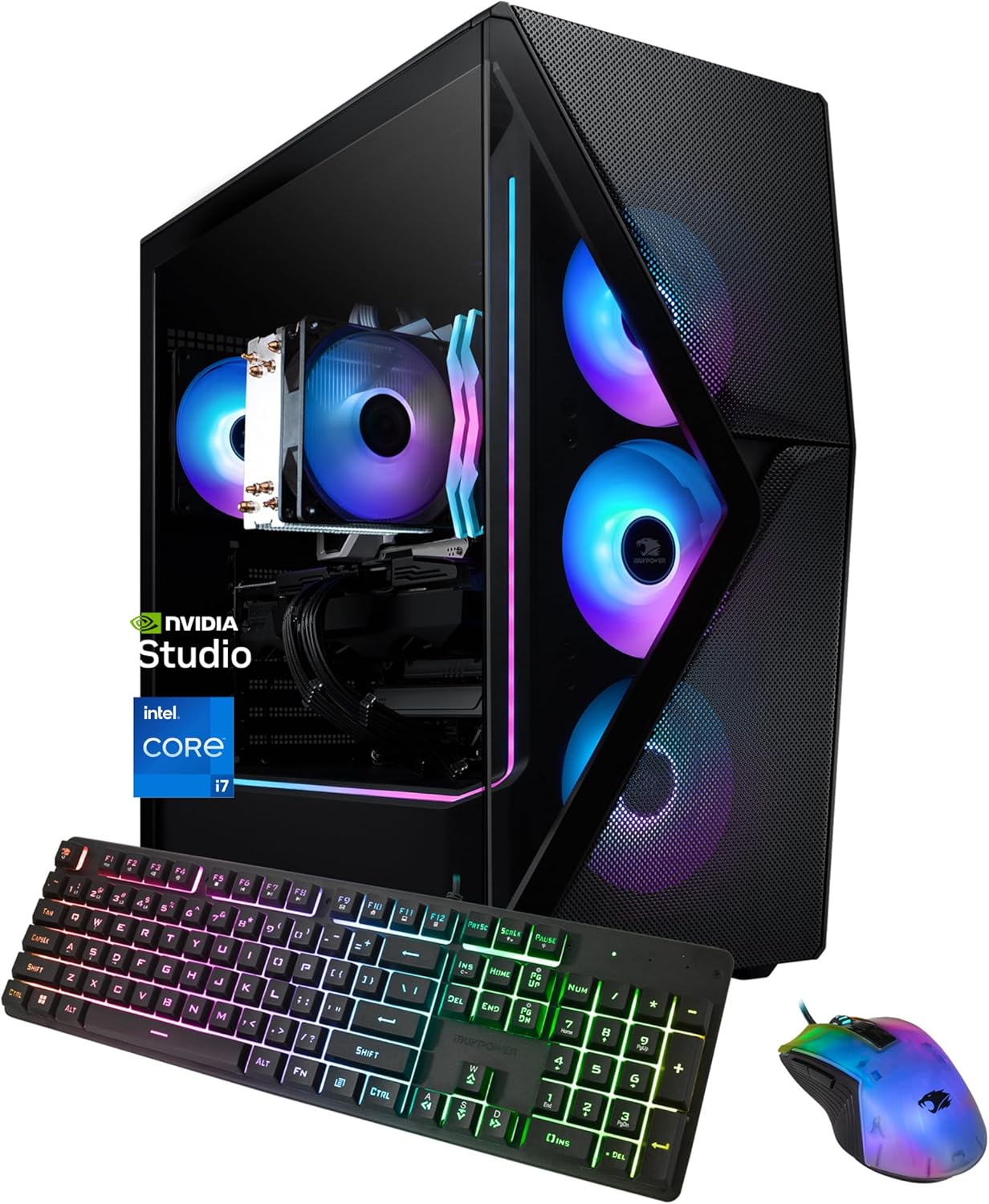
If looking for a game-worthy tower with room to grow, the iBUYPOWER Slate MESH is your call for more power now and upgrade easily later. You’re off to a blazing start with Windows 11 Home, an Intel Core i7 processor and enough memory to ensure everything is snappy from the get-go, your streams remain smooth and background apps have your back without slowing down you. Combine with an NVIDIA GeForce RTX 5070 and you’ll be able to explode through the latest games on high detail settings at a frame rate that keeps things smooth.
You’ll love how flexible this build is when your requirements evolve. The roomy tower design keeps component access easy, so upgrading the storage to speedier sticks, doubling up on memory or dropping in a new GPU is relatively painless. Which is to say you can dial performance up or down on your terms, and don’t need to throw money at a completely new system whenever an upgrade is needed. Day-to-day customization: You can customize performance profiles, swap from fan speed to RGB for each profile and personalise the lighting in how you work and play.
If you both create and game, NVIDIA Studio support also minimizes your hassle. You’ll also get access to RTX- and AI-powered video editing, 3D rendering and design tools, which will significantly reduce your overall wait time — allowing you to iterate faster on heavy projects.
Whether you’re hitting ranked matches, cutting clips for your channel, or overhauling it all with the next big release, the Slate MESH is a mix of capability and freedom to tinker. It’s the Best Customizable Gaming PC for a reason, and this rig evolves with you.
4. Skytech Archangel – Best Upgradable Mid-Tower Gaming PC

If you’re in the market for a mid-tower that plays well today and holds plenty of headroom for tomorrow, the Skytech Archangel is a no-brainer. You have Windows 11 Home with an Intel Core i5 for navigating day-to-day tasks, and snappy game loads. Pair that with a dedicated GeForce RTX 4060 and you’re good to go for high-refresh 1080p or well-balanced 1440p gaming in current games, helping its efficient DLSS support keep performance relatively steady.
You’ll notice the benefit of thoughtful thermals immediately. Mesh front panel, along with the well-optimized high-efficiency air cooler and RGB fans provide rapid heat dissipation and a computing experience that is at the same time efficient and low noise. That means less spiking, more consistent boost clocks and a quieter sound profile over longer sessions.
Enhancements are simple—the point of this build. The spacious mid-tower design leaves plenty of space to add more storage, swap a GPU or customize your water loop. 32GB of memory allows you to chat, stream, and play your favorite games with ease while continuing to run simultaneously and effectively, so you can add anything else later on.
If your priorities are stability, clean airflow and a case that’s happy to be messed with, the Archangel strikes the right balance of performance and potential. It is indeed the Best Upgradable Mid-Tower Gaming PC for gamers who demand a savvy entry point and a reasonable road to upgrade down the line.
5. CyberPowerPC Gamer Xtreme – Best Budget Gaming PC

If you’d like a budget gaming desktop that can tackle anything from basic mousing and keyboarding to challenging games, the CyberPowerPC Gamer Xtreme provides everything you need to get started. You have Windows 11 Home running on an Intel Core i5 processor, so everyday tasks, schoolwork and multiplayer sessions feel prompt. Paired with a purpose-built GeForce RTX 5060 8GB, you can venture in todays’ most challenging, graphics-intensive games and experience the beautiful world of IRL #GameReady PCs for yourself!
There will be room for a library of your favorite games with 1TB of storage, so you won’t have to juggle titles and install/uninstall them all the time or delete media files to make space. It sticks to the standard computer-tower design: it’s simple to get in and tinker around, adding more storage or memory, even swapping out the graphics card when you want, meaning that its lifespan can be extended on your terms.
Setup stays simple. Plug in, attach your peripherals, log into your accounts and you’re playing — no detour through complicated configuration. The Core i5’s core-to-clock speed ratio is good for streamers and multitaskers — it’ll maintain game performance while you chat, capture clips or look things up in a guide.
If your chief concern is finding that right cost-to-capability ratio with an upgrade path to constantly push performance in a cost-effective way, then we think this build really does it. You get solid 1080p gameplay, a decent OS, plenty of storage and room to expand — all without having to pay the premium price to do so. Which is why the CyberPowerPC Gamer Xtreme makes our list of the Best Budget Gaming PCs.
Things to Consider Before Buying a Gaming PC:
Just assess your gaming goals, budget, and how long you want the system to remain competitive, so you can prioritize components accordingly. Consider GPU and CPU performance for your target resolution and frame rates, sufficient RAM and fast storage, power supply quality, cooling and case airflow, motherboard upgradeability, monitor specs, peripherals, and warranty to ensure you get the performance and longevity you expect.
Performance Specifications
If you target 1080p high settings, an RTX 3060 or Radeon RX 6600 XT will suffice; for 1440p aim for RTX 3070/4070 or RX 6800, and for 4K consider RTX 4080/4090 or RX 7900 XTX. You should pair those GPUs with a 6–8 core CPU (e.g., Ryzen 5 5600X or i5-12400), 16–32GB RAM at 3200–3600MHz, and a 1TB NVMe to minimize load times and stutter.
Budget Constraints
Entry-level gaming rigs range , mid-range , and high-end; expect the GPU to consume roughly 40–50% of your budget, CPU 20–25%, and the remainder for RAM, storage, PSU, case and cooling. You should decide whether to buy new, refurbished, or used parts based on warranty and availability to stretch funds effectively.
To save, prioritize GPU first for raw frame rate, buy a solid used GPU if warranties and seller reputation check out, and consider prebuilts during sales—many shave 10–20% off component costs; you should also allocate for a quality PSU and for adequate cooling to avoid upgrade costs later.
Researching Brands and Models
When you research brands and models, compare benchmark results (3DMark Time Spy, Shadow of the Tomb Raider FPS) and thermals from sites like TechPowerUp and GamersNexus; ASUS ROG Strix and MSI MAG often show 5–15% better cooling but cost more, while boutique builders (Origin, Maingear) add premium support. Check model IDs, chassis sizes, and included warranties so you know whether the system meets your noise, space, and upgrade expectations.
Reading Customer Reviews
You should scan at least 50–100 reviews to identify patterns instead of isolated complaints; focus on verified purchases and mentions of DOA rates, coil whine, or overheating. Note dates—older BIOS or driver issues may have been fixed—and track seller response times for RMAs; consistent reports of failures within 30 days are a definite red flag.
You can deepen your assessment by filtering reviews for technical details like exact GPU/PSU models, BIOS version, and ambient test conditions, and cross-checking with Reddit threads (r/buildapc) or YouTube teardowns that show photo/video proof. Look for common phrases (e.g., “power delivery issue,” “thermal throttling”) and tally occurrences; also pay attention to reported RMA turnaround—reputable builders typically resolve hardware replacements within 7–14 days.
Deep Dive: Compare Prices & Features
Look beyond MSRP: compare used vs new (used RTX 30-series can be 20–40% cheaper), evaluate cost-per-frame (price divided by average fps in your target game), and factor in upgrade paths—a Z790/AM5 board adds longevity. Use sources like TechSpot and GamersNexus for component heat, noise, and real-world fps charts; cross-check warranties (1–3 years) and estimated PSU headroom (20–30% above peak draw) before buying.
Keeping Your Gaming PC in Top Shape
Schedule cleaning every 3–6 months: use compressed air from ~20–30 cm to clear dust from fans, GPU heatsinks and PSU vents. Monitor temperatures with MSI Afterburner or HWInfo — idle CPU ~30–40°C, GPU ~30–45°C, and keep load peaks below ~85°C. Reapply thermal paste every 2–3 years or if temperatures rise 5–10°C. Also keep GPU drivers and motherboard BIOS updated, run TRIM on SSDs, and scan for malware to avoid stealth performance drops.
When to Consider Upgrading Components
If you target 60+ fps at 1440p/4K and frame rates stay well below that, prioritize a GPU upgrade; conversely, if CPU usage hits ~90% while GPU usage is low, swap the CPU. Move from 8GB→16GB RAM for modern AAA titles and 16→32GB for streaming or heavy multitasking. Choose NVMe SSDs (500GB–1TB) to reduce load times and increase PSU capacity by ~150–250W when installing higher-TDP GPUs.
Run benchmarks like 3DMark Time Spy and use in-game overlays to log CPU/GPU utilization; a sub-90% GPU with a pegged CPU indicates a CPU bottleneck. For example, upgrading a GTX 1060 to an RTX 3060 Ti typically allows comfortable 1440p60 performance in many modern games, while shifting from HDD to NVMe can cut load times by 30–60%. Check component TDPs and add recommended PSU headroom (e.g., ~550W for mid-range cards, ~650W+ for higher-end) before committing to upgrades.
To wrap up
Summing up, before buying a gaming PC you should define your budget and performance targets, balance CPU and GPU for your preferred games, prioritize upgrade paths and cooling, verify compatibility with peripherals and monitors, check warranty and service options, and factor in noise, power consumption, and resale value so your system meets current needs and stays relevant as games evolve.
Leave a Reply