
Finding the best gaming TVs can feel overwhelming when every model promises faster play and sharper images. This guide makes the choice easier by comparing key features like low input lag, 4K resolution, and smooth refresh rates. Whether you play on a console or PC, you’ll learn what matters most before you spend your money. Get ready for a jaw-dropping upgrade that makes every match feel more immersive-starting with our top picks.
Contents
- Top 7 Gaming TVs:
- 7: Samsung 65-Inch Class M80H Series Mini LED 4K Smart TV
- 6: TCL 65-Inch QM6K Series QLED Mini LED 4K Google TV
- 5: Hisense 65-Inch U6 Pro Series Mini-LED 4K Fire TV (65U6SF Pro)
- 4: Hisense 65-Inch U7 Mini-LED 4K Google TV (65U7SG)
- 3: TCL 65-Inch QM8L Series SQD-Mini LED 4K Google TV
- 2: Samsung 65-Inch Class S90H Series OLED 4K Smart TV
- 1: LG 65-Inch OLED evo AI C6 4K Smart TV
- Things to Consider Before Buying a Gaming TV:
- OLED, QLED, and LED
- Screen Sizes and Resolutions
- Refresh rate, response time, and input lag
- Resolution, HDR, and HDMI 2.1
- Variable refresh rate and low-latency modes
- Picture quality, brightness, and burn-in risk
- Define your budget and gaming needs
- Compare models and verify console or PC compatibility
- Match screen size to viewing distance
- Check ports, game modes, and return policies
- Conclusion
Top 7 Gaming TVs:
7: Samsung 65-Inch Class M80H Series Mini LED 4K Smart TV

For gamers who want to go beyond 60Hz, the Samsung M80H is the ideal budget TV.Because 60 Hz is the maximum refresh rate for many of these TVs, the additional frames from your console will never be shown. That is resolved by the M80H.To start, the Motion Xcelerator 144Hz with Variable Refresh Rate effectively reduces tearing and stuttering.Following that, scene-by-scene, the NQ4 AI Gen2 processor and the Mini LED’s AI Mode enhance color and contrast.
Lastly, you don’t need a console to play games thanks to the integrated Gaming Hub.Downside: HDR10+ only, no Dolby Vision. The 20-watt, two-channel speakers don’t sound very thick. Lamps are picked up by the shiny screen.This setup is ideal for cloud gamers and first-time 120Hz gamers. Avoid if you’re a Dolby Vision enthusiast or don’t have a soundbar.
6: TCL 65-Inch QM6K Series QLED Mini LED 4K Google TV

Those who play video games on consoles and want a Mini-LED with serious HDR punch should get the TCL QM6K.Nite scenes appear gray because entry TVs illuminate the entire screen simultaneously. Zone after zone, the QM6K dims.To start, there’s the QD-Mini LED with Halo Control local dimming, which causes less blooming and deeper blacks.Up next: a 144 Hz native panel paired with a 288 Hz 1080p Game Accelerator 288 VRR.
At last, a built-in subwoofer and an Onkyo 2.1 system support Dolby Vision and HDR10+.-Only two of the inputs support the full 2.1 GHz of HDMI signal. When compared to the brighter Mini-LEDs, the HDR highlights appear weak.Recommend to: homes with a single console, budget-conscious HDR enthusiasts. Players using three or more 120Hz displays should not use this.
5: Hisense 65-Inch U6 Pro Series Mini-LED 4K Fire TV (65U6SF Pro)

When playing games in well-lit living rooms, the Hisense U6SF Pro is your best bet.Near a window during the day will light up most screens.That room is perfect for the U6SF Pro.First, even when exposed to bright overhead lights and midday sun, a glare-free, anti-reflection screen will remain clean.To continue, games with fast-paced action, like shooters and racing, benefit from a native 144Hz refresh rate.
As a last point, the integrated subwoofer makes the explosions and engines seem more realistic.Downside: not as many dimming zones as the U7SG upgrade. The maximum refresh rate is 144 Hz. Not all streaming setups will work with Fire TV.Ideal for: spaces with plenty of natural light and those without a soundbar. Individuals seeking flawless blacks in a darkroom should not proceed.
4: Hisense 65-Inch U7 Mini-LED 4K Google TV (65U7SG)
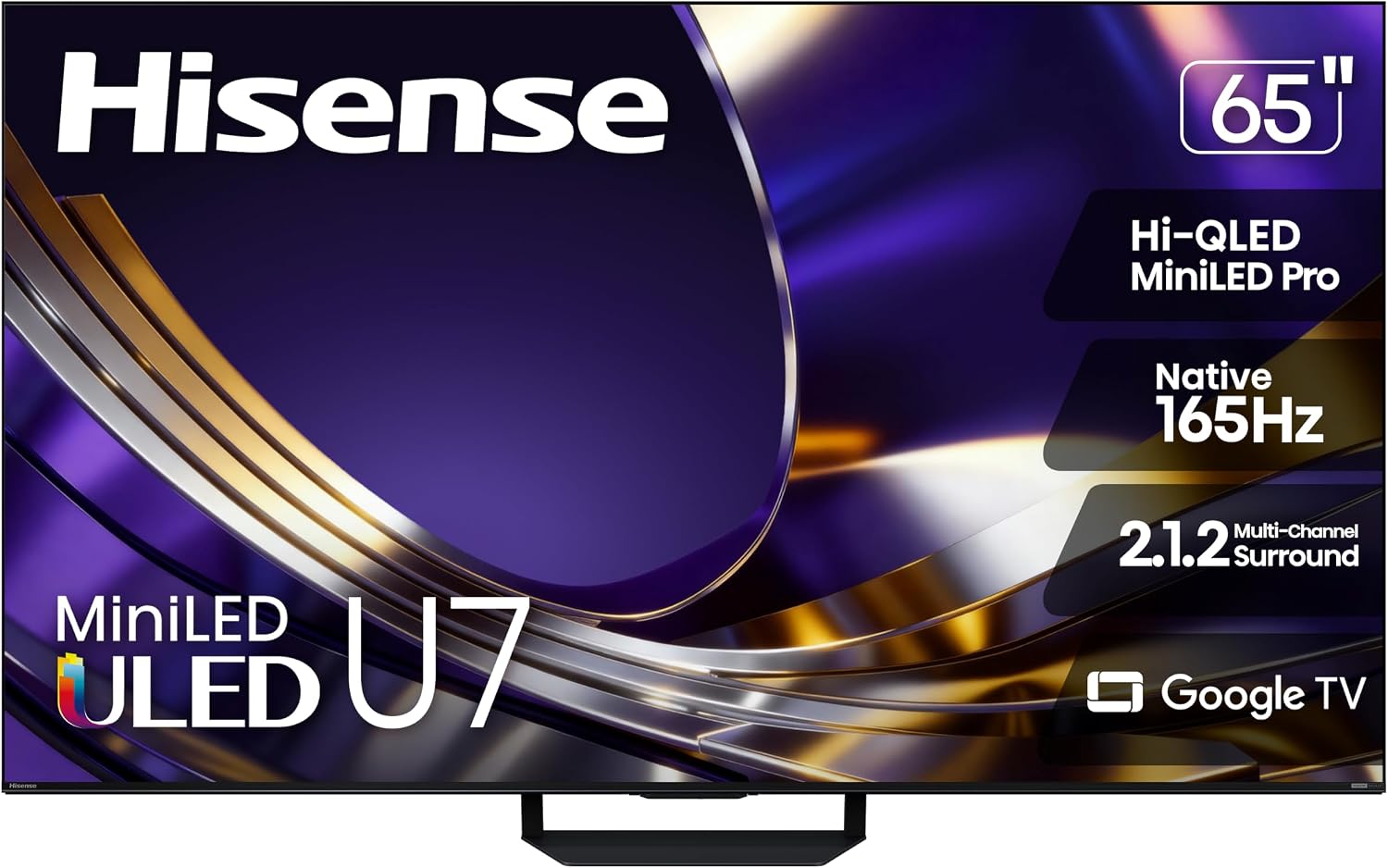
For gamers who thrive in fast-paced, competitive games, the best Mini-LED is the Hisense U7SG.Every frame and millisecond counts when you’re playing a competitive game. You can expect top-notch speed from the U7SG.The first is the quickest refresh rate here: 165 Hz native with VRR up to 330 Hz @ 1080p.Also, a PC, an Xbox, and a PS5 all get full 4K 120Hz over the four HDMI 2.1 connectors.
Lastly, a dual-layer anti-reflection screen may conceal up to three thousand nits and three thousand dimming zones.Drawbacks: dark backgrounds can cause haloing around bright things. On an OLED, fast-paced action appears more blurry.Ideal for: homes with multiple consoles and avid gamers. That is, unless you’re a lover of film noir who is obsessed with getting a completely black screen.
3: TCL 65-Inch QM8L Series SQD-Mini LED 4K Google TV

The most stunning HDR display for visually stunning games is the TCL QM8L.A lot of TVs can’t handle the highlights that HDR games are designed for. Their QM8L gets to them.This screen has the highest peak brightness of any on this list, reaching 6,000 nits across more than four thousand dimming zones.After that, a 144 Hz display with AMD FreeSync Premium Pro and Game Accelerator 288 VRR will ensure fluid, low-latency gameplay.
Lastly, there’s the Bang & Olufsen 5.1 sound system with built-in subwoofer and Dolby Atmos.Downside: light reflected off the shiny screen. In order to mount the 50.9-pound wall mount, two individuals are required. The refresh rate terminates at 144 Hz.Ideal for: Those who enjoy high dynamic range photography and those who enjoy single-player adventure games. Players aiming for 165Hz should not use this.
2: Samsung 65-Inch Class S90H Series OLED 4K Smart TV

When it comes to glare-free OLEDs, the Samsung S90H is the ideal option for gamers who want to play under the lights.OLEDs provide instantaneous responsiveness and flawless blacks—until light reflected off a glass surface ruins them. That is resolved by the S90H.In bright settings, reflections are practically eliminated with a Glare Free matte OLED panel.Next up: tear-free gaming on any console or PC with Motion Xcelerator 165Hz with NVIDIA G-SYNC and AMD FreeSync Premium Pro.
Lastly, older games can be upgraded to crisp 4K with the help of the 128 neural networks found in the NQ4 AI Gen3 processor.Downside: Xbox users will not be able to access Dolby Vision features. In extremely bright environments, blacks could appear somewhat grayish. At this point, it is tied for the largest investment.Living areas with plenty of natural light are ideal for OLED aficionados. Does not work with Dolby Vision.
1: LG 65-Inch OLED evo AI C6 4K Smart TV

The LG C6 OLED evo is the greatest gaming TV on the market because it is compatible with all of your consoles.Selecting between fast motion, perfect blacks, or high dynamic range is usually the only option for gaming televisions. Not the C6.First, playing Xbox games on an OLED with Dolby Vision—the technology uses self-lit pixels to create HDR content. You won’t find this feature in any of the other OLEDs here.As for the second point, the response time is 0.1 ms and the maximum frequency is 165 Hz, so the controls seem instantaneous and the motion remains clean.
Lastly, it has four HDMI 2.1 connections that support G-Sync, FreeSync Premium, and VRR, so it’s compatible with all consoles.Fourth, even when the lights are turned on, the a11 AI Processor Gen3 and Brightness Booster maintain deep blacks.Cons: Lights shining on the shiny screen will reflect off of it. Colors aren’t as vibrant as they would be with QD-OLED. Static HUDs provide a burn-in risk when used for thousands of hours.Ideal for: playing on multiple consoles at once and Xbox players. Ideal for: sunny rooms or long sessions of the same game.
Things to Consider Before Buying a Gaming TV:
Choosing the right gaming TV can significantly enhance your gaming experience. With various features and specifications to evaluate, it’s essential to understand what will best suit your gaming style. From refresh rates to input lag, several factors play a role in ensuring an immersive and responsive gaming environment.
OLED, QLED, and LED
Choosing among OLED, QLED, and LED technologies can significantly impact your gaming experience. OLED displays offer superior contrast and vibrant colors, thanks to their self-illuminating pixels. QLED, known for maintaining brightness and color accuracy, is particularly effective in well-lit rooms. LED TVs, typically more affordable, provide decent performance but may struggle with deep blacks and extreme brightness compared to their OLED and QLED counterparts. Each option has distinct advantages, making the decision dependent on personal preference and viewing environment.
Screen Sizes and Resolutions
Screen size and resolution play vital roles in the gaming experience. Larger screens, such as 55 inches or more, can immerse you in expansive game worlds, while smaller screens may suit compact spaces better. Additionally, resolutions like 4K or 8K offer significantly sharper visuals, enhancing detail and clarity. Many modern gaming consoles support these higher resolutions, making them ideal for current and future games. Ultimately, the choice between size and resolution should align with your setup and viewing distance for optimal performance.
Refresh rate, response time, and input lag
Refresh rate defines how many times your TV can redraw the image per second, affecting overall smoothness. Optimal rates for gaming often fall between 120Hz to 240Hz for an immersive experience. Response time plays a crucial role as well; the quicker the pixel can transition from one color to another, the less motion blur will be noticeable. Input lag, measured in milliseconds, informs how quickly your commands translate on-screen. Aim for under 15ms to maintain a competitive edge.
Resolution, HDR, and HDMI 2.1
Resolution largely determines the clarity of the image, with 4K becoming the standard for new gaming consoles. HDR enhances contrast and color vibrancy, thereby enriching the visual experience. HDMI 2.1 support is increasingly important, particularly for next-gen consoles, as this standard allows for higher frame rates and 4K resolution at 120Hz. When investing in a gaming TV, ensure these features align with your gaming aspirations.
Variable refresh rate and low-latency modes
Variable refresh rate offers a smoother experience by matching the display’s refresh rate to the game’s frame rate, reducing stuttering and tearing. Low-latency modes further enhance responsiveness, a key factor in fast-paced gaming scenarios. While these technologies enhance gameplay, they often come at a premium price. Availability varies by model, and some TVs may require firmware updates to fully utilize these features, necessitating thorough research before purchasing.
Picture quality, brightness, and burn-in risk
Picture quality is a hallmark of any gaming TV, especially with brightness levels impacting visibility during bright scenes. HDR capabilities can create stunning visuals, but limitations in peak brightness may hinder performance in bright rooms. Concerns about burn-in, particularly with OLED displays, also warrant attention; prolonged display of static HUD elements can lead to permanent image retention. Weighing these aspects can help you select a TV that delivers a balanced gaming experience.
Define your budget and gaming needs
Establishing a budget is the first step in your purchasing journey. Assess how much you are willing to invest-options range from budget-friendly models to high-end televisions with elaborate features. Determining your gaming needs, like preferred resolutions (4K, for instance) and refresh rates, will help narrow down choices. Understanding these requirements allows you to focus on televisions that not only fit your budget but also enhance your gaming experience.
Compare models and verify console or PC compatibility
Reviewing different models is essential to make an informed decision. Check specifications such as HDMI support, which is vital for newer consoles and PCs. Compatibility with features like VRR (Variable Refresh Rate) and ALLM (Auto Low Latency Mode) can enhance your gameplay. Research comparisons that highlight these aspects to determine whether a specific TV meets your gaming requirements.
Match screen size to viewing distance
Choosing the right screen size depends heavily on your viewing distance. For instance, if you sit around 6-8 feet from the TV, a 55 to 65-inch model is typically ideal. Measuring the distance can help you envision how the dimensions will impact your gaming experience. Larger screens create immersive gameplay, but they can also cause strain if positioned too close. Aim for a size that enhances engagement without overwhelming your field of vision.
Check ports, game modes, and return policies
Assessing the TV’s connectivity options is essential for a seamless gaming experience. Look for multiple HDMI ports, particularly those supporting HDMI 2.1 for next-gen consoles. Game modes, designed to reduce latency and enhance performance, are worthwhile features for avid gamers. Reviewing the store’s return policy adds peace of mind in case the TV does not meet your expectations. Be sure the model you choose aligns with both your current setup and future needs.
Conclusion
Consider all these aspects before purchasing a gaming TV. The refresh rate, resolution, and input lag significantly influence your gaming experience. Comparing features like HDR support and HDMI ports across different models helps ensure you choose a TV that fits your needs. Additionally, evaluating brands based on user reviews and professional recommendations can guide you toward a reliable option. Investing time into research today can result in enhanced enjoyment and performance in your gaming sessions tomorrow.
Leave a Reply