
Finding the best handheld gaming console shouldn’t feel like a hard boss battle. You want to play your favorite titles on the go without losing performance or dealing with short battery life. Imagine the breathtaking thrill of winning in epic worlds right from your couch or daily commute. We’ve tested every top device to help you find your perfect portable powerhouse. Let’s look at the top winners for every type of gamer.
Contents
- Top 7 HANDHELD GAMING CONSOLE:
- 7: Anbernic RG35XX H
- 6: Anbernic RG CubeXX
- 5: Nintendo Switch OLED
- 4: ASUS ROG Xbox Ally
- 3: ASUS ROG Ally (Z1 Extreme)
- 2: Valve Steam Deck OLED 512GB
- 1: Nintendo Switch 2 System
- Things to Consider Before Buying a HANDHELD GAMING CONSOLE:
- PC-Based Handheld Devices
- Retro and Emulation Handhelds
- Display Quality and Refresh Rates
- Battery Life and Power Consumption
- Internal Storage and Expansion Slots
- Advantages of On-the-Go Play
- Hardware Limitations and Thermal Constraints
- Identifying Preferred Game Libraries
- Assessing Ergonomics and Weight for Comfort
- Researching Warranty and Repairability
- Checking Accessory Compatibility
- Monitoring Seasonal Sales and Refurbished Options
- To wrap up
Top 7 HANDHELD GAMING CONSOLE:
7: Anbernic RG35XX H

If you’re on a tight budget but still want access to all your favorite old games, go no further than the Anbernic RG35XX H.Emulators for smartphones look the part, but when timing is of the essence, platformers are ruined by on-screen controls.Real hardware is used to fix that in the RG35XX H.To start, it has a layout similar to the Game Boy Advance, which means that games with two joysticks and arcade ports are now a natural fit.
The next thing you know, you can plug in the 64GB TF card and instantly start playing thousands of oldies. Not a single configuration.Finally, the battery life is up to 8 hours, which is more than enough time for a single flight.Downsides: plastic construction, lack of contemporary AAA games, and a learning curve for the Linux-only OS.Most suited for: commuters and long-lost fans of classic video games. Not for: those seeking games from the current generation.
6: Anbernic RG CubeXX

For those on a tighter budget who are nonetheless concerned about the games’ authenticity, the Anbernic RG CubeXX is the way to go.Handhelds with wide screens make Game Boy and arcade games more playable. A new shape on the CubeXX takes care of that.To start with, there’s the 3.95-inch 1:1 square IPS screen, which displays the Game Boy, NES, and arcade ports in their original aspect ratio.You won’t have to waste time searching for ROMs because the 64GB card comes packed with thousands of titles for more than a dozen platforms.
On a final note, there is 5G WiFi, Bluetooth, and an HDMI output, so you can play on a big screen at home with wireless controllers.Disadvantages: incompatible with large-screen emulators, Linux only, and lack of support for AAA titles.Ideal for: those who prefer older consoles and Game Boy lovers. Plays poorly with PSP and widescreen players.
5: Nintendo Switch OLED

For Nintendo enthusiasts seeking the exclusive library without splurging on premium tier, the Nintendo Switch OLED is the ideal choice.It seems wasteful to go all out on the latest gear when all you want are Mario, Zelda, and Animal Crossing.You get the same collection on top-notch technology with the OLED variant.First, there’s the 7-inch OLED touchscreen, which makes colors pop unlike any LCD panel. There is a clear visual improvement in Mario Odyssey.
Coming up next: docked hybrid play—TV sessions on the sofa, portable play while on the go, and sharing a single save file.At last, there are improved speakers and a broad adjustable kickstand, so you can play Mario Kart without headphones or share Joy-Cons on a table.Negatives: Shorter battery life compared to current handhelds, 720p output only, and outdated Nvidia chip.Who it’s best for: Households with children and fans of Nintendo exclusively. that it isn’t for: those that desire docked 4K output.
4: ASUS ROG Xbox Ally
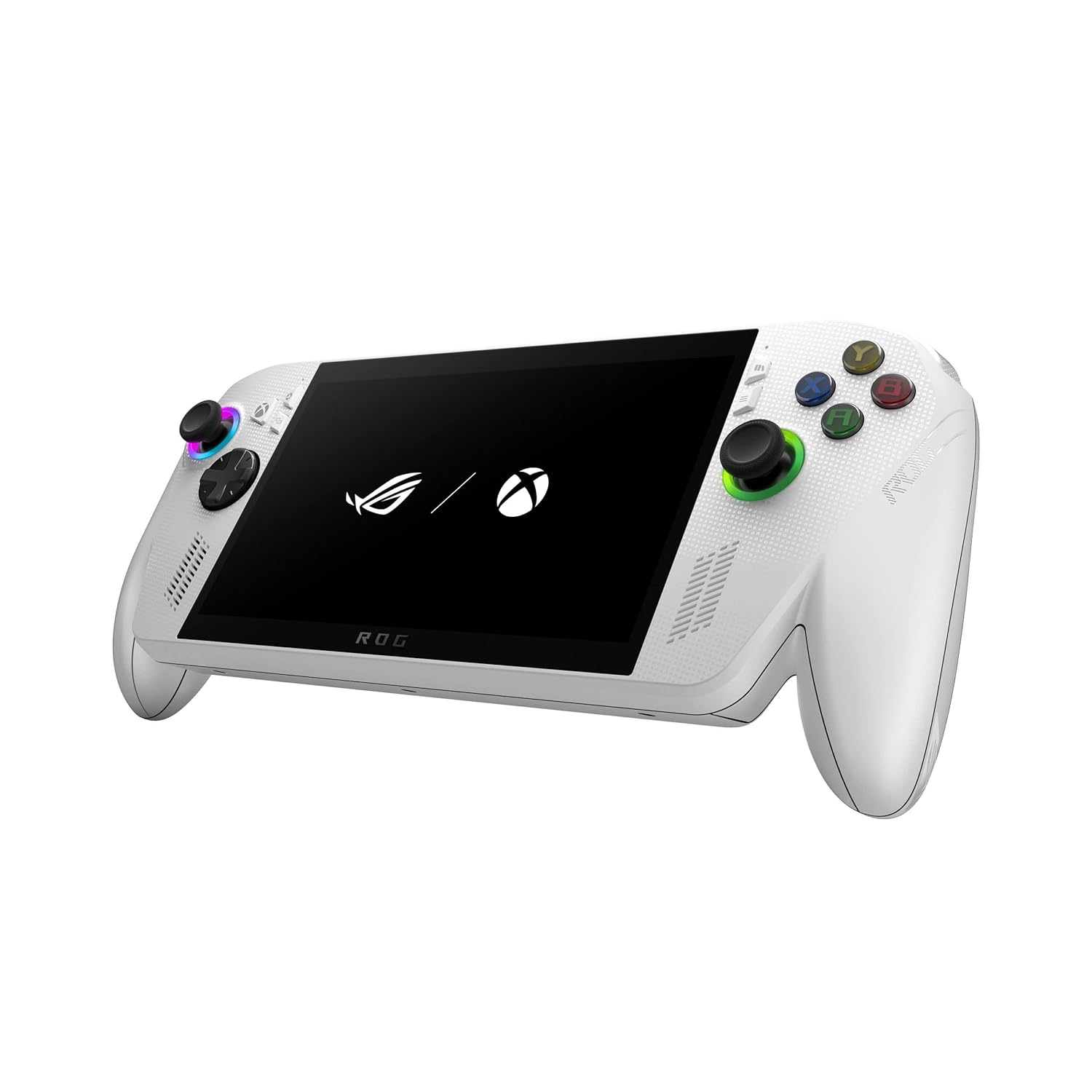
For those looking to play PC games on Xbox-friendly hardware, the ASUS ROG Xbox Ally is the ideal entry-level portable Windows device.Windows on mobile devices has always been awkward due to small icons, clumsy mouse points, and unintentional touches. It feels like work to set up.The Xbox Ally takes care of that.First, a simplified Xbox user interface (UI) built into Windows 11—instead of a desktop, the computer launches into a controller-friendly interface.
Afterwards, a 7-inch 1080p 120Hz touchscreen powered by AMD Ryzen Z2 A—current PC games running at high frames per second.Lastly, you’ll have access to hundreds of titles the second you log in with the complimentary three months of Xbox Game Pass Premium.Downsides: Windows remains beneath the launcher, certain menus only work with controllers, and Z2 A is the entry-level CPU.Ideal for: Xbox members and occasional PC players. Who this isn’t for: SteamOS zealots and die-hard Steam users.
3: ASUS ROG Ally (Z1 Extreme)

If you’re looking for a top-tier Windows portable for serious PC gaming on the road, go no further than the ASUS ROG Ally with Z1 Extreme.Budget Windows handhelds boast cutting-edge performance but crash under the strain of a demanding game. Suddenly, frame rates drop.Reliable hardware is what the ROG Ally uses to support its claims.To start, there’s the AMD Ryzen Z1 Extreme processor, which delivers actual frame rates in current PC games thanks to its eight Zen 4 cores.
Following that, a 7-inch 1080p 120Hz touchscreen—that means clean graphics and fluid reloading in shooters and platformers.Lastly, launch Windows 11 while Armoury Crate is installed—you may do it simultaneously on Steam, Xbox, Epic, and GOG. An full library on a single device.The user interface of Armoury Crate isn’t up to SteamOS’s standards, the battery drains quickly when used heavily, and the operating system is just Windows.that this is ideal for: PC players that have libraries spread out across different outlets. Only users with SteamOS can use this.
2: Valve Steam Deck OLED 512GB

If you own a Steam library and are looking for the most streamlined portable experience, go no further than the Valve Steam Deck OLED.Windows portables necessitate ongoing fiddling with menus. Every time you start a new session, you waste the first minute trying to figure out how to use launchers.Simplified into a single button, that is the Steam Deck OLED.To start with, there’s the 7.4-inch HDR OLED 90Hz screen with anti-glare etched glass. It has genuine blacks, infinite contrast, and a sturdy panel that can withstand usage outdoors.
Following that, there will be a mobile-optimized version of SteamOS with features like one-touch pause and resume, rapid library access, and verified compatibility labels for all games.Last but not least: a more current wireless connection with a longer-lasting battery, Wi-Fi 6E, and quicker downloads than the original Deck.Drawbacks: non-Steam store compatibility is restricted, there is no Xbox UI or Game Pass integration, and stock is scarce on this listing.Who it’s best for: Players who value polish and current Steam owners. This does not apply to Xbox members or those who only play on consoles.
1: Nintendo Switch 2 System

In 2026, the best portable gaming system will be the Nintendo Switch 2, a hybrid that combines a handheld gaming device with a 4K television.Here, every other handheld makes you pick one. Screen for travel or large-screen. Always choose one.That choice is nullified by Switch 2.First, the Switch’s 7.9-inch HDR 120fps touchscreen, powered by an Nvidia chip that can handle DLSS, is very sharp both while playing on the go and when used in TV mode, thanks to AI upscaling.
The next big thing is the magnetized Joy-Con 2 with Mouse Mode. These controllers slide on like a desk mouse and snap on cleanly, allowing you to play games that other handhelds can’t.Last but not least, you may save your progress across three different play modes: portable, tabletop, and 4K via the dock. Only one room, but three devices.Downsides: Quick battery drain under heavy use, Joy-Cons are too little for adult palms, and the flat shape is missing deep grips.Most suited for: casual gamers and families looking for a dual-use device (couch and travel). Who this isn’t for: Xbox-exclusive players or PC library owners.
Things to Consider Before Buying a HANDHELD GAMING CONSOLE:
These consoles focus entirely on gaming, delivering an optimized experience with exclusive titles and hardware tailored for performance. Expect impressive graphics and smooth gameplay tailored to specific franchises.
PC-Based Handheld Devices
PC-based handhelds run full PC games, enabling you to enjoy high-quality graphics on the go. Compatibility with various platforms offers flexibility, allowing for modding and varying game types.
Familiarity with PC-based handhelds introduces a blend of gaming and portability. These devices often feature powerful processors, which can handle demanding titles. Users appreciate flexibility in game selection but should check system requirements before playing demanding games.
Retro and Emulation Handhelds
Retro and emulation handhelds are designed for enthusiasts looking to relive classic gaming. These devices can emulate numerous consoles, providing a nostalgic gaming experience with a portable twist.
Retro and emulation devices often support a wide range of classic games through various emulators. Enthusiasts enjoy the ability to play favorite titles from past consoles, making these handhelds popular for nostalgia seekers and gamers exploring gaming history.
Display Quality and Refresh Rates
Display quality greatly influences your gaming experience. Look for high-resolution screens and smooth refresh rates to ensure immersive gameplay with minimal motion blur and crisp visuals.
Battery Life and Power Consumption
Battery life dictates how long you can game on the go. Opt for consoles that offer extended playtime and efficient power management to maximize your enjoyment during lengthy gaming sessions.
Evaluating battery capacity and usage can guide your choice. Some consoles boast several hours of gameplay, while others might require frequent recharges, impacting portability and convenience.
Internal Storage and Expansion Slots
Internal storage dictates how many games and files you can store. A console with expansion slots will allow for greater versatility and adaptability as your gaming library grows.
Considering your gaming habits is important when selecting storage options. If you prefer to have multiple games installed simultaneously, ensure the console features ample internal memory and compatible expansion solutions for added flexibility.
Advantages of On-the-Go Play
Accessibility to games while commuting or traveling enhances your gaming experience. Quick play sessions fit perfectly into busy lifestyles, allowing you to enjoy entertainment on the go without the constraints of a stationary setup.
Hardware Limitations and Thermal Constraints
Performance can be hindered by the device’s compact hardware. Overheating issues may arise during intense gaming sessions, impacting gameplay quality and responsiveness.
Compact designs often lead to limited heat dissipation, which can cause throttling during demanding games. Battery life may also decrease when devices struggle to maintain optimal performance, leading to interruptions in your gaming sessions. Understanding these constraints is important for a satisfactory portable gaming experience.
Identifying Preferred Game Libraries
Assessing the titles available for each console ensures you select a device that offers your favorite games and genres.
Check which platforms support the games you love. Exclusive titles can significantly influence your choice, so ensure the console aligns with your gaming preferences and offers an attractive library that suits your interests.
Assessing Ergonomics and Weight for Comfort
Choosing a console that feels comfortable during extended play is imperative to avoid fatigue.
Evaluate the design and weight of potential devices. A lightweight console with ergonomic features will enhance your gaming experience, allowing you to enjoy longer sessions without discomfort. Consider how the device feels in your hands and its adaptability for various playing positions.
Researching Warranty and Repairability
Evaluate warranty options and repairability before buying. A solid warranty can save you money if issues arise, while easily repairable consoles can extend their lifespan. Always check manufacturer policies and third-party repair availability.
Checking Accessory Compatibility
Verify that accessories you want to use are compatible with the console. Whether it’s controllers, charging docks, or headsets, compatibility plays a significant role in your gaming experience and convenience.
Accessory compatibility can greatly enhance your gaming enjoyment. Some consoles support a wide range of peripherals, allowing for personalized setups. Always review both official and third-party accessory options to ensure you can achieve the setup that meets your needs.
Monitoring Seasonal Sales and Refurbished Options
Take advantage of seasonal sales and consider refurbished options for a cost-effective purchase. Sales events often feature significant discounts, while refurbished consoles can offer the same performance at a lower price.
Seasonal sales often coincide with holidays and major shopping events, providing opportunities to save. Refurbished devices, inspected for quality, can be a smart alternative, allowing you to access high-quality consoles without paying full price. Always check warranties and return policies for added peace of mind.
To wrap up
On the whole, assessing battery life, game library, portability, and price is important when selecting a handheld gaming console. Understanding your gaming preferences and how often you’ll use the device will guide your decision. Conduct thorough research to find an option that best fits your needs and enhances your gaming experience.
Leave a Reply