
Finding the best home printers shouldn’t mean wasting money on ink, blurry pages, or features you’ll never use. This guide compares reliable options for everyday documents, school projects, and sharp photos, so you can choose a printer that fits your home and budget. We’ll cover key features, running costs, and easy-to-use models to help you print with confidence. First, let’s look at what makes a printer worth buying.
Contents
- Top 7 Home Printers:
- 7: Canon PIXMA TS3720 Wireless All-in-One Printer
- 6: Canon PIXMA TR7120 Wireless Color Inkjet Printer
- 5: HP LaserJet M209dw Monochrome Laser Printer
- 4: Epson EcoTank ET-2803 Supertank Printer
- 3: Brother MFC-L2820DW All-in-One Laser Printer
- 2: Epson EcoTank ET-2980 Supertank Printer
- 1: Epson EcoTank Photo ET-8500 Supertank Printer
- Things to Consider Before Buying a Home Printer:
- Inkjet, Laser, and All-in-One Models
- Specialty and Photo Printers
- Print Needs, Speed, and Quality
- Budget, Running Costs, and Space
- Connectivity, Compatibility, and Features
- Check Ink or Toner Costs
- Compare Warranties and Reviews
- Define your needs and budget
- Compare options and make your choice
- Conclusion
Top 7 Home Printers:
7: Canon PIXMA TS3720 Wireless All-in-One Printer

If you only print small documents sometimes from home, the Canon PIXMA TS3720 is your best bet.A simple printer capable of producing tonight’s field trip paperwork is more than most households require. Simplicity is key with the TS3720.One little body that can print, copy, and scan using only two easy-swap cartridges (black and tri-color) is the first thing to mention.The next step is to set up the dual-band Wi-Fi without a computer. It supports Chromebooks, Mopria, and AirPrint.
Lastly, we provide square 5×5 prints, borderless photographs up to 5×7, and school project banners and envelopes.Limitation: printing on one side only. Long jobs require a slower speed of about 7.7 pages per minute. Replacing the entire tri-color cartridge is necessary when one color is empty.Most suited for: first-time apartment dwellers and students. Not suitable for: households with multiple printers that print daily.
6: Canon PIXMA TR7120 Wireless Color Inkjet Printer

When it comes to inexpensive all-in-ones, the Canon PIXMA TR7120 is your best bet for handling schoolwork, forms, and lengthy documents.It becomes tedious quickly to copy a 10-page lease one sheet at a time. We fixed that in the TR7120.As a first step, you can set up an automatic document feeder to scan and copy multiple documents at once.Secondly, you may print up to 14 black-and-white pages per minute with automated two-sided printing, which significantly reduces paper consumption. 3.
Lastly, it has dual-band Wi-Fi for stable connections and a 1.42-inch OLED screen for quick ink level readings.Cons: High frequency of ink runs caused by low cartridge yields. As soon as one color runs out, the tri-color cartridge is replaced. Darker prints of bright hues are possible.Ideal for: light home offices, students, and parents that need to handle school papers. Forget about printing in vibrant colors.
5: HP LaserJet M209dw Monochrome Laser Printer
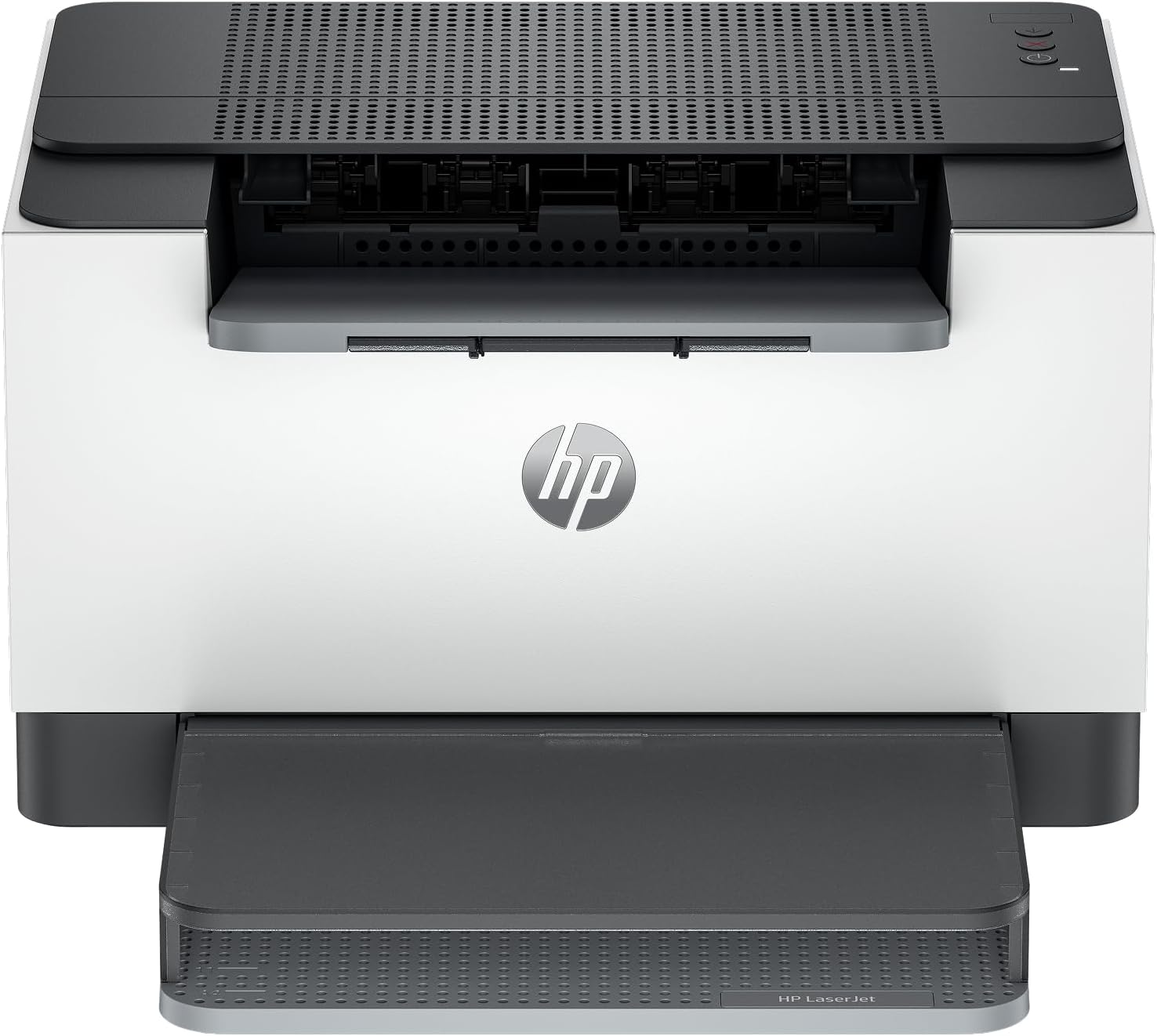
For occasional printer users, the HP LaserJet M209dw is a great choice.When left unused for an extended period of time, inkjets can produce clogs. Because it is a dry powder, laser toner will never run out.A twenty-page report is completed before you even reach the printer, thanks to the thirty pages per minute speed.The next feature is automated two-sided printing, which HP claims is the quickest in its class and can process up to 19 photos per minute.
One more thing: self-resetting dual-band Wi-Fi can automatically mend failed connections.The lack of color and images is a major drawback. Image scanner not available. Prior to the first page, there is a short warm-up.Ideal for households who print forms and labels multiple times per month. Do not use if you: print photographs or scan documents.
4: Epson EcoTank ET-2803 Supertank Printer

For those new to printing without cartridges, the Epson EcoTank ET-2803 is an excellent choice.The printer’s cartridges are the most expensive part. Instead, you use bottles to fill up the ET-2803’s tanks.To begin, the included ink can last for up to two years at a monthly usage rate of 125 pages.That brings us to our next point: each set of replacement cartridges can print up to 4,500 black and white pages or 7,500 color pages, which is around 800 cartridges’ worth of printing.
At last, regular copying and printing from your phone are taken care of by a flatbed scanner, a color screen, and AirPrint.Negative: auto-reverse printing is not available. The maximum speed in black and white is 10 pages per minute. If it sits inactive for too long, it can clog, just like any other inkjet.Ideal for: weekly assignments and coloring projects for families. Avoid using this if you require a document feeder.
3: Brother MFC-L2820DW All-in-One Laser Printer

For parents who do most of their job from home, nothing beats the Brother MFC-L2820DW.Everything from employment contracts to worksheets and the odd fax ends up in the same printer. The L2820DW quickly and efficiently removes the pile.First, it has an automatic duplex feature and can print up to 36 sheets per minute in black and white.Following that, a 50-page automatic document feeder can scan, copy, and fax documents with many pages all at once.
Lastly: a 2.7-inch touchscreen connects quickly to well-known cloud applications via USB, Ethernet, or dual-band Wi-Fi.Downside: no color assignments or pictures; everything is black and white. It only scans one side at a time. You may change the drum independently of the toner.Ideal for: homes with a lot of paperwork, freelancers, and people who work remotely. This is not for households that use color printing.
2: Epson EcoTank ET-2980 Supertank Printer

For families on the go, nothing beats the Epson EcoTank ET-2980, an ink-tank printer that works every time.Every day, a family printer cranks out birthday greetings, permission slips, and homework. The ET-2980 lasts for a long time.To start, you can print up to 3,600 black and 5,500 color pages before you need to refill the ink, which is good for up to three years.The next function that the ET-2803 does not have is automatic two-sided printing, which can produce up to fifteen pages per minute.
Lastly, each pair of EcoFit bottles has approximately 90 cartridges, and refills are mess-free because they only fit their matching tanks.Downside: it doesn’t have a document feeder that can carry out scans of several pages. You can only print 8 pages per minute in color. It requires frequent use, just like any inkjet.Ideal for: households where children print in color at least once a week for school. These printers and scanners aren’t suitable for large documents or specialized printers.
1: Epson EcoTank Photo ET-8500 Supertank Printer

The Epson EcoTank Photo ET-8500, designed for creative projects, photographs, and documents, is the top home printer.There are two main options on most home printers: crisp documents or high-quality images. You get both with the ET-8500.Claria ET comes first. Exceptional six-color ink, the sole six-ink system available here, for photographs that pop with color and detail.Second, it can print edge to edge on a variety of media, including CDs, DVDs, envelopes, and cardstock.Thirdly, you won’t break the bank printing a lot of photos because EcoTank refills don’t require cartridges.
A 4.3-inch touchscreen, automated two-sided printing, Wi-Fi Direct, and Ethernet round out the list of features at number four.Negatives: manual page-by-page scanning is required due to the lack of a document feeder. Being 18.5 pounds, it requires its own special place. To keep clogs at bay, print frequently.Those that love to sew, have lots of pictures to share, or print everything out would love this. Those whose households revolve around paperwork exclusively or who print occasionally should not proceed.
Things to Consider Before Buying a Home Printer:
Choosing the right home printer involves more than just picking a brand. Consider your printing needs, the types of projects you undertake, and the available budget. Understanding the various options on the market ensures that you select a printer that aligns perfectly with your requirements.
Inkjet, Laser, and All-in-One Models
Inkjet printers are well-known for their versatility, easily handling documents and vibrant color images. Laser printers, on the other hand, excel in speed and text clarity, making them ideal for high-volume printing tasks. All-in-one models combine printing, scanning, copying, and sometimes faxing capabilities, offering a comprehensive solution for home offices. Assessing your specific printing needs will determine the best choice, as some models specialize in photo quality while others focus on document output efficiency.
Specialty and Photo Printers
Specialty printers cater to niche needs, such as printing labels, stickers, or specific media sizes. Photo printers focus on producing high-quality images, often utilizing advanced color technology to enhance detail and vibrancy. While these models may not be as versatile as all-in-one solutions, their output quality can be superior for photographers and artists. If prioritizing image fidelity or unique printing formats, investing in a specialty model may be worthwhile for meeting those specific creative demands.
Print Needs, Speed, and Quality
Assessing your print needs focuses on the balance between volume and quality. If you print frequently, opt for a model with faster speeds to avoid delays. High-resolution capabilities become important for professional documents or photos. Some brands offer dual-sided printing to enhance efficiency, a valuable feature for reducing paper waste. Specifically, if you plan to print color images regularly, prioritize printers renowned for their vibrant color reproduction.
Budget, Running Costs, and Space
Determining your budget involves not just the initial purchase price but also ongoing expenses. Some printers appear affordable but may incur high ink or toner replacement costs. Consider the available space where the printer will be placed, as larger models may not fit comfortably in smaller setups. Evaluate both compact models ideal for home offices and larger all-in-ones that can perform multiple tasks. Overall savings can stem from energy-efficient options that consume less power while in use.
Connectivity, Compatibility, and Features
Exploring connectivity options ensures your printer easily integrates with other devices. Wi-Fi capability is standard but check for additional features like Bluetooth or USB connectivity. Compatibility with various operating systems matters, especially if you’ll share the printer among multiple users. Look for features such as mobile printing and cloud access to enhance usability. Many modern printers come equipped with touchscreen interfaces, making navigation straightforward and user-friendly.
Check Ink or Toner Costs
Ink or toner costs can significantly affect the overall expense of owning a printer. Many models have a low initial purchase price but may require expensive cartridges, leading to higher operating costs over time. Research the price of replacement cartridges for each model you consider and check the page yield, which indicates how many pages each cartridge can print. Some printers use high-capacity cartridges, reducing the frequency and cost of replacements, making it essential to factor this into your decision.
Compare Warranties and Reviews
Warranties and customer reviews provide insight into the reliability and satisfaction rates of different printer models. Typically, a longer warranty period indicates a manufacturer’s confidence in their product. Reviews from other users can reveal issues such as connectivity problems, print quality, or frequent paper jams. Utilize multiple sources for reviews, such as online retail sites and dedicated tech review platforms. This approach helps ensure that you choose a printer that not only meets your needs but also proves dependable over time.
Define your needs and budget
Establishing both your requirements and budget is your first step toward selecting the right home printer. Think about how frequently you’ll print, the types of documents you’ll create, and whether you need color printing or scanning capabilities. Setting a monetary limit helps narrow down options significantly. Consider costs associated with ink or toner as well, since ongoing expenses can exceed the initial purchase price. For instance, an economical printer may have high ink costs, making a pricier model more viable in the long run.
Compare options and make your choice
Examine the various models available while keeping in mind features that fulfill your needs. Analyze capabilities such as print speed, resolution, and connectivity options. Reading reviews from other users provides valuable insights into performance and reliability. Evaluate the trade-offs between different printer types, such as inkjet versus laser, based on your primary use case. As an example, home office users may prioritize a multifunction printer that offers scanning and copying alongside basic printing.
Conclusion
Evaluating your needs before purchasing a home printer can save time and frustration. Consider factors such as print volume, types of documents you’ll be producing, and your budget for ink and maintenance. Assessing these elements helps in selecting a model that not only meets your requirements but also fits your lifestyle. Investing time in research now can ensure that you make a well-informed decision, leading to satisfaction with your choice for years to come.
Leave a Reply