
Finding the best inkjet printer shouldn’t be a gamble, especially if you are tired of blurry photos. You deserve stunning print quality and easy wireless connectivity without the high ink costs. Stop wasting money on clunky machines that fail when you need them most. We evaluated the top models to help you avoid unnecessary frustration. Here are the winners that will make your home projects shine.
Contents
- Top 5 Inkjet Printer:
- 1. Epson EcoTank Pro ET-5850 – Best Inkjet Printer Overall
- 2. HP OfficeJet 250 – Best Portable Inkjet Printer for Travel
- 3. HP OfficeJet Pro 9730e – Best Wide Format Inkjet Printer
- 4. Brother MFC-J6555DW – Best Inkjet Printer for Business
- 5. Brother MFC-J1205W – Best Budget Inkjet Printer
- Things to Consider Before Buying a Inkjet Printer:
- Single-Function Printers
- All-in-One Printers
- Print Quality
- Speed and Efficiency
- Advantages
- Assess Your Printing Needs
- Compare Models and Features
- Misconceptions on Cost-Effectiveness
- Summing up
Top 5 Inkjet Printer:
1. Epson EcoTank Pro ET-5850 – Best Inkjet Printer Overall

The Epson EcoTank Pro ET-5850 is an excellent choice if you need a single printer that can manage heavy printing without requiring frequent ink refills and is ideal for use in home offices or small businesses. Printing, copying, scanning, and faxing are all capabilities of an all-in-one printer, which streamlines your productivity even when you’re busy.
With Epson’s four-color, all-pigment ink system and a maximum print resolution of 4800 x 2400 dpi, you can achieve sharp, professional-quality output. You won’t have to worry about reports, invoices, and marketing materials slowing you down because of the speed—up to 25 pages per minute for both color and black-and-white. Designed to handle larger workloads as your printing needs increase, it has a monthly duty cycle of up to 66,000 pages.
Greater in-house capability is another benefit of media flexibility. Presentations, labels, and promotional prints may be easily made on demand thanks to the wide range of print media options, which include plain paper, envelopes, cardstock, and glossy photo paper. Effortlessly print or copy on both sides of a page with automatic duplexing and save time with the 50-sheet auto document feeder for multi-page scans or copies. The 550-page memory provides additional piece of mind when faxing, especially during busy periods.
Scan with clarity thanks to up to 1200 dpi optical resolution and 24-bit color depth for crisp text and detailed images, and everyday use is made easy with a responsive 4.3″ touchscreen for job management.
2. HP OfficeJet 250 – Best Portable Inkjet Printer for Travel
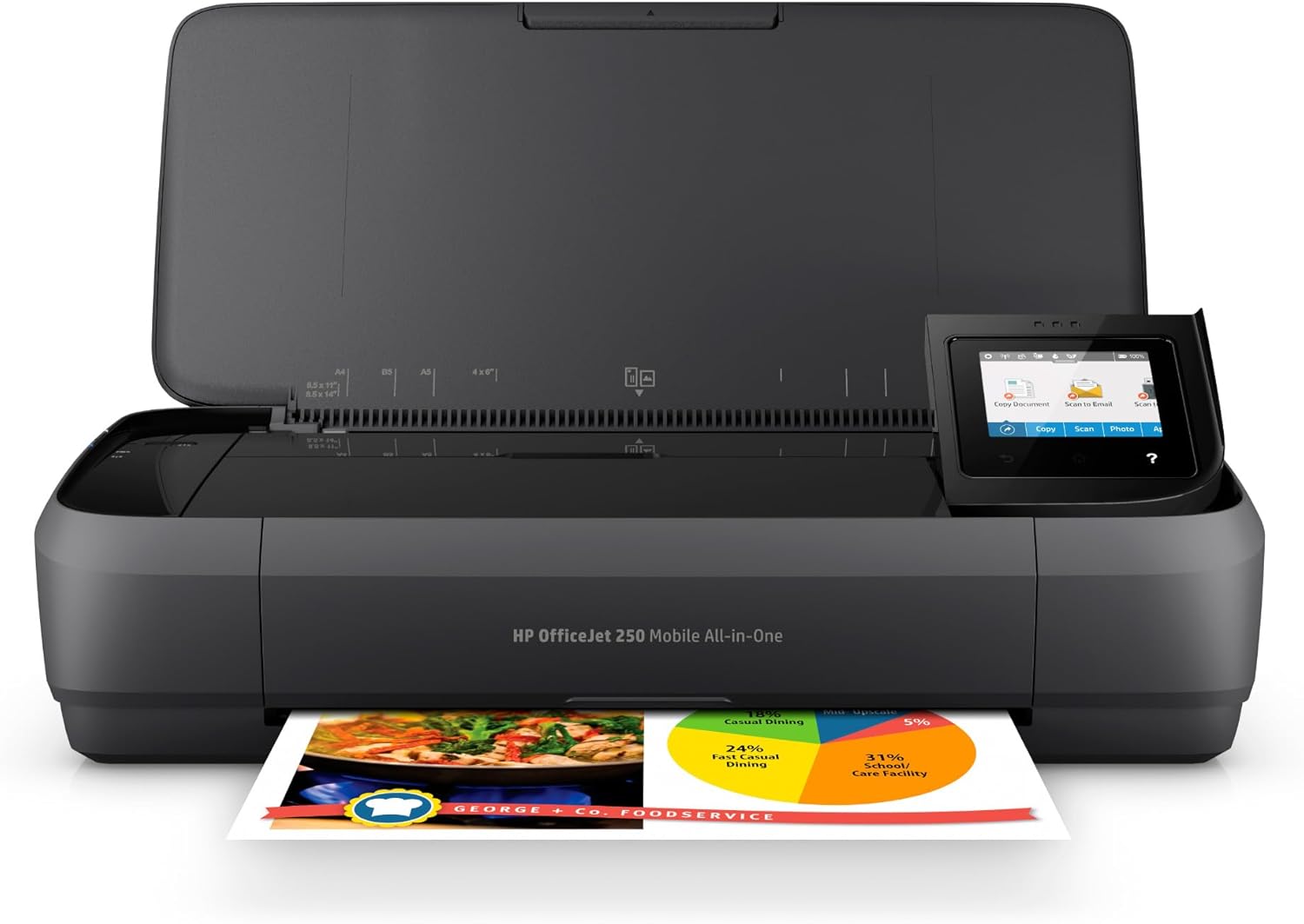
The HP OfficeJet 250 is well-suited to help you stay productive no matter where you are if you often travel for work and still require dependable printing capabilities. So you can take care of last-minute paperwork, signed forms, and client documents even when you’re not in the office, this small and portable all-in-one printer can print, scan, and copy from your laptop, tablet, or smartphone—often without requiring a network connection.
The OfficeJet 250 is a great option for sales trips, field work, events, and remote job sites due to its mobility design. It fits effortlessly into a backpack, briefcase, or car setup. Effortlessly print and scan from your phone with the HP app. The controls are straightforward and won’t slow you down.
It is also easy to transport and set up. You may connect in hotel rooms, temporary workplaces, or even at a client location with HP Auto Wireless Connect, which allows wireless printing with or without a router and helps you get started quickly. With the fast-charging battery, you can stay prepared even when power is limited. It charges in approximately 90 minutes with the printer switched off, and you can connect it to AC power anywhere you are—at home, in the office, or even in the car—as long as you have the correct adapter.
It is compatible with Original HP 62 series cartridges, which allow you to print more pages between replacements and reduce interruptions. You even have the option to use high-yield cartridges. This is the one to get if you’re looking for a portable printer that can handle actual business needs.
3. HP OfficeJet Pro 9730e – Best Wide Format Inkjet Printer

You can get wide-format output from the HP OfficeJet Pro 9730e without upgrading to a cumbersome production printer, which is great if your job requires bigger and more complex prints, such as floorplans, mood boards, spreadsheets, or presentations that are ready to show clients. Speeds of up to 18 pages per minute (ppm) in color and 22 ppm in black and white make it ideal for business use, ensuring that even large documents do not cause significant delays.
Support for artificial intelligence formatting is one of the best features offered by HP. It helps tidy up layouts before printing web pages or emails by erasing unnecessary areas and decreasing uncomfortable cutoffs, resulting in less page waste and prints that appear deliberate. When you need printouts that closely resemble what you see on screen, the 9730e’s improved color matching capabilities are a godsend for designers and artists.
The improved office capabilities make day-to-day management easier, such as automatic two-sided printing, copying, and a document feeder for work with several pages. You may save time by not having to constantly switch out paper kinds thanks to the two 250-sheet input trays. One tray can hold plain paper, and the other can hold heavier stock.
With dual-band Wi-Fi, which can detect and fix typical connection difficulties instantly, connectivity is designed to be dependable. Plus, the HP app allows you to print, scan, copy, or fax from any device—phone, tablet, or computer—so you can stay productive even when you switch devices.
4. Brother MFC-J6555DW – Best Inkjet Printer for Business

The Brother MFC-J6555DW is designed for larger documents and business-speed performance, making it an ideal printer for busy offices that need to handle actual workloads. Printing at up to 30 pages per minute (ppm) in black and color means you can breeze through reports, bills, and client packets without worrying about your printer slowing you down.
Among its many benefits is the capacity to handle ledger-size transactions. The maximum document size for printing, copying, scanning, and faxing is 11″ x 17″. This is perfect for large spreadsheets, blueprints, marketing layouts, or presentations with plenty of information. You can spend less time tending to the printer when you use flexible paper handling to handle bigger workloads more smoothly.
For reliable, high-volume printing results day in and day out, look no farther than Brother’s MaxiDrive inkjet technology. Teams who require fast, dependable color papers will find it to be an ideal solution.
Additionally, connectivity is adaptable, making it suitable for nearly any workplace design. Connecting to the printer is as easy as plugging it into an Ethernet cable for a steady network connection, using Wi-Fi Direct for a fast device-to-printer connection, or using dual-band Wi-Fi for shared access. The ability to print or scan from a mobile device is a huge time saver.
Get more done in less time with less menu clicks thanks to the 3.5″ color touchscreen, which makes commonplace chores like printing, scanning, copying, and faxing a breeze.
5. Brother MFC-J1205W – Best Budget Inkjet Printer

The Brother MFC-J1205W is designed to make everyday printing economical and hassle-free, without punishing you with regular cartridge changes. While still tiny enough to fit on a small desk, it prints more pages than average entry-level printers thanks to Brother’s INKvestment Tank system, which combines an internal ink tank with high-yield cartridges.
You won’t have to worry about buying new ink cartridges every few weeks because this printer can print for up to a year with only the four cartridges that come with it. Everyday tasks like homework, forms, labels, and home-office papers are made easier with the robust speeds—up to 9 ppm in color and 16 ppm in black.
Plus, you get adaptable connection, letting you print the way you normally do it. If you have more than one computer in your home and wish to print from different locations, you can utilize Wi-Fi, Wireless Direct, or USB. Printing and managing the printer is made easy with mobile apps such as Brother Mobile Connect, Mopria, and AirPrint.
Without navigating menus, Brother Mobile Connect allows you to print, copy, and scan from your phone. It also lets you perform basic device administration. You may prepare to change the ink before a deadline comes by using the Page Gauge feature, which shows you how much ink is used and how much is left. This is a great option if you’re looking for cheap printing that doesn’t take up too much room.
Things to Consider Before Buying a Inkjet Printer:
Most buyers should weigh print quality, page yield, and total cost of ownership before choosing an inkjet; you need to match resolution and color accuracy to your projects, evaluate ink cartridge prices and subscription options, check connectivity, speed, and paper handling, and factor warranty and ongoing maintenance to ensure the printer meets your workload and budget.
Single-Function Printers
Single-function inkjets only print, so you get a smaller footprint and often faster first-page-out times; entry-level models commonly use 2-4 cartridges and suit users who print mainly text or occasional photos. If your monthly volume is under 200 pages, you’ll see lower upfront cost, but check per-page ink costs-some cartridges yield ~400-800 pages, so lifetime expense depends on cartridge yield and frequency of use.
All-in-One Printers
All-in-One printers combine print, scan, copy (and sometimes fax), offering ADFs that hold 20-50 sheets and duplex scanning on midrange models; they streamline workflows if you digitize receipts or handle multipage documents. Many AIOs include Wi‑Fi, cloud apps, and mobile printing; models like Epson EcoTank ET‑4760 cut ongoing ink spend with refillable tanks rated for thousands of pages.
With All-in-One units, you get trade-offs to evaluate: an ADF and flatbed scanner save time on multi-page jobs, while network features (Ethernet, Wi‑Fi Direct, LDAP) support shared office use. If you prioritize low running costs, ink-tank AIOs deliver per-page savings-manufacturers quote yields such as 6,000 color or 7,500 black pages for refill sets-whereas cartridge-based AIOs may be cheaper initially but cost more over time. Consider maintenance access (user-replaceable printheads vs. service-only), firmware security updates for networked devices, and ink compatibility for photo vs. document output; choose an AIO if you scan frequently, need copying/faxing, or want centralized device management for multiple users.
Print Quality
High-resolution models reach up to 4800 x 1200 dpi and often use 6-12 ink channels to widen color gamut; pigment inks give crisper, water-resistant text while dye inks typically yield smoother photo gradients. If you print photos, prioritize printers with dedicated photo inks and borderless 4×6 support under 60 seconds; for documents aim for consistent 600 dpi text clarity. You should also check third-party lab reviews and sample charts for real-world color accuracy.
Speed and Efficiency
Typical consumer inkjets print 5-15 ppm black and 2-10 ppm color, while compact office models can reach 20-30 ppm; first-page-out times commonly fall between 6-12 seconds. Duplexing and faster processors boost throughput, and monthly duty cycles usually range from 500 to 5,000 pages-align those figures with your expected monthly volume. You should confirm whether advertised speeds are measured in draft or best-quality modes.
Print speed drops significantly at higher quality: switching from draft to best can cut ppm by 40-80% and increase ink consumption per page. Cartridge yields vary roughly 200-2,500 pages, whereas refillable tank systems often advertise thousands of pages per refill, translating to ink costs around per page depending on model and color usage. You should include these running-cost trade-offs when calculating total cost of ownership.
Advantages
You get superior photo and color output ideal for photos, marketing samples, or detailed graphics; for example, a midrange Canon PIXMA or Epson Expression can achieve 4800×1200 dpi and reproduce deep gradients, while initial purchase prices often fall under , making them accessible when your priority is image quality over high-volume black-and-white text printing.
Assess Your Printing Needs
Estimate your monthly volume (home users often print 50-200 pages, small offices 300-1,000), decide how many photos vs. text pages you produce, and note required features like duplexing or photo tray. If you print 100+ pages monthly, prioritize lower cost-per-page systems (ink tank or high-yield cartridges) and check estimated yields listed by manufacturers to match your usage patterns.
Compare Models and Features
Focus on print resolution (up to 4800×1200 dpi for photo-capable inkjets), speed (typical color 8-20 ppm), and ink system: refillable tanks (Epson EcoTank) can provide up to 7,500 color pages per refill, while standard cartridges often yield 200-500 pages. Also weigh connectivity (Wi‑Fi, Ethernet, mobile printing), automatic duplexing, and photo paper support when shortlisting.
Misconceptions on Cost-Effectiveness
Per-page math matters more than sticker price; you should compare cost per page, yield, and replacement frequency. For example, refillable systems like Epson EcoTank or Canon MegaTank can yield thousands of pages per refill (often several thousand), dramatically lowering long-term costs versus cartridges that typically yield 200-500 pages. Third-party ink can cut costs but may void warranty or clog heads, so factor ink source, yield, and total cost of ownership into your choice.
Summing up
So you should weigh print quality, per-page ink costs, duty cycle and connectivity, confirm cartridge availability and compatibility, factor in scan and print speed versus your workflow, and consider long-term maintenance and warranty so your device fits expected usage and budget.
Leave a Reply