
Finding the best laptops for your specific needs shouldn’t feel like a confusing nightmare. Instead of worrying about weak battery life or sluggish performance, discover a powerful machine that actually keeps up with you. Our expert guide cuts through the tech jargon to reveal the top-rated choices for every budget. Ready to experience effortless speed and reliability? Let’s dive into our top picks.
Contents
- Top 5 Laptops:
- 1. Apple MacBook Air 13-inch – Best Laptop Overall
- 2. ASUS Zenbook Duo Dual 14″ OLED – Best Productivity Laptop for Multitasking
- 3. ASUS ROG Strix SCAR 18 – Best Gaming Laptop
- 4. Microsoft Surface Pro – Best 2-in-1 Laptop
- 5. HP 15.6″ Laptop – Best Budget Laptop
- Things to Consider Before Buying a Laptop:
- Ultrabooks
- Gaming Laptops
- 2-in-1 Laptops
- Performance
- Battery Life
- Portability
- Determine Your Needs
- Research Brands and Models
- Assessing Features
- Ignoring Future Needs
- Overlooking Warranty and Support
- Conclusion
Top 5 Laptops:
1. Apple MacBook Air 13-inch – Best Laptop Overall

The 13-inch Apple MacBook Air powered by the M4 chip is designed to handle your daily routine with ease and speed. It’s lightweight, reliable, and ideal for a wide range of tasks. Whether you’re editing papers, juggling browser tabs, or running productivity and content tools side by side, the M4’s seamless performance across programs will make all of your work, school, and creative endeavors seem responsive.
With Apple Intelligence, a personal intelligence system that prioritizes privacy protections and helps you write, create, and communicate more efficiently, you also get support. It really shines when you need intelligent help integrated into your workflow but don’t want to introduce unnecessary complexity.
One of the main draws of the MacBook Air is its long battery life. Whether you’re in class, on the go, or in a meeting, you won’t have to worry about finding an outlet because it can last up to 18 hours on a single charge. You won’t feel like you’re “downgrading” when you go mobile because performance remains constant whether you’re plugged in or running on battery.
Sharp text and detailed images are yours to enjoy on the 13.6-inch Liquid Retina display, which is capable of displaying 1 billion colors. You can look and sound confident on conversations and when working remotely thanks to the four-speaker system with Spatial Audio, three microphones, and 12MP Center Stage camera.This quality laptop is perfect for everyday use thanks to its lightweight design, backlit keyboard, and fingerprint reader.
2. ASUS Zenbook Duo Dual 14″ OLED – Best Productivity Laptop for Multitasking

The ASUS Zenbook Duo Dual 14″ OLED is designed to accommodate your real work habits, which may involve many apps open, frequent switching, and a large amount of information displayed on the screen simultaneously. It makes multitasking feel effortless. You can use the second screen for things like email, chat, notes, timelines, reference tabs, or a full-screen calendar without taking your eyes off your primary activity thanks to the dual 14-inch OLED display configuration, which creates a genuine two-screen workstation.
We optimize performance for workloads that are heavier. You can run enormous files, intense multitasking, and massive projects with ease on a system that has an Intel Core i9, 32 GB of RAM, and a 1 TB SSD. If you spend your day switching between spreadsheets and documents, managing multiple tabs in your browser, or working with creative tools, it’s a good fit.
Windows 11 Home’s snap layouts and multi-window capabilities make it easy to manage apps, and the machine’s portability is impressive for a dual-screen device. It’s built with mobile productivity in mind. If you want to make notes by hand, annotate papers, or do rapid sketches and revisions without leaving the screen, then you’ll appreciate the extra layer of freedom that comes with stylus support.
The inkwell gray finish adds a touch of professionalism, while the integrated graphics are perfect for processes that include creativity or productivity rather than intense AAA gaming. In general, it’s an excellent choice if you’re looking for a laptop that can take the place of a multi-monitor desk arrangement, allowing you to work more efficiently with fewer interruptions and less clutter.
3. ASUS ROG Strix SCAR 18 – Best Gaming Laptop

Bringing desktop-class power to a portable setup, the ASUS ROG Strix SCAR 18 is a gaming laptop that can push high frame rates in recent AAA titles while yet feeling quick for regular multitasking. Gaming launches, streaming, and background apps won’t bog you down when things get intense because you’re running Windows 11 with a 14th Gen Intel Core i9-14900HX, a high-performance CPU designed for intensive tasks.
You may enjoy higher settings, more fluid competitive play, and quicker GPU-accelerated creative tasks like editing or rendering with the help of an NVIDIA GeForce RTX 4070 Laptop GPU, which boasts up to 140W Max TGP. When you upgrade from midrange gaming hardware, you’ll notice an immediate performance gain.
A 1 terabyte PCIe Gen4 solid-state drive (SSD) ensures lightning-fast boot speeds, game loads, and system responsiveness, and sixteen gigabytes of dynamic random-access memory (DDR5-5600MHz) provide responsive multitasking. Whether you’re juggling multiple tabs in your browser, games, and Discord, the system is designed to keep you going fast.
Asus relies on ROG Intelligent Cooling to address the issue of gaming laptops’ sustained performance. The cooling system is designed to control heat more effectively, with Thermal Grizzly Conductonaut Extreme liquid metal on the CPU and an additional intake fan. This means that you won’t experience throttling while the laptop warms up, and you can maintain stronger performance over longer gaming sessions.
4. Microsoft Surface Pro – Best 2-in-1 Laptop

The Microsoft Surface Pro seamlessly transitions between a laptop and a tablet, making it ideal for those who desire a versatile device that can accommodate both roles. Lightweight and featuring a 13-inch touchscreen, this device may be used as a laptop when multitasking and typing is required, and switched to tablet mode for reading, taking notes, drawing, or working while on the move.
With Windows 11 Home, a Snapdragon X Plus processor, 16 GB of RAM, and 512 GB of storage, this model offers a contemporary setup that is optimized to handle everyday tasks like document editing, web browsing, meetings, and creative programs with ease, all while providing ample room for all your files and projects.
It’s also known as a Copilot+ PC, which indicates that it’s built to work with Windows’ latest AI-enhanced features. Maintaining your privacy and security while you breeze through everyday chores like organizing, producing, and getting things done is our top priority.
One major benefit of the Surface Pro is how well it adjusts to your daily routine. You can use it on a desk for concentrated work, as a portable internet device for browsing the web at your leisure, or even in places where a full-sized laptop might be too cumbersome, like a conference or class. Getting more done with fewer devices has never been easier than with the Surface Pro, thanks to its superior 2-in-1 design, touchscreen control, and adaptability.
5. HP 15.6″ Laptop – Best Budget Laptop
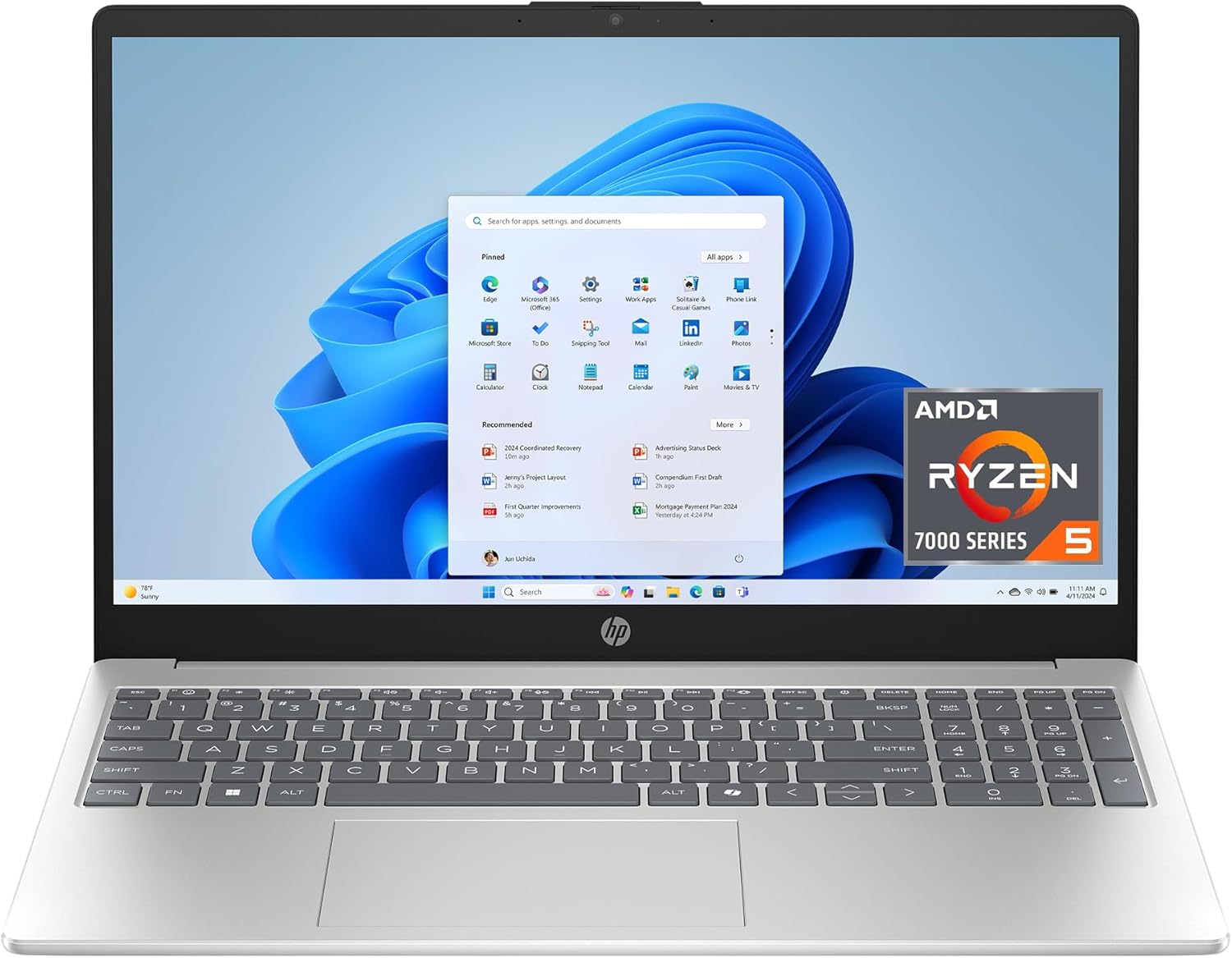
HP’s 15.6-inch laptop offers an affordable option with a useful combination of screen size, storage, and AMD performance, making it ideal for everyday tasks like schoolwork, surfing, streaming, and light productivity. When compared to using a trackpad alone, the 15.6-inch micro-edge HD touchscreen makes speedy navigation, scrolling, and swiping feel more natural. In order to make watching more comfortable for longer periods of time, it employs a 1366 × 768 resolution and a flicker-free design.
Thanks to its AMD Ryzen 5 processor, this budget laptop can perform common multitasking like opening multiple tabs on the web, creating documents, making video chats, and basic creative work with ease. In addition to a 512 GB disk, which is more than enough space for all of your files, images, applications, and academic or professional endeavors, you receive 8 GB of RAM, which is more than adequate for normal everyday use.
If you’re looking for an integrated graphics solution that can handle casual gaming, light graphics, and smooth streaming, go no further than AMD Radeon. If you’re looking for a reliable system that can handle Netflix, YouTube, business software, and everyday computing, this is a good pick.
If you’re looking for a larger touchscreen laptop that won’t break the bank but will still feel capable for your everyday chores, this HP is a simple choice with Windows 11 Home preinstalled and a sleek, natural silver finish.
Things to Consider Before Buying a Laptop:
Just prioritize how you will use the machine-work, gaming, content creation, or mobility-so you can match processor, RAM, storage, GPU, battery life, and display to your needs. Balance performance with budget, check build quality and ports for your peripherals, and verify warranty and upgrade options to protect your investment.
Ultrabooks
You’ll get the lightest portable option with ultrabooks: typically 11-14″ screens, under 1.3-1.5 kg, and SSDs that boost boot times to under 10 seconds; many meet Intel Evo specs or use Apple M-series silicon, delivering 10-18 hours of real-world battery life and quiet fan profiles-good if you travel, work on long flights, or want fast resume and high aluminum build quality.
Gaming Laptops
You should expect powerful discrete GPUs (NVIDIA RTX 30/40-series or AMD equivalent), 45-150W GPU TDPs, and displays from 120 Hz up to 360 Hz; typical units weigh 2.2-3.5 kg and give 2-6 hours of mixed-use battery life, so prioritize GPU and cooling if you play AAA titles at high settings or stream.
Thermals define sustained frame rates: check sustained TDP numbers (e.g., 80-150W for higher-tier GPUs) and reviews that measure long-play throttling. Brands like ASUS ROG, MSI, and Razer differ in chassis cooling; some models offer per-core boost tuning and 240-330W power bricks-if you want 1440p/4K gaming or ray tracing at stable fps, prioritize chassis with vapor chambers, multiple heat pipes, and accessible RAM/SSD upgrade paths.
2-in-1 Laptops
You’ll find two main flavors: detachable tablets (Surface Pro style) and 360° convertibles (Yoga/Pavilion), both offering touchscreen and pen input; expect 8-12 hour battery life on midrange CPUs, lighter weights (0.7-1.5 kg for detachables), and often lower thermal headroom than clamshells-ideal if you take notes, sketch, or give presentations with a single device.
Hinge mechanics and pen tech matter: look for low-latency pens (≈8-10 ms) and strong hinge durability ratings if you flip modes frequently. Also compare display color gamut (sRGB vs. Adobe RGB), pen pressure levels (2,048-4,096+), and whether the chassis allows cooling for sustained CPU bursts-choose convertibles when touch and tablet ergonomics outweigh raw sustained performance.
Performance
You should target CPUs and RAM based on tasks: for productivity a quad- to octa-core Intel i5/i7 or Ryzen 5/7 with 16 GB RAM handles spreadsheets, virtual machines, and browser tabs; for video editing or 3D work choose 6-8 core chips and an NVIDIA RTX 3060/3070 class GPU, plus NVMe SSDs (read speeds 2,000-5,000 MB/s) to cut export times substantially.
Battery Life
You can expect advertised battery hours to differ from real use: many Windows ultrabooks with 50-60 Wh packs hit 8-12 hours for mixed tasks, while power-hungry laptops drop to 3-5 hours under heavy loads; Apple’s M1/M2 Macs often deliver 12-18 hours in light use due to efficiency gains, so check measured reviews rather than just manufacturer claims.
To evaluate real battery performance, run consistent tests: set brightness to 150 nits, use a looping video or web-browsing script, and compare results-this standardizes readings across models; also consider battery health specs (cycle count limits) and whether the battery is user-replaceable if you plan to keep the laptop 3-5 years.
Portability
You should weigh trade-offs between size and capability: ultraportables (13″-14″) at 0.9-1.3 kg are ideal for frequent travel, 15″ models at 1.4-1.8 kg balance screen real estate with mobility, and gaming/workstation machines often exceed 2 kg but provide higher performance and cooling-choose based on how often you carry the device daily.
Also factor in practical travel considerations: thin chassis under 18 mm often drop full-size ports so you’ll need dongles, while metal bodies like aluminum or magnesium increase durability; if you fly often verify the laptop fits your carry-on bag and that battery capacity complies with airline rules (typically under 100 Wh without airline approval).
Determine Your Needs
If you edit photos or video, target 16GB+ RAM, a dedicated GPU (e.g., NVIDIA GTX/RTX or AMD Radeon), and a 15-17″ color-accurate display with 100% sRGB; for office work and web use, 8GB RAM, a 13-14″ screen, and a 256-512GB SSD suffice. If portability is key, prioritize sub-1.3 kg designs and 8-12 hour battery life. For gaming, look for at least an RTX 3050/3060 and 144Hz panel to match modern titles.
Research Brands and Models
Compare lines like Dell XPS and Lenovo ThinkPad for productivity, MacBook Air/Pro for macOS efficiency, ASUS ZenBook and HP Spectre for premium portability, and MSI/Acer for gaming; check model-specific reviews rather than brand reputation alone. Use benchmarks (Cinebench, 3DMark), battery tests, and display color coverage reports to see real-world differences between similarly spec’d machines.
Dig into long-term reliability and support: ThinkPads often offer robust keyboards and on-site service options, Apple provides tight hardware-software integration and 1-3 year AppleCare, while thin gaming laptops may show thermal throttling despite high peak performance. Consult Notebookcheck, AnandTech, and user forums for sustained performance, and weigh warranty length and service network when choosing a model.
Assessing Features
You should match specs to tasks: choose at least a quad‑core CPU (Intel i5/Ryzen 5) for everyday use, 16GB RAM for multitasking, and NVMe SSD (256-512GB) for speed; pick a discrete GPU like GTX 1650 or RTX 3050 for gaming or a color‑accurate 100% sRGB panel for photo work; also check ports, webcam, keyboard feel, and rated battery life (8-12 hours for ultrabooks, 4-6 for gaming).
Ignoring Future Needs
If you expect to keep a laptop 3-5 years, plan for future workloads: choose 16GB RAM (8GB becomes a bottleneck after about 2 years for heavy multitasking), a 512GB SSD, and a CPU with 6+ cores if you edit video or run VMs. Many ultraportables solder RAM and storage, so if you want to upgrade later pick models with spare M.2 slots or user-accessible RAM to avoid early obsolescence.
Overlooking Warranty and Support
A standard manufacturer warranty is usually 12 months; you should check exactly what’s covered before buying. If downtime costs you money, opt for on-site or next-business-day service and verify international coverage if you travel. Brands differ: AppleCare+ adds accidental-damage repairs for two years, while Dell ProSupport can provide next-business-day on-site service for three years-your support choice affects uptime and repair speed.
You should compare exclusions and costs: batteries often shift to prorated coverage after 12 months, ADP (accidental-damage protection) commonly runs depending on duration, and extended plans usually add 2-4 years. Confirm claim limits, local parts availability, typical turnaround times, whether loaner units are offered, and check user reviews and a test support call to gauge actual response quality before you commit.
Conclusion
The best laptop for you balances performance, battery life, build quality, and price; assess your workloads, desired portability, display quality, RAM and storage needs, and GPU requirements, then prioritize features like upgradeability and port selection. Check operating system compatibility, warranty and support options, and read reviews to ensure the model meets your workflow and longevity expectations before committing.
Leave a Reply