
Finding the best mechanical keyboards shouldn’t be a frustrating quest. If you’re tired of mushy, unresponsive keys, it’s time to finally transform your **typing experience**. We’ve rigorously tested dozens of models to find the definitive winners that deliver that satisfying tactile feedback you crave. This guide cuts through the noise and makes it simple to discover the perfect keyboard for your gaming setup or workspace. Let’s dive in and find your ideal match.
Contents
- Top 5 Mechanical Keyboards:
- 1. Asus ROG Strix Scope II 96 Wireless – Best Mechanical Keyboard Overall
- 2. SteelSeries Apex Pro (Gen 3) – Best Mechanical Keyboard for Gaming
- 3. Logitech G915 LIGHTSPEED – Best Low-Profile Wireless Mechanical Keyboard
- 4. Corsair K70 RGB Pro – Best Mechanical Keyboard for Esports
- 5. Redragon K671 – Best Budget Mechanical Keyboard
- Things to Consider Before Buying a Mechanical Keyboard:
- Switch Types
- Key Features
- Compatibility
- Advantages
- Personal Preferences
- Usage Scenarios
- Assessing Your Needs
- Testing Keyboards
- Cleaning
- Troubleshooting
- Final Words
Top 5 Mechanical Keyboards:
1. Asus ROG Strix Scope II 96 Wireless – Best Mechanical Keyboard Overall

[su_button url=”https://www.amazon.com/dp/B0C7KFZ5TL?tag=subtp-20″ background=”#ef2e2d” size=”9″ center=”yes”]Check Price at Amazon[/su_button]
If you want a high-end mechanical keyboard that conserves space without cutting out keys, the ROG Strix Scope II 96 Wireless offers you a layout that’s smarter and feels more pro-grade. The 96% layout shrinks the numpad and arrows but tightens things up so nothing is wasted, leaving you room to use your mouse while keeping every shortcut at your fingertips for fast productivity and play.
You’ll have a polished out-of-the-box typing experience. Pre-lubed ROG NX Snow linear switches ensure near-silent, fingertip-sensitive keypresses, and you also have the option of substituting them with clicky-feeling keycaps in the form of ROG NX Storm switches. They both feature a walled stem design, which helps increase stability and decrease the wobble. Because it’s hot-swappable, you can insert your favorite 3-pin/5-pin MX-style switches to dial in your perfect sound and feel.
Connection is effortless. Connect up to three devices via Bluetooth, low-latency 2.4 GHz with ROG SpeedNova for games or USB wired when you’re ready to play at the pro level. Sound-dampening foam and optional switch-dampening pads underneath the keys also help keep case ping to a minimum, so even when you’re hammering out a late-night homework assignment or in an open office without bothering others around you.
With per-key RGB lighting you can set a clean, professional look to match your setup or an explosive design that reacts to your games and changes with the weather. And with its durable gunmetal black metal frame, stand up to any hit in battle regardless of whether you’re gaming on the couch or at your desk. If you’re looking for a small, all-in-one keyboard that’s both fast and relatively quiet as well as highly customizable, the Scope II 96 Wireless will make every key press feel—and sound—just right.
2. SteelSeries Apex Pro (Gen 3) – Best Mechanical Keyboard for Gaming

[su_button url=”https://www.amazon.com/dp/B0D4RKYZJ5?tag=subtp-20″ background=”#ef2e2d” size=”9″ center=”yes”]Check Price at Amazon[/su_button]
If you want a faster, cleaner key press to take your gaming to the next level, then look no further than the SteelSeries Apex Pro (Gen 3), undoubtedly the world’s fastest mechanical keyboard, from opening up opportunities for abilities and things that might be more important and/or time sensitive when it comes down to competition! Its OmniPoint 3.0 Hall-effect switches allow you to tune actuation for each and every key, so you can run movement keys at a featherlight level while keeping your ultimates or macros at some deeper, more deliberate depth of press. Rapid Trigger and Rapid Tap switch instantly as you lift, with 20× faster actuation than the competition while registering keypresses up to 11× quicker than the industry standard, so that you can counter-strafe, track, shoot or complete objectives (and everything in-between!getPost navigation Prepare for an inspiring performance.
You also get smarter accuracy. The Protection Mode feature is designed to prevent accidental hitting of the surrounding keys once your intended target key(Normal Trigger) has been pressed, in order to avoid mispresses in a competition. An alloy-steel frame will keep the board feeling rigid under heavy use, and wired lets you prioritize stable low-latency performance over freedom.
Control is straightforward mid-match. The OLED Smart Display delivers information straight from games and apps, such as the current song playing or new content from an app, even when your computer’s in sleep mode;5000 Series aluminum construction built for 50 million clicks and heavily tested for quality and durability;Equipped with a USB passthrough port that’s perfect for plugging in your mouse or another device;Aircraft grade brushed anodized aluminum frame: Built to withstand a lifetime of gaming. Dynamic per-key RGB is capable of new custom effects and up to 16.8 million colors, giving you the richest personalization.The apex pro also includes a premium magnetic wrist rest, and features a USB passthrough port.
Whether you’re seeking more accuracy, comfort or a way to personalize your keyboard, the Apex Pro (Gen 3) delivers with control and style — for those who want everything.
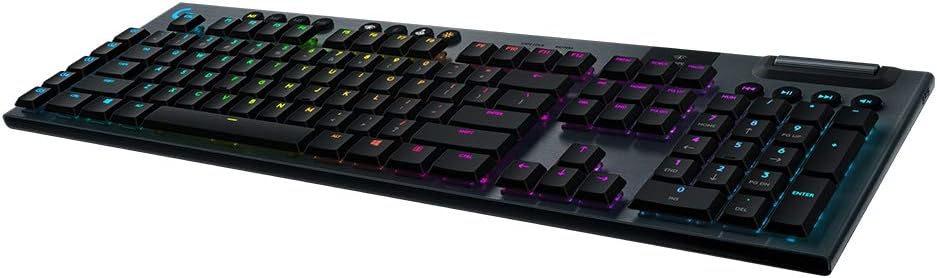
3. Logitech G915 LIGHTSPEED – Best Low-Profile Wireless Mechanical Keyboard
[su_button url=”https://www.amazon.com/dp/B07NY9ZT92?tag=subtp-20″ background=”#ef2e2d” size=”9″ center=”yes”]Check Price at Amazon[/su_button]
If you’re seeking a high-end, low-profile board that ditches the cord without sacrificing pace, then the Logitech G915 LIGHTSPEED delivers a smooth, dialed-in wireless experience. You receive pro grade LIGHTSPEED wireless with 1 ms report rate and next gen HERO 16K sensor for incredibly precise gameplay with ultra long battery life. A single charge keeps you powered for up to 30 hours of wireless sound, low noise monitoring and vibrational alerts play when power is low; recharge in a quick three hours with the USB-C charging cable.
You choose the feel. Low-profile GL mechanical switches – a clicky, tactile switch or linear full-height keys..phase of a wheedling creature. Each has a different feel, giving you the flexibility to match movement keys, editing shortcuts or even your typing with your comfort. Aircraft-grade 5052 aluminum alloy is built sturdy and thin for those on the go, while the key to N-keys rollover with a lightweight CNC anodized brushed aluminum frame makes it so you’re never stuck in one place again the customize-able all per-key RGB lets you build a vivid color–creating your or anything that fits too match your fortress of solitude or lets you match through this latest battle.
Control is streamlined. Assign a custom list of commands to activate at your command and save up to 5 profiles via LGS on the onboard memory without the need for software, or access your profile content with G HUB. Its dedicated media keys and a large, edgeless volume wheel allow adjust audio without interrupting your game or meeting.
Whether you’re in the living room or the office, the LIGHTSPEED wireless feature serves your need for a low-hassle cable-free performance The G915 design is Bluetooth-ready with Windows, Android and iOS support For high-performance connectivity, it also features Lightspeed Wireless technology.PLL2
4. Corsair K70 RGB Pro – Best Mechanical Keyboard for Esports

[su_button url=”https://www.amazon.com/dp/B09NCMHTSB?tag=subtp-20″ background=”#ef2e2d” size=”9″ center=”yes”]Check Price at Amazon[/su_button]
If you’re in need of a tried and true esports keyboard that emphasizes speed, focus, and endurance needed to win, the Corsair K70 RGB Pro style delivers all those suit up for battle. You have the legendary K70 line of products, it features a tough aluminum frame, vibrant per-key RGB backlighting with powerful CORSAIR iCUE software, and renowned CHERRY MX Red switches – good for 50 million quiet authorizations. Each switch is rated for up to 100 million keystrokes, so the anime feel lasts season after season.
Using CORSAIR AXON Hyper-Processing Technology, the K70 RGB Pro has the power to process 8x faster than ordinary gaming keyboards – so your keypresses are detected quicker across high-action sequences. Once it’s time to compete you can hellbent your way through, turn on the Tournament Switch and your static lighting is also enabled, which stops unwanted macro plug ins happening during the match!
You also have plenty of long-term customization choices. Polycarbonate Keycaps Zero two PBT keycaps are made via 5 axis CNC milling process with high quality materials, individually shaped and colored in a way that is methodical on the eye, With durable and non-textured design, The additional Polycarbonate material ensure that it’s resistant to friction or moisture degradation. Take complete control of your Typing Experience with per-key RGB lighting controlled by you When It’s time to hit the lights, simply cover it up with integrated magnetic covers featuring a phenomenal Nook underneath for all good Here we have customer service that really cares We ship right here from Columbia, Missouri, USA Ensure you get The product in case anything goes wrong You are backing everything They make With so much attention put into their keyboards they truly are the fastest growing and one of my personal favorites That is why they care and know all Track what would be best different cables? Different stems? Who knows.
You’re looking for an affordable gaming keyboard that’s designed to last and offers a solid feature set—including dedicated media buttons, programmable keys, and space-saving form factors—along with consistent performance to help keep you at your best.
5. Redragon K671 – Best Budget Mechanical Keyboard

[su_button url=”https://www.amazon.com/dp/B0CF3VGQFL?tag=subtp-20″ background=”#ef2e2d” size=”9″ center=”yes”]Check Price at Amazon[/su_button]
If you’re ordering the best budget mechanical keyboard, because you want a premium feel without paying too much, the Redragon K671 is serving up the basics that are important to you: dependable wired operation, hot-swappable switches and difficult customization options. The wired connection provides stable, low-latency input for work and g aming, while the mechanical switches deliver quick and satisfying feedback that it ensures you can type with speed and accuracy.
You enjoy 11 backlighting effects with 5 adjustable brightness levels and five customizable speed settings built to run even during the most intensive gaming sessions while in harmony with systems from entry level up to high end. Double-shot ABS keycaps ensure the lighting shines through, and helps bring out the vivid colors of RGB without issue as legends remain clear even in dimly lit rooms The LED can be disabled for a more subtle approach to your favorite tech Pitch Backlit simply press FN plus Pause key to adjust between Full backlit Half backlit and Breathing mode. The hot-swappable design allows you to swap in different switches later on without investing in a whole new board, so it’s a smart place to start that can stick with you as you grow.
Productivity is built in. The Macro function or Text / Shortcut Key setting is designed to meet the demand in managing complicated work or increasing the speed input. With macro editing and above features, use these functions for more than just gaming; it’s perfect for developers who want to have a vast array of shortcuts by one click architecture or software design, photo / film editing, taking you to detail with great compatibility of both Windows and OS system. Customizable keys and comfortable touches round off this package that’s ideal for long sessions, while the compact, clutter-free form factor is perfect for those with limited desk space.
Things to Consider Before Buying a Mechanical Keyboard:
Over time, you’ll see that selecting the right mechanical keyboard requires evaluating switch type, actuation force and sound to match your typing and gaming needs. Consider layout and size for your desk, build quality and keycap material for durability, wired vs wireless connectivity for latency, and customization options and budget to ensure the keyboard supports your workflow and personal preferences.
Switch Types
Linear, tactile, and clicky switches differ by actuation force (commonly 45–62g) and travel (actuation ~1.8–2.2mm, total 3.4–4.0mm); you’ll notice Cherry MX Reds (45g) give smooth travel, Browns (~55g) provide a subtle bump, and Blues (~50–60g) offer audible clicks. Optical and speed switches reduce debounce latency for esports, while silent variants cut noise for shared spaces. After testing a couple of feels you’ll know which reduces fatigue and boosts accuracy.
Key Features
Prioritize per-key RGB or single-zone lighting, programmable layers and macros, onboard profile storage (commonly 3–5 slots), NKRO, 1000Hz polling for wired play, and switches rated for ~50M actuations. Look for hot-swap sockets (MX cross-stem compatible), high-quality PBT keycaps, screw-in stabilizers, and detachable USB-C cables if you travel; gasket mounts change acoustics and feel. Knowing which features you’ll actually use prevents paying for extras.
Compatibility
Check OS and firmware support: Windows generally has full driver support for vendor software, macOS may need Mac-layout keycaps or a Win/Mac mode, and Linux works best with standard HID devices or QMK/VIA-compatible boards for remapping. Verify advertised Bluetooth profiles (HID/BLE) and multipoint pairing (often 2–3 devices), and confirm keycap stem type (Cherry MX cross) for aftermarket caps; wired USB-C provides universal plug-and-play and the lowest latency for competitive use.
Advantages
You gain long-term value from switches rated 50–100 million keystrokes, plus a huge choice of switch types (35–80 g actuation forces) to match your feedback preference. You can tune performance with hot-swap boards, custom keycaps, plate materials, and programmable macros; competitive gamers benefit from NKRO and low latency while programmers leverage layers and custom layouts to speed repetitive tasks.
Personal Preferences
Your tolerance for noise and actuation force steers switch choice: Reds (45 cN, 2.0 mm actuation) favor speed, Browns (≈55 cN) suit mixed typing/gaming, Blues (60–65 cN) reward typists who like audible clicks. Consider keycap profile—SA is tall and sculpted, OEM common, Cherry lower for faster reach—and materials like PBT for durability. If you enjoy modding, hot-swap and gasket mounts let you iterate without soldering, so test a switch sampler before committing to a full build.
Usage Scenarios
Gaming often favors low-actuation linear switches—many competitive players choose 45 cN variants—and a TKL or 65% layout to shorten mouse travel; 60% can reduce desk width by ~30%. For coding and long-form writing you might prefer tactile or medium-travel switches to reduce errors over hours, while office environments benefit from quieter switches and foam damping to lower noise. If you stream or share space, prioritize wireless convenience with proven low-latency dongles or wired USB for reliability.
If you prioritize battery life, note that wireless boards with full RGB often last 10–30 hours, whereas backlight-off models can reach 60–100 hours; wired USB avoids that constraint. Competitive setups should target 1000 Hz polling and sub-1 ms RF or wired connections; Bluetooth tends to add latency. Acoustic tuning matters: gasket mounts and internal foam can cut perceived noise by 6–10 dB, and swapping plate material—brass for brightness, polycarbonate for warmth—lets you tailor tone to your environment and typing speed.
Assessing Your Needs
Identify whether you mainly game, type long-form, or program: FPS players often prefer linear switches with ~45g actuation and 1000Hz polling; writers typically favor tactile switches around 55–60g for feedback; if you use macros, choose a 75%/TKL with extra keys and QMK/VIA support; tight desks benefit from 60% layouts, while numpad users need full-size boards.
Testing Keyboards
Visit a local store, borrow from friends, or order a switch tester to confirm feel and sound: spend at least 5–10 minutes typing real text (code, emails, or a 60–90 WPM typing test), check for stabilizer rattle on long keys, and verify NKRO and anti-ghosting in a gaming scenario.
Bring a short script or use a typing test (10–15 sentences) to compare travel distance and actuation points across switches; record sound with your phone for quieter vs louder switches, try a switch tester with 5–10 switch types, run a simple 1ms-polling game to notice latency differences, and test the vendor’s software for remapping and macro reliability before committing.
Cleaning
Remove keycaps and soak them in warm, soapy water for 4–12 hours, then air-dry 24 hours before reinstalling. Use 2–3 short bursts of compressed air from 6–8 inches to dislodge debris from the PCB and switch housings; avoid spraying liquid directly. Gently clean between switches and stabilizers with a microfiber cloth or cotton swab lightly dampened with 70% isopropyl alcohol, and use a soft brush for stubborn grit.
Troubleshooting
Address chattering, stuck keys, or dead zones by isolating the issue: test the keyboard on another computer, run an online keyboard tester to see per-key signals, and inspect keycaps and stabilizers for physical obstruction. For hot-swap boards, swap the suspect switch with a known-good one; for soldered boards, check solder joints for cracks or cold joints with a magnifier and multimeter continuity test. Update firmware or drivers before hardware repair.
For chattering specifically, adjust debounce settings in your firmware or software—many users find 10–20 ms effective—then retest. Apply a tiny amount of contact cleaner to non-hot-swap switch contacts or replace the switch if noise persists. Intermittent keys often trace to worn springs or solder fatigue; reflowing solder joints or replacing the spring (65 g vs 80 g if feel is an issue) solves many cases. Keep notes of steps taken so you can revert if needed.
Final Words
Hence you should weigh switch type, layout, size and keycap material against your typing and gaming needs; test actuation, travel and noise, decide on wired vs wireless and battery life, consider hot-swappable PCBs for future upgrades, check build quality, stabilizers and firmware support, and balance features with warranty and budget so you get a keyboard that suits your workflow and longevity.
Leave a Reply