
Finding the best mini gaming PC shouldn’t mean sacrificing performance for a tiny footprint. If you’re tired of massive, dusty towers stealing your desk space, you need a powerful change. We tested the top small form factor builds to find the ultimate balance of power and size. Experience jaw-dropping compact performance that fits right in your backpack. Let’s dive into our top picks for your next desktop upgrade.
Contents
- Top 7 Mini Gaming PC:
- 7: ACEMAGICIAN M1 (Ryzen 7 7735HS)
- 6: GMKtec M7 Ultra (Ryzen 7 PRO 6850U + Oculink)
- 5: BOSGAME P6 (Ryzen 9 6900HX)
- 4: ACEMAGIC M5 (Intel i7-14650HX)
- 3: ACEMAGIC M5 (Intel i9-14900HX)
- 2: GEEKOM IT15 (Intel Ultra 9 285H + Arc 140T)
- 1: TOPGRO T1-MAX (i9-13900HX + RTX 4070)
- Things to Consider Before Buying a Mini Gaming PC:
- Component Clearance and GPU Dimensions
- Matching Specs to Gaming Requirements
- Verifying Port Connectivity and Expansion
- Managing Airflow in Restricted Spaces
- Selecting Low-Profile Internal Components
- Conclusion
Top 7 Mini Gaming PC:
7: ACEMAGICIAN M1 (Ryzen 7 7735HS)

When shopping for a first-time small PC, go no farther than the ACEMAGICIAN M1.Launching a real game causes your ancient business laptop to choke. Problem solved by the M1.The first is the 4.75 GHz Ryzen 7 7735HS, which has 8 cores and 16 threads. Real processing power for today’s games.Radeon 680M graphics—RDNA2 architecture, 12 processing units—up next. Enjoys stutter-free 1080p gameplay in Fortnite, Valorant, and CS.
The specifications are as follows: a 4K triple display, 512GB PCIe SSD, and 24GB LPDDR5. A second display and sufficient RAM for current games.Bad: You can’t update the RAM because LPDDR5 is soldered. AAA installs quickly fill up 512GB. Limited to integrated graphics, with a maximum resolution of 1080p medium.Recommend to: esports players and first-time consumers of small PCs. Those aiming for 1440p or 4K will not be satisfied.
6: GMKtec M7 Ultra (Ryzen 7 PRO 6850U + Oculink)

The top tiny gaming PC with an integrated upgrade path is the GMKtec M7 Ultra.Forever stuck with integrated graphics? Not with most cheap small PCs. That is resolved by the M7 Ultra.To start, the OCuLink connector supports PCIe x4 bandwidth. Later on, you can upgrade it to a 1440p setup by plugging in an extra GPU.Up next: 12 CPU cores, Ryzen 7 PRO 6850U graphics, and Radeon 680M. Similar to the performance of a GTX 1050 Ti.
Last but not least: a quad 8K monitor, two 2.5GbE LAN ports, and two USB 4 ports. Modern I/O.Lightweight foundation 512GB storage is a drawback. The DDR5 memory only supports 4800 MHz. Quite audible in performance mode at full 70W.Most suited for: eGPU planners and gamers looking for an upgrade method. Do not use if you require maximum speed right out of the box.
5: BOSGAME P6 (Ryzen 9 6900HX)

Introducing the BOSGAME P6, the ultimate compact gaming PC with desktop-level processing capabilities.Memory is typically slow in mid-range small PCs. Once you encounter a game that heavily relies on the central processing unit, the bottleneck becomes apparent. It is resolved by the P6.To begin, we have the Ryzen 9 6900HX, which boasts 8 cores and 16 threads with a boost speed of 4.9GHz. Run Discord, play games, and stream all at once with desktop-class multitasking.Finally, the integrated 32GB LPDDR5X runs at 6400MHz. Optimal mainstream small PC RAM for speeding up simulation and massively multiplayer online game frame rates.
Lastly, a 1 terabyte PCIe 4.0 NVMe solid-state drive (SSD) optimized for home servers and soft routers, with three 4K displays and two 2.5G LANs.Negatives: the graphics are still Radeon 680M, which is fine for esports but won’t cut it at AAA settings. No memory upgrade possible because LPDDR5X is soldered. Output: OCuLink port not located.Ideal for: those that race sims, play massively multiplayer online games, or are broadcasters. Players aiming for maxed out AAA images should go elsewhere.
4: ACEMAGIC M5 (Intel i7-14650HX)

The most effective Intel small gaming PC for multithreading is the ACEMAGIC M5 equipped with the Core i7-14650HX.Eight cores is the standard for AMD small PCs. Streaming a game makes you aware of every dropped thread. Fixing that is the M5 i7.Intel i7-14650HX, which has 16 cores and 24 threads and can reach 5.2 GHz, is the first. HX-class, workstation-replacement silicon designed for concurrent processing.Up next: Intel Smart Cache 30 MB and TDP 55 watts. A desktop-class power envelope can sustain boost for longer, and a larger cache means fewer memory stalls.
Lastly, a 4K triple display, 1 TB PCIe 4.0 SSD, and 32 GB of DDR4 dual channel RAM. More than enough RAM to run virtual machines and gaming libraries.Disadvantages: Intel UHD graphics—suitable only for light gaming or use with an additional GPU. Performance of DDR4 memory, not DDR5. Warmth is generated when 55W is operated.The ideal choice for developers using virtual machines, video editors, and streamers. Audiences without an eGPU will not like this.
3: ACEMAGIC M5 (Intel i9-14900HX)

For top-tier Intel Core i9-14900HX performance in a compact gaming PC, go no further than the ACEMAGIC M5.Once you encounter a next-gen workload on a standard small PC, you’ll be right back where you started. The i9 M5 purchases more room.Firstly, the Intel i9-14900HX, which has a maximum speed of 5.8 GHz and 24 cores and 32 threads. Premier mobile silicon—i9 processing power in a compact 5-by-5-inch physical factor.Up next: 55W sustained TDP and 30MB Smart Cache. Power envelope and cache ensure that boost remains active during lengthy game sessions, renderings, and compiles.
The system concludes with 32 GB of DDR4 RAM, a 1 TB PCIe 4.0 NVMe SSD, and three 4K displays—one each via HDMI and DisplayPort.The downside is that it still uses Intel UHD graphics, so you’ll need to use an external GPU or use it as a PC. Not even with DDR4 does 55W choke compared to a desktop i9.Ideal for: programmers, artists, and those who make 3D models. Players anticipating AAA performance on their own will not enjoy this.
2: GEEKOM IT15 (Intel Ultra 9 285H + Arc 140T)
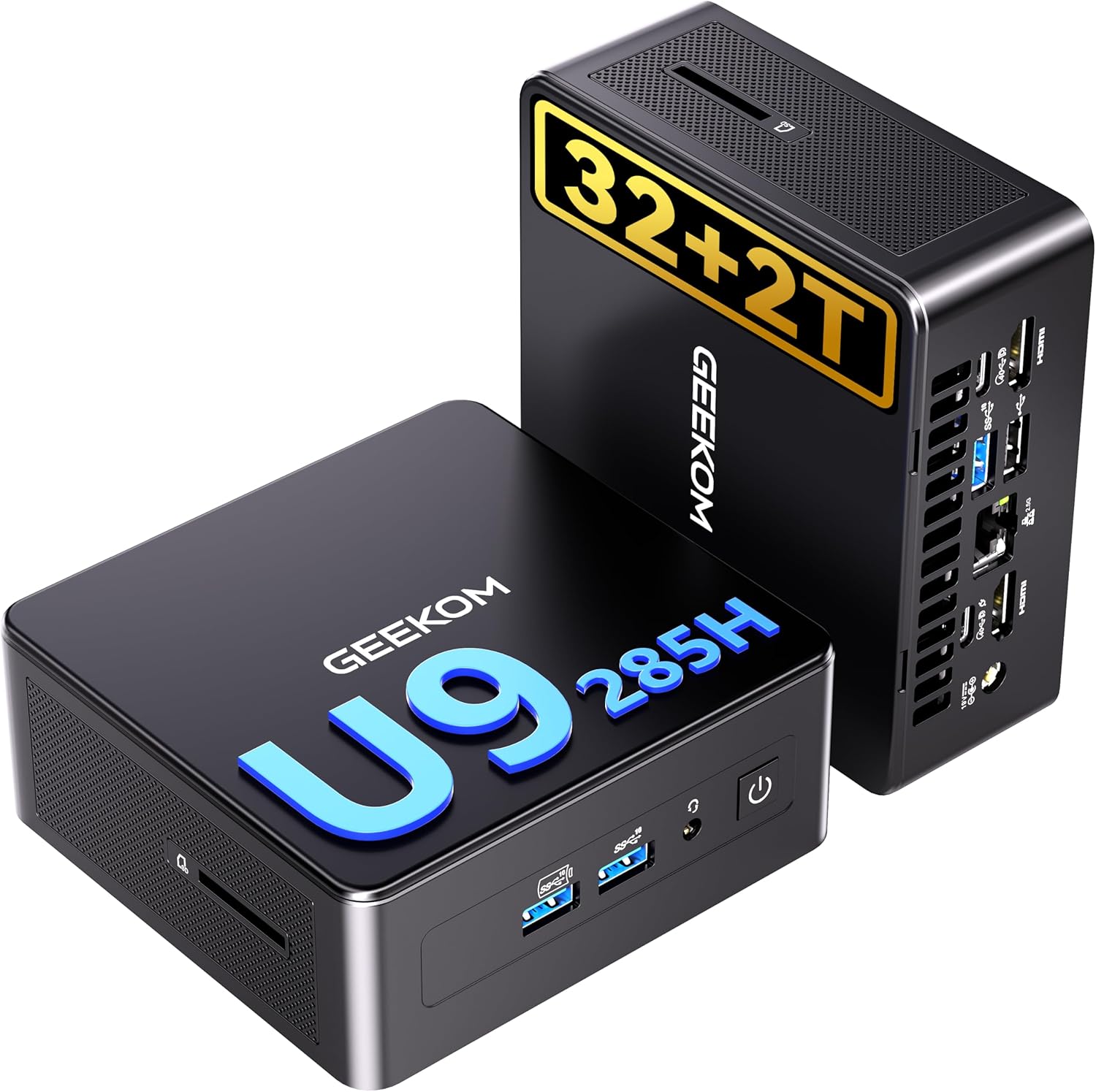
For artificial intelligence tasks and creator-level gaming, nothing beats the GEEKOM IT15, a top-tier Intel micro PC.The UHD graphics that come standard on most Intel mini PCs are so inadequate that they struggle to run games beyond Minecraft. So concludes that with the IT15.To start, there’s the Intel Core Ultra 9 285H, which has 16 cores and can reach speeds of up to 5.4 GHz. The latest mobile architecture from Intel, Arrow Lake, 15th generation silicon.
A total of 99 TOPS and an Intel Arc 140T GPU make up the second part of the AI compute system. Genuine graphics processing capability for 1440p esports and creative applications like Unreal, Blender, and Premiere.Thirdly, it has 4 USB ports, 32GB of DDR5 RAM, 2TB of PCIe Gen4 NVMe SSD, WiFi 7, and is upgradable to 128GB of RAM.Negatives: The Arc 140T is limited to 1440p esports and does not have a dedicated GPU. Under load, the fan makes loud noise. Output: OCuLink port not located.Ideal for: esports players seeking an Intel platform, inventors, and AI tinkerers. Avoid if you’re a AAA gamer looking for maximum graphics settings.
1: TOPGRO T1-MAX (i9-13900HX + RTX 4070)

Since no other model offered features a genuine separate graphics card, the TOPGRO T1-MAX is our top pick for best tiny gaming PC in 2026.Here, every single small PC has integrated graphics, with a maximum resolution of 1080p. The T1-MAX shattering that barrier.The first is the 8GB GDDR6 NVIDIA GeForce RTX 4070. For 4K AAA games and creator tasks, we offer DLSS 3 frame creation with real desktop-grade ray tracing.And secondly, a 5.4 GHz Intel Core i9-13900HX with 24 cores and 32 threads. Together with the 4070, you have unadulterated desktop power.
Thirdly, a 230W power supply, 1TB PCIe 4.0 SSD, and 32GB of DDR5 RAM. No mobile throttling, just full envelope power from a real PC.Drawbacks: When under load, the 230W power draw becomes hot and noisy. No room to switch out graphics cards later; only one dedicated GPU. Mini PCs often have smaller footprints.Ideal for: players with 4K displays, mobile streamers, and content creators focusing on AAA games. Avoid if you’re looking for a silent build or are very careful about watts.
Things to Consider Before Buying a Mini Gaming PC:
Managing heat efficiently is paramount in a compact design. Insufficient cooling may lead to throttling, affecting performance during demanding sessions. Prioritize systems with effective cooling solutions to maintain peak performance.
Component Clearance and GPU Dimensions
Checking component clearance is crucial for fitting all parts comfortably. Limited space can restrict your GPU options, compromising your gaming experience.
Carefully assessing GPU dimensions will ensure compatibility with your chosen case. Measure available space and compare it with GPU specifications to avoid performance limitations and installation issues. This step is often overlooked but can significantly impact your mini gaming PC’s performance and upgradability.
Matching Specs to Gaming Requirements
Assess your gaming preferences against the specifications of potential mini gaming PCs. Focus on graphics capabilities, CPU power, and memory, ensuring they align with the performance needs of your favorite games.
Verifying Port Connectivity and Expansion
Evaluate connectivity options on selected models to ensure compatibility with peripherals and future upgrades. Check for necessary ports such as USB, HDMI, and Ethernet for a comprehensive gaming setup.
Considering the connectivity options is necessary for maximizing your gaming experience. Ensure sufficient USB ports for peripherals, HDMI or DisplayPort for monitors, and Ethernet for stable internet connectivity. Expansion slots can also be significant if you plan to upgrade components in the future, enhancing longevity and performance.
Managing Airflow in Restricted Spaces
Ensuring proper airflow is necessary, especially in compact setups. Positioning your PC in well-ventilated areas allows for optimal cooling, preventing overheating during intense gaming sessions. Use fans strategically to promote airflow and consider dust filters to keep the system clean.
Selecting Low-Profile Internal Components
Choosing low-profile components is key for space efficiency. Components such as GPUs, coolers, and RAM should fit comfortably within your mini gaming PC’s dimensions without sacrificing performance.
Many manufacturers design low-profile alternatives to standard components, maintaining performance while fitting into tighter spaces. Whether opting for a compact GPU or shorter RAM sticks, these choices help ensure your gaming PC remains sleek and functional, preventing issues related to heat and inadequate space.
Conclusion
Summing up, assessing your gaming needs, budget, and space is imperative before purchasing a mini gaming PC. Consider performance specs, upgrade options, and heat dissipation. Check compatibility with peripherals and software. A well-informed choice will ensure optimal gaming experiences tailored to your preferences.
Leave a Reply