
Best Mini ITX Cases help you build a powerful small form factor PC that won’t crowd your desk. If you crave a compact PC that packs serious performance, you’re in the right place. As an expert who’s tested dozens of SFF cases, I’ll show top picks that balance cooling, airflow, and value. These game-changing choices deliver stunning performance and a stress-free setup. Read on to find your perfect fit.
Contents
- Top 7 Mini ITX Cases:
- 7: Jonsbo C6-ITX Mini ITX Handled Mesh PC Case
- 6: HYTE Revolt 3 Small Form Factor ITX Case
- 5: Cooler Master NR200 Mini-ITX PC Case
- 4: Lian Li A4-H2OX5 Mini-ITX Case
- 3: NZXT H2 Flow Mini-ITX Airflow PC Case
- 2: Fractal Design Terra
- 1: Cooler Master NR200P MAX V2 Mini-ITX Case Bundle
- Things to Consider Before Buying a Mini ITX Case:
- Sandwich vs. Traditional Internal Structures
- Console and Ultra-Small Form Factor Designs
- Portability and Desk Space Advantages
- Thermal Constraints and Acoustic Trade-offs
- GPU Length and Slot Clearance
- CPU Cooler Height and RAM Clearance
- Drive Bay Availability and Mounting Solutions
- Determining Airflow and Fan Placement
- Recommended Component Installation Order
- Managing Heat with Custom Cables and Mesh Panels
- Final Words
Top 7 Mini ITX Cases:
7: Jonsbo C6-ITX Mini ITX Handled Mesh PC Case

The finest entry-level compact form factor builder on a tight budget is the Jonsbo C6-ITX.A low-profile cooler and an expensive SFX power supply are necessities for most Mini ITX cases. I don’t think so.One thing to know is that it is compatible with regular ATX power supplies, the kind used in full tower computers.Coming up next: a CPU cooler clearance of 170 mm—even the most affordable case here can accommodate a complete tower air cooler.
The top cover and fan grille may be removed without tools, and there is mesh on all sides.Unfortunately, lengthy cards are not an option because graphics cards have a maximum length of 255mm. Not included: fans. No window pane.Suitability: entry-level systems and low-budget gaming PCs. Avoid using liquid cooling or lengthy graphics cards.
6: HYTE Revolt 3 Small Form Factor ITX Case

If you’re a builder who takes your PC on the go, you need the HYTE Revolt 3, the top Mini ITX case.There is no way to hold the small cases that are sold as portable. That is fixed in the Revolt 3.The first is a vertical chassis that doubles as a carrying handle. Seize it and proceed.The next step is to remove each exterior panel, which will allow you access from every angle as you construct.Lastly, the front panel interface (I/O) features a headphone jack, two Type-A ports, and USB 3.2 Gen 2 Type-C.
Negatives: Hot chips run hot because air cooling is the only option in practice. Limited room for cables. Bigger picks trail in card clearance.Players on local area networks and students commuting between residences will benefit the most. Heavy liquid cooling and the biggest cards are not compatible.
5: Cooler Master NR200 Mini-ITX PC Case
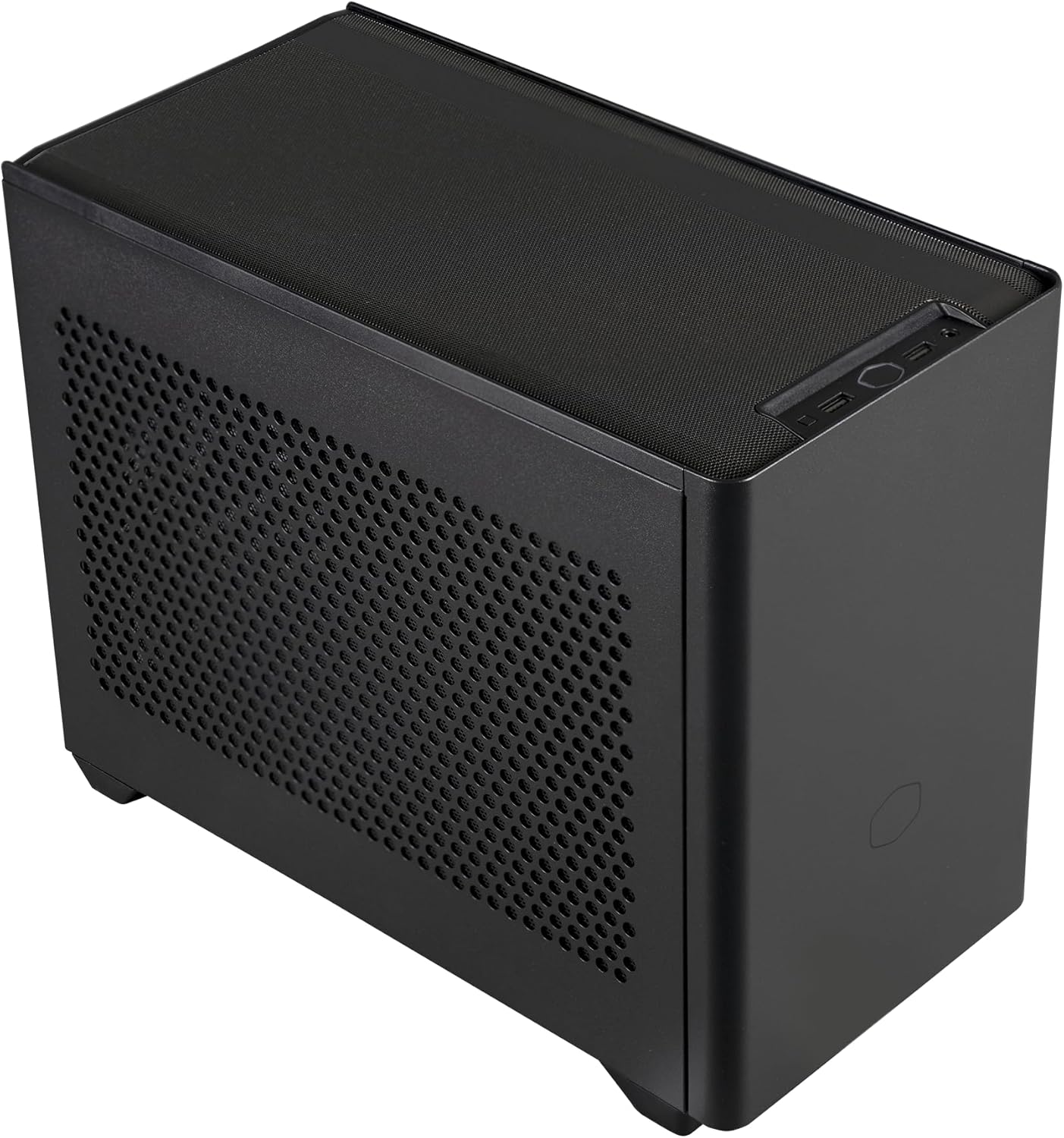
The most tried-and-true Mini ITX case on the market—the Cooler Master NR200.For small builds, the graphics card is often overclocked and left to fend for itself during summer. The NR200 declines the deal.A 330 mm card can be mounted horizontally; an RTX 5080 fits perfectly.The next thing to worry about is the 18.25-liter shell’s clearance for up to six fans and the 165 mm CPU cooler.
Last but not least: a detachable side bracket accommodates 240 or 280 mm radiators, allowing for future conversion to liquid cooling.Detriment: Only compatible with SFX power supplies. The regular model does not come with toughened glass. The space for cable is small.Who it’s best for: novice SFF builders looking for a gentler approach. Avoid utilizing a full-size power supply if you can help it.
4: Lian Li A4-H2OX5 Mini-ITX Case

If you’re looking for a tiny case that nevertheless houses a full-size graphics card, go no further than the Lian Li A4-H2OX5.In a severely shrunken casing, the graphics card is the first component to be removed. The A4 looks down on that.One thing to know is that it has a total capacity of 11 liters and uses a sandwich layout to place a triple-slot card underneath the motherboard.Also included is a PCIe 5.0 riser cable, allowing for full bandwidth operation of the latest cards.
Lastly, an aluminum casing supporting a 240 mm radiator with mesh on all three sides and bottom.Detriment: Only compatible with SFX power supplies. Minimal clearance exists for the air cooler. For an initial effort, the construction is delicate.Ideal for: developers seeking flagship performance in a compact, eye-catching package. Tower coolers and newcomers are not suitable.
3: NZXT H2 Flow Mini-ITX Airflow PC Case

The top Mini ITX case for a liquid-cooled setup is the NZXT H2 Flow.While mesh cases allow air to circulate, they conceal all contents. Cook your pieces in a beautiful glass cabinet. H2 Flow is multipurpose.To start, there’s a hybrid glass-and-mesh side panel that will allow air to circulate while allowing your project to remain visible.Right up next: a 20.7-liter frame supporting a 280 mm radiator, with two 120 mm top fans already mounted.
Lastly, the most user-friendly part of this tiny case is the PCIe 5.0 riser cable and tool-less panels.Mini ITX has a somewhat large capacity, at 20.7 liters. The maximum height for a graphics card is 331 mm. Dust easily shows up on glass.Initial liquid-cooling builds and desktop computers are the best options. Avoid using the longest cards or those with minimal size builds.
2: Fractal Design Terra

If the builder is going for a furniture-style appearance, Fractal Design Terra is the way to go.I usually keep my little cases in a black box under my desk. It is atop the Terra.First, an 8 mm thick aluminum face encased in anodized aluminum surrounds a front panel carved from solid walnut.The next thing is that you can re-proportion the inside to fit your own parts thanks to the 30mm of internal adjustability provided by the stepless sliding central spine.
Last but not least: 10.4 liters, a 20Gbps USB Type-C port on the front, and space for a 322mm graphics card.Downside: it can only be cooled by air and does not support attaching a radiator. A cooler has a maximum height. This volume necessitates patience when routing cables.Ideal for: places where esthetics are paramount, such as living rooms and workstation displays. Avoid: liquid cooling or large first-time builds.
1: Cooler Master NR200P MAX V2 Mini-ITX Case Bundle

For those who would rather have the tough portions handled for them, the Cooler Master NR200P MAX V2 is the greatest Mini ITX case of 2026.Unless this one, every other case is meaningless. Finding a suitable power supply and cooling system is still an ongoing task. This one is delivered complete.To start, your card will have 600W supplied to it by an 850W SFX Gold power supply that comes with short bespoke cables and a 12V-2×6 socket.Second, a 280 mm liquid cooler installed on top; no need to double-buy a radiator or worry about clearance calculations.
Thirdly, the riser cable is included for vertical mounting of cards up to 357.6mm.Finally, the 18.25-liter frame is identical to the NR200’s, allowing for a compact design.The most costly option here is a major drawback. You can’t exchange the included components. No windows.Who this is ideal for: inexperienced builders who value getting the job done properly the first time around. Warning: this is not for the DIY enthusiast.
Things to Consider Before Buying a Mini ITX Case:
Many enthusiasts find the compact nature of Mini ITX cases appealing, yet selecting the right one involves more than just a small footprint. Assessing functionality, compatibility, and layout can drastically impact performance and aesthetics in your build. Choosing wisely can enhance your overall experience and satisfaction.
Sandwich vs. Traditional Internal Structures
Sandwich cases position components in stacked layers, improving airflow efficiency. Traditional structures, on the other hand, typically feature a horizontal arrangement. Each design affects cooling, cable management, and room for upgrades. Ensuring compatibility with your hardware will be vital.
Console and Ultra-Small Form Factor Designs
Console designs present a compact form, mimicking traditional gaming consoles. Ultra-small form factors focus on maximizing portability while accommodating vital components. These cases can house powerful hardware despite their small footprint.
Offering a sleek appearance, console and ultra-small form factor designs often prioritize style alongside functionality. Typical users favor these cases for home entertainment setups or minimalistic workspaces. Despite their size, many support full-sized components, which can enhance performance without sacrificing space. Accessibility to ports and ventilation must also be considered when selecting these layouts.
Portability and Desk Space Advantages
Mini ITX cases excel in portability, making them ideal for users who frequently move their setups. Their compact design also maximizes desk space, allowing for a cleaner and more organized workstation. This feature is particularly appealing for students or professionals with limited workspace.
Thermal Constraints and Acoustic Trade-offs
Cooling solutions in small form factor systems often face limitations, impacting overall performance. While optimized airflow design helps mitigate heat, high-performance hardware may still produce considerable noise.
Thermal management becomes a critical consideration when choosing a mini ITX case. Hot air buildup can affect component longevity and stability, necessitating careful selection of cooling systems. Users may find that choosing more efficient, quieter fans or all-in-one liquid cooling solutions provides better thermal control while minimizing noise production, effectively balancing performance and acoustic comfort. Opting for additional venting options can also enhance airflow, further optimizing heat dissipation.
GPU Length and Slot Clearance
Many Mini ITX cases have limited space for GPUs, requiring careful measurement of card length and slot position. Check your graphics card dimensions against the case specifications, especially when aiming for higher performance models.
CPU Cooler Height and RAM Clearance
Another consideration is the height of the CPU cooler and RAM clearance. Low-profile coolers are often required to fit comfortably within tight spaces, ensuring compatibility with taller RAM modules.
Standard ATX cases generally provide more room for CPU coolers and RAM configurations. In Mini ITX setups, however, selecting a cooler that fits under the case height limit can be tricky. Many enthusiasts opt for low-profile coolers to maximize airflow and maintain clearance for RAM modules, particularly those with taller heatsinks. Researching specific models can reveal effective combinations that prevent thermal throttling in compact builds.
Drive Bay Availability and Mounting Solutions
Assessing drive bay availability is critical when planning for storage options. Some Mini ITX cases offer dedicated bays for both SSDs and HDDs, while others may require creative mounting solutions to maximize space.
Exploring drive bay configurations helps in planning your storage needs effectively. For instance, certain cases may feature removable trays or brackets, allowing you to customize your layout based on your specific storage requirements, such as prioritizing high-speed SSDs over larger-capacity HDDs. Understanding how many drives can be accommodated ensures that you won’t face limitations in your build.
Determining Airflow and Fan Placement
Strategic fan placement is important for maintaining optimal temperatures. Position intake fans at the front and exhaust fans at the rear or top of the case. This configuration results in a steady flow of cool air moving through the system.
Examining your specific components aids in determining the number and type of fans needed. Larger GPUs or power-hungry CPUs may require additional cooling solutions. Assess how air will travel through the case, avoiding obstacles that could hinder airflow, such as cables or obstructive components. Prioritizing a clean and uncluttered interior will significantly enhance thermal performance and prolong the system’s lifespan.
Recommended Component Installation Order
Starting with the motherboard is often recommended, as it allows easier access to install CPU, RAM, and CPU cooler. Following that, install the power supply, which provides ample room for cable management. Other components can be added, such as storage drives and GPU, ensuring everything fits neatly.
Managing Heat with Custom Cables and Mesh Panels
Attention to detail in heat management can enhance the performance of a mini ITX build. Custom cables can promote airflow, reducing heat buildup, while mesh panels permit better ventilation. Choosing components with effective cooling solutions also contributes to maintaining optimal temperatures.
Heat management in a compact case becomes particularly important due to limited airflow. By integrating custom cables that streamline the interior layout, airflow can be significantly improved. Mesh panels enhance this effect by allowing fresh air to circulate freely, substantially lowering the temperatures of critical components during operation.
Final Words
Considering dimensions, cooling options, and compatibility with desired components will guide your selection of a mini ITX case. Prioritize features that meet your specific needs, whether gaming performance or efficient space utilization. A thoughtful assessment can lead to a successful investment in a mini ITX case that enhances your computing experience.
Leave a Reply