
The best mini ITX cases offer an exciting solution for gamers and DIY enthusiasts frustrated with bulky setups. If you crave a sleek, high-performance build but struggle to find a compact, efficient design, you’re not alone. Our guide highlights top-rated small form factor cases and cutting-edge compact PC cases, promising improved airflow and style. Discover how these amazing cases can revolutionize your setup and boost your gaming experience—let’s dive in!
Contents
- Top 5 Mini ITX Cases:
- 1. Thermaltake Tower 100 – Best Mini ITX Case Overall
- 2. Cooler Master NCORE 100 MAX Bronze – Best Mini ITX Case with Included PSU & Liquid Cooler
- 3. Fractal Design Terra – Best Premium Wood-Accent Mini ITX Case
- 4. Fractal Design Ridge – Best Console-Style Mini ITX Case
- 5. Thermaltake Core V1 – Best Budget Mini ITX Case
- Things to Consider Before Buying a Mini ITX Case:
- Assessing Component Dimensions
- Understanding GPU and CPU Clearance
- Evaluating Fan Placement and Design
- Considerations for Liquid Cooling Solutions
- Weight and Structural Integrity
- Surface Finishes and Customization Options
- Slot and Port Availability
- Balancing Size with Future Growth
- Comparing Value Based on Features and Brand Reputation
- Final Words
Top 5 Mini ITX Cases:
1. Thermaltake Tower 100 – Best Mini ITX Case Overall
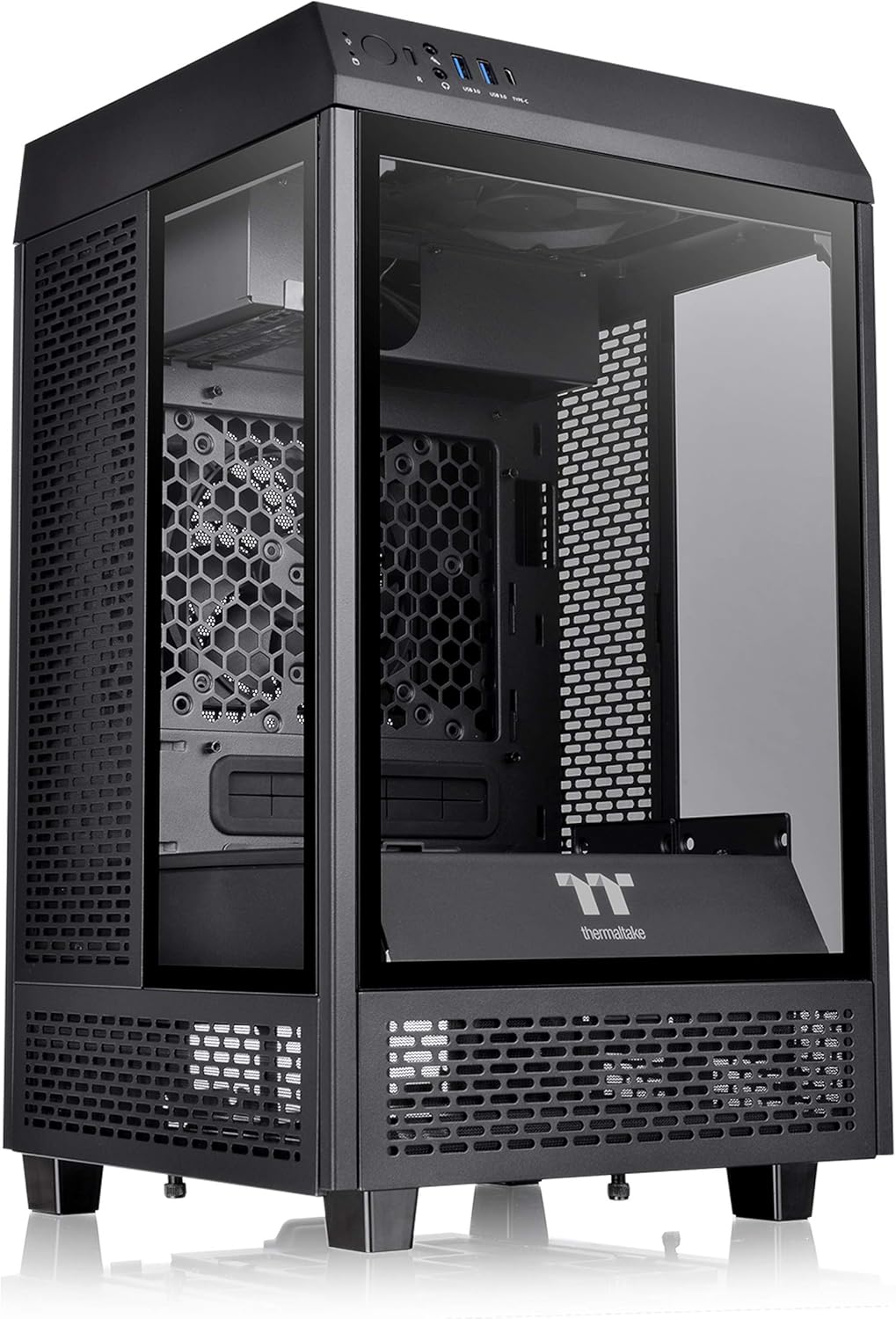
Need the coolest looking mini ITX small form factor perfect for carrying to LAN parties? Meet the Thermaltake Tower 100, your new solution. It is a modern take on the sleek Wave 900, but shows that you don’t have to go large to get great performance.
3 x 4mm Thick Tempered Glass The Tower 100 is built with 3 sides of reinforced tempered glass for unparalleled views and augmented reality Thermaltake style. And with a I/O port with Type C plug and double use of USB 3.0 ports, your devices will not be at a loss for speed.
Storage shouldn’t be a problem for the Tower 100, it can accommodate up to two 3.5′ HDDs or four 2.5′ SSDs. Added brackets make it easy to change them to a different style or help you organize your drive collection. And with eight #CASE-B-09 dust filters that are tailored to the refined design, keeping a clean system is straightforward, as well as the filtering dust away from your components with less restricted airflow.
Its mini-tower design with elegant black finish will add a polished look to your system no matter if you’re swatting bugs in an FPS or beating the competition in your favorite MOBA, or if you’re fighting against the grain of a script at the office or kicking back for some light electrical surfing on the Web. The Tower 100 isn’t just a case, it’s a challenge to your own modding and aesthetic capabilities to make it one of your own both inside and out. Rise up with the Thermaltake Tower 100, the perfectly balanced minimalist compact chassis.
2. Cooler Master NCORE 100 MAX Bronze – Best Mini ITX Case with Included PSU & Liquid Cooler

Ready to get on the fast track to building a great PC? Presenting the Cooler Master Ncore 100 MAX Bronze The Ncore 100 MAX Bronze is a Mini-ITX PC chassis which adds style to your everyday PC. With a volume of 15.7 liters (1.7mm SECC), this keyboard-friendly chassis is extremely compact with capacity for up to 280 mm E-ATX motherboard and even comes with an ATX PSU mount.ISOLATIONWhether you’re customizing it for studies or personalizing it for gaming, you’ll find that every build will fit. ISOLATIONWhether you need a computer part like a motherboard or a component like a laptop, the open market is loaded with the possibility of great upgrades. Pre-routed cabling makes it easy to build the system out, but even when not directly trained, you can do it without pulling any hair from your head.
One of the distinctive characteristics of the NCORE100MAX is its expandable structure that can accommodate bigger GPUS. At a height of 155mm and 172mm no graphics card is too large, and your PC will stay silent, regardless of whether you’re pushing the GPU to the limit.
And this case comes with an 850W SFX Gold ATX 3.0 PSU with custom-length cables for a clean, professional cast. Paired with the highest quality PCIe 4.0 Riser Cable, your build will also stand out.
The NCORE 100 MAX is made out of durable aluminum, alloy steel, and plastic that offers both durability and good looks. At work or at play, this Mini-Tower is a great sidekick. Celebrate your own unique personality and passion, add a clean look to your build.
3. Fractal Design Terra – Best Premium Wood-Accent Mini ITX Case

Looking for a small but stylish case for your next Mini ITX build? The Fractal Design Terra is the top premium pick, balancing practicality with organic good looks. This 10.4 L case is made of metallic material which is strong enough to support your high-end graphics card at 322 mm length. which may prevent you from sacrificing performance just to create an attractive and less obstructed look.
You will love the singular front-facing panel made from FSC certified walnut that brings a touch of outside into your interior. It’s a great option for anyone who looks for sustainability without compromising on style. Anodized aluminum on the outside delivers top-level toughness, and a sleek style, including a stunning 8mm-thick aluminum face, distinguishes the Terra from the pack.
When customizing, the Fractal Design Terra offers 30mm internal adjustment capability, making it easy to personalise your build with a slidable, stepless and adjustable middle wall. You’ll also get a handy front I/O panel with an aluminum power button and not one, but two USB ports. One fast USB Type-C 20Gbps, to be exact.
Take your build to the next level with Terra from Fractal Design. It fulfills your technical requirements, yet ever the aesthete, wears your good taste and high standard on it’s elegant side. Taste the difference in design With this great Mini ITX case.
4. Fractal Design Ridge – Best Console-Style Mini ITX Case

Do you want a good-looking case that doesn’t take over your mobile lifestyle, and that manages to look cool (with all those ventilation holes on the bottom) when you’re gaming at home? Enter the Fractal Design Ridge. Inspired by the clean lines and classic designs of your favorite consoles, this console style case serves as a neat and tidy enclosure for your Pi project.
It might be a little tight, a tailored fit so to speak, but it can fit as many as four 2.5-inch SSDs or hard drives and it supports graphics cards as long as 325mm, which is quite impressive. You will also need to have an SFX or SFX-L power supply as well to take full advantage of its small size.
Worried about overheating while getting super invested in those gaming sessions? You can relax. It also offers a perforated sides and ventilated material front to keep the cooler as cool as its contents. High end CPUs or GPUs may demand further space, though 2 pre-installed Aspect 140 mm PWM Fans are good for most builds.
Supporting Mini-ITX and Mini-DTX motherboards, and with a CPU cooler clearance of 70mm, there isn’t a lot that the Ridge doesn’t have you covered for. It also comes with USB 3.1 Gen 2 Type-C ports to ensure that your connections are quick and hassle free. At a travel-friendly weight of only 9.48 pounds, this case is more than just a sign of the integrity of your build †itâ€s also your carry on ticket to winning decisively on the battlefield. If you’re looking to take your setup to the next level, the Fractal Design Ridge is the high-performance case you’ve been searching for.
5. Thermaltake Core V1 – Best Budget Mini ITX Case

Are you looking for an inexpensive mini ITX case that looks expensive and at the same time functions just as impressively for your gaming PC setup? You would then have the Thermaltake Core V1 which is a small form factor case, but with relatively good airflow. This tiny but mighty case is built to support Mini ITX form factor motherboards and provide just what you need.
Access your media with one push of the MC600P i/o control by enabling m.2 SSD support and two front USB 3.0 ports with USB 3.0 internal connector. Core V1 also supports the mounting of two 3.5” internal hard drives and two 2.5” hard drives thus you can store all your favorite games and media. When the action heats up, the case will help keep your peripherals cool; the mastercase H500P mesh has a light grey tinted tempered glass Side panel and just three RGB fans, making it the perfect choice for the gaming enthusiast who still wants a cool look.
The Core V1 is built with three customizable appealing chambers that allows user to install their system without modification. The changeable side fascia and built in I/O panel can adjust to six different locations, three options on each side of the case. Air or liquid cooling? This case can handle either.
Featuring support for up to four 3.5″ HDDs or four 2.5″ HDDs/SSDs along with a 260mm dual expansion slot, this mini tower screams in value and style. Coated in glossy alloy steel, the Thermaltake Core V1 does only look great, it is also cool for not only your gaming system but also for your computer technology lifestyle.
Things to Consider Before Buying a Mini ITX Case:
There’s a lot to think about when choosing a Mini ITX case for your build, especially since these compact cases come with unique challenges. You’ll need to evaluate factors like cooling solutions, component compatibility, and ease of assembly to ensure your system performs well. Your decision will also impact future upgrades and cable management, so understanding what fits your specific needs can save you time and frustration. This guide will help you navigate the key aspects so you can pick the perfect Mini ITX case for your setup.
Assessing Component Dimensions
Each component in your build comes with specific size constraints—GPUs can range from 170mm to over 320mm in length, while CPU coolers vary significantly in height. You’ll want to consult detailed specs or manufacturer datasheets to verify clearance inside the Mini ITX chassis you’re eyeing. For example, the Cooler Master NR200 supports CPU coolers up to 155mm tall and GPUs up to 330mm, which accommodates many high-end components without cramping.
Understanding GPU and CPU Clearance
GPU and CPU cooler clearances are pivotal in small cases, where limited space can restrict your selection. Mini ITX cases often cap GPU length around 300-330mm and cooler height between 60-165mm. Your choice here affects not just compatibility but also thermal performance, since tighter fits can throttle airflow and thus your system’s overall stability.
Delving deeper, many Mini ITX cases adopt unconventional internal layouts to maximize clearance. For instance, some models reposition the power supply or employ vertical GPU mounts to squeeze longer graphics cards inside. Additionally, choosing low-profile or all-in-one liquid coolers can help you navigate CPU cooler height restrictions. Matching your components to the case’s exact internal limitations, including clearance for cables and airflow routes, ensures you won’t encounter frustrating last-minute incompatibilities or cooling bottlenecks.
Evaluating Fan Placement and Design
Fan placement can spell the difference between a hot-running system and one that stays consistently cool. Seek cases that offer at least two fan mounting positions—commonly front and rear, sometimes top or bottom—which facilitates a clear airflow path. Larger fans, like 140mm models, tend to move more air at lower RPMs, reducing noise, while multiple smaller fans can be more flexible in tight layouts. Check for fan filter accessibility, too, so you can maintain clean airflow channels, enhancing cooling efficiency over time.
Considerations for Liquid Cooling Solutions
While Mini ITX cases are compact, many support at least a 120mm or 240mm radiator for liquid cooling, providing superior heat management for high-performance CPUs or GPUs. Confirm radiator mounting locations and clearance, especially around the motherboard and PSU, to avoid compatibility hiccups. Some cases limit your choice to single-fan radiators, while others allow slim dual-fan units; knowing these dimensions helps you tailor your cooling solution. Efficient integration of liquid cooling can dramatically lower CPU temperatures and reduce system noise compared to air cooling alone.
Exploring liquid cooling further, you might find cases with dedicated pump and reservoir mounting points or built-in channels to tidy tubing runs, which helps optimize space and maintains airflow integrity. Thin radiator designs, often under 30mm thickness, are usually best for Mini ITX to prevent clearance issues with tall RAM or VRM heatsinks. Additionally, consider how easy it is to install and service the cooling system — some cases offer removable panels or modular interiors that simplify adjustments and upgrades, making ongoing maintenance smoother and less intrusive to your compact build.
Weight and Structural Integrity
Aluminum tends to keep your Mini ITX case lightweight, making transportation and desk placement easier if you frequently move your setup. However, steel cases excel at rigidity, minimizing flex when installing heavy GPUs or large cooling systems. Some manufacturers use reinforced steel frames to combine weight and strength, resulting in a reliable chassis that can handle demanding builds without warping or bending over time.
Surface Finishes and Customization Options
Surface finishes like anodized aluminum, powder coating, or brushed metal textures do more than enhance aesthetic appeal—they can improve scratch resistance and grip. Customization options, such as detachable panels, RGB accent areas, or modular components, let you tailor your case’s appearance and functionality to fit your personal taste and hardware needs precisely.
Diving deeper, powder coating often provides a durable matte finish that hides fingerprints and minor scuffs better than glossy surfaces, ideal if you frequently adjust your build. Meanwhile, brushed aluminum offers a premium feel with subtle sheen variations, popular in high-end cases like the Lian Li PC-O11 Dynamic Mini. Many brands now include interchangeable front panels or magnetic dust filters, allowing you to update your case’s look or improve airflow without replacing the entire chassis. Custom paint jobs or vinyl wraps are also viable if you want a truly unique aesthetic, combining performance with personal expression.
Slot and Port Availability
Check how many PCIe slots and front I/O ports your Mini ITX case provides. While most support a single full-length GPU slot, a few include additional half-height slots that can be handy for sound cards, network adapters, or capture cards. Front panel USB options vary too—having USB 3.0 or USB-C ports readily accessible can be a significant convenience boost, especially if your motherboard’s headers align with these front connectors for enhanced functionality.
Balancing Size with Future Growth
Smaller Mini ITX cases appeal due to their compact form but often limit expansion capabilities. Some models strike a balance by offering modular drive cages or removable panels, giving you flexibility to upgrade storage or cooling without needing a full case swap. Identifying a case that supports taller CPU coolers or longer GPUs while maintaining a small footprint helps extend the lifespan of your build.
Further exploring size versus growth reveals that you should weigh the size benefits against potential restrictions. Cases like the NZXT H1 provide a compact design yet include support for a full-length GPU and a liquid cooling radiator, while ultra-compact cases may force you to compromise on the power supply form factor or cooling options. Investing in a slightly larger but thoughtfully designed Mini ITX case allows the integration of higher-end components over time, such as aftermarket GPU coolers or additional SSDs, keeping your rig competitive for years.
Comparing Value Based on Features and Brand Reputation
Evaluating whether a case offers good value means weighing its features alongside the brand’s track record. Established brands often justify higher prices through superior engineering, robust warranties, and community support. Features like tool-less drive bays, multiple radiator mounts, or sound dampening significantly enhance usability and performance. Sometimes, paying a bit more upfront saves you from compatibility headaches or premature replacement, yielding a better overall investment.
Final Words
Ultimately, when selecting a Mini ITX case, you need to evaluate your specific needs, including component compatibility, cooling options, and available expansion slots. Consider the balance between size and airflow to ensure your system runs efficiently. Pay attention to build quality and ease of assembly to avoid unnecessary frustrations. By carefully assessing these factors, you can find a case that not only fits your hardware but also supports your desired performance and aesthetic preferences, making your compact build both functional and enjoyable.
Leave a Reply