
Searching for the best Ring Doorbell alternative can feel like a chore, especially if you hate paying monthly subscription fees. You deserve the ultimate peace of mind without worrying about your privacy or hidden costs. We’ve tested the top smart home security brands to find a video doorbell that finally puts you in control of your data. Here are the most reliable choices to keep your front porch safe and secure today.
Contents
- Top 7 Ring Doorbell Alternative:
- 7: Wyze Wired Doorbell Camera v2
- 6: Tapo TP-Link D230S1 Smart Video Doorbell
- 5: Aqara Video Doorbell G4
- 4: Tapo TP-Link D225 Smart Video Doorbell
- 3: Reolink 2K Battery Video Doorbell
- 2: Eufy Security Video Doorbell E340
- 1: Lorex 2K Wired Smart Video Doorbell
- Things to Consider Before Buying a Ring Doorbell Alternative:
- Wired vs. Battery-Powered Models
- Local Storage vs. Cloud-Based Systems
- Integration with Google Assistant and Apple HomeKit
- Connectivity with Third-Party Automation Hubs
- Auditing Existing Doorbell Wiring and Wi-Fi Strength
- Determining Budget for Upfront Costs and Monthly Plans
- Strategic Placement for Maximum Coverage
- Configuring Motion Zones to Reduce False Alerts
- Final Words
Top 7 Ring Doorbell Alternative:
7: Wyze Wired Doorbell Camera v2

A more streamlined and reasonably priced option to Ring is the Wyze Wired Doorbell v2.If you want to view a video of your own porch, you’ll have to pay Ring every month. On the first day, the v2 deletes that charge.Say goodbye to your old wired doorbell and hello to free, permanent local storage of all your footage.To start, it has a microSD card port, so you can record locally. There is no subscription or cloud account.
Following that, 2K resolution with color night vision—much crisper than Ring’s 1080p—and real colors even when it’s dark outside.Last but not least: package tracking with two-way audio—chat with delivery people and receive notifications when a box is near.Only works with preexisting doorbell wiring; there is no battery backup. The software is simple. Downside: HomeKit is absent.The most cost-effective way to leave Ring is for renters who already have wire set up. Do not use in unwired dwellings.
6: Tapo TP-Link D230S1 Smart Video Doorbell

If you’re looking for a battery-operated Ring replacement with free AI, go no further than the Tapo D230S1.As part of its Protect plan, Ring secures notifications for people, packages, and vehicles. All of it is yours at no cost with the D230S1.Requires no wiring; powered by batteries.First, color night vision and 2K 5MP resolution allow you to see license plates and faces clearly in any light.Following that, we have free AI detection—alerts for people, packages, and vehicles—with no further cost. Specific features for which Ring charges a monthly fee.
Last but not least, choose between microSD or cloud storage; you can even enable backup if you like. In any case, a subscription is not necessary.The downside is that you will need to recharge it every few months because the battery life is not as long as dedicated battery devices. The app has an antiquated user interface. Wi-Fi not available 6. Ideal for tenants unable to install wiring. Avoid: residences with heavy foot traffic as they quickly deplete batteries.
5: Aqara Video Doorbell G4

When looking for a subscription-free alternative to Apple HomeKit Ring, go no further than the Aqara Video Doorbell G4.The doorbell experience is not great for iPhone users, and Ring barely supports Apple Home.It was always intended for HomeKit to be used with the G4.
To start, you can integrate HomeKit Secure Video, which encrypts recordings locally or uploads them to iCloud. High-quality privacy features pre-installed.As a next step, we have local AI face recognition, which allows the doorbell to identify known guests within the app. Cloud upload is unnecessary.
Finally, you have the option to use it wirelessly or connect it to your current wiring; it operates on six AA batteries. Decision is yours to make.Downside: Only supports 1080p, while newer options provide 2K. Although it can be adjusted to different tones, the chime remains quite loud. New Aqara users may find the app to be a bit complicated.Ideal for: People living in entrenched Apple ecosystems who own iPhones. Those whose homes solely use Android or who require 2K resolution should not get this.
4: Tapo TP-Link D225 Smart Video Doorbell

The Tapo D225 is, without a doubt, the most cost-effective option among these Ring alternatives.You desire high-quality features at an affordable price. Ring is a trade-off inducer. No, the D225 isn’t.First, a 2K+ resolution with HDR allows you to see your visitor’s plates and faces clearly at any time of day or night, even when the sun is directly behind them.Secondly, a full-body view (180 degrees) that records both the ground and any people coming or going from the door in a single shot. No need for a secondary camera.
Finally, it has dual-power flexibility, so you can either hardwire it for always-on monitoring or use the battery when the wires are out of reach.Compared to devices with dedicated batteries, wireless models have a lower battery life. Despite being easy to skip, the app’s persistent attempts to upsell Tapo Care cloud are bothersome. Not yet certified by Matter.Anyone looking for Ring-level functionality without the Ring-level prices should consider this the best option. Not for: Smart home builders who only work with Matter.
3: Reolink 2K Battery Video Doorbell

An alternative to Ring that prioritizes user privacy and keeps all recorded footage private is the Reolink 2K Battery Video Doorbell.In order to index your video footage against their AI, the majority of cloud-based doorbells keep it on a third party’s server. You can save all of your clips on the microSD card that comes with the Reolink.You may store months of footage on your microSD card (up to 512 GB) without ever having to upload it or worry about it being indexed.After that, 5GHz Wi-Fi compatibility—more range than 2.4GHz-only doorbells, less dropped clips, quicker live view—will be available.
Waterproof to an IP65 standard, suitable for use in any climate.Downside: unlike the Wyze Duo or Eufy, it only has one camera and doesn’t offer a downward package view. Weird, out-of-date companion app. Unfortunately, Apple does not support HomeKit.Those who value their privacy and do not want cloud-only doorbells might consider this option. Avoid if you are looking for a downward package camera.
2: Eufy Security Video Doorbell E340

When looking for a dual-camera Ring alternative, go no further than the Eufy Security Video Doorbell E340.A doorbell with only one lens will only show you faces, not the package that’s five feet below. What’s Ring’s plan? Market you an additional gadget.You get two cameras in one doorbell with the E340.The first is a pair of cameras that can see the entire person, including their feet, as well as the porch floor, where the packages really drop.After that, there will be 2K Full HD with color night vision up to 16 feet, so you can see faces, parcels, and plates well even when it’s completely dark outside.
As a last point, it has 8 GB of internal eMMC storage and is compatible with HomeBase, so you may expand it endlessly. All of it may be accessed without a membership.The gadget is big compared to small doorbells, but the battery can be replaced. Ads for HomeBase are promoted by the Eufy app. Not a problem just yet.Ideal for: households with a high volume of packages or victims of late deliveries. Avoid: minimalist installations.
1: Lorex 2K Wired Smart Video Doorbell
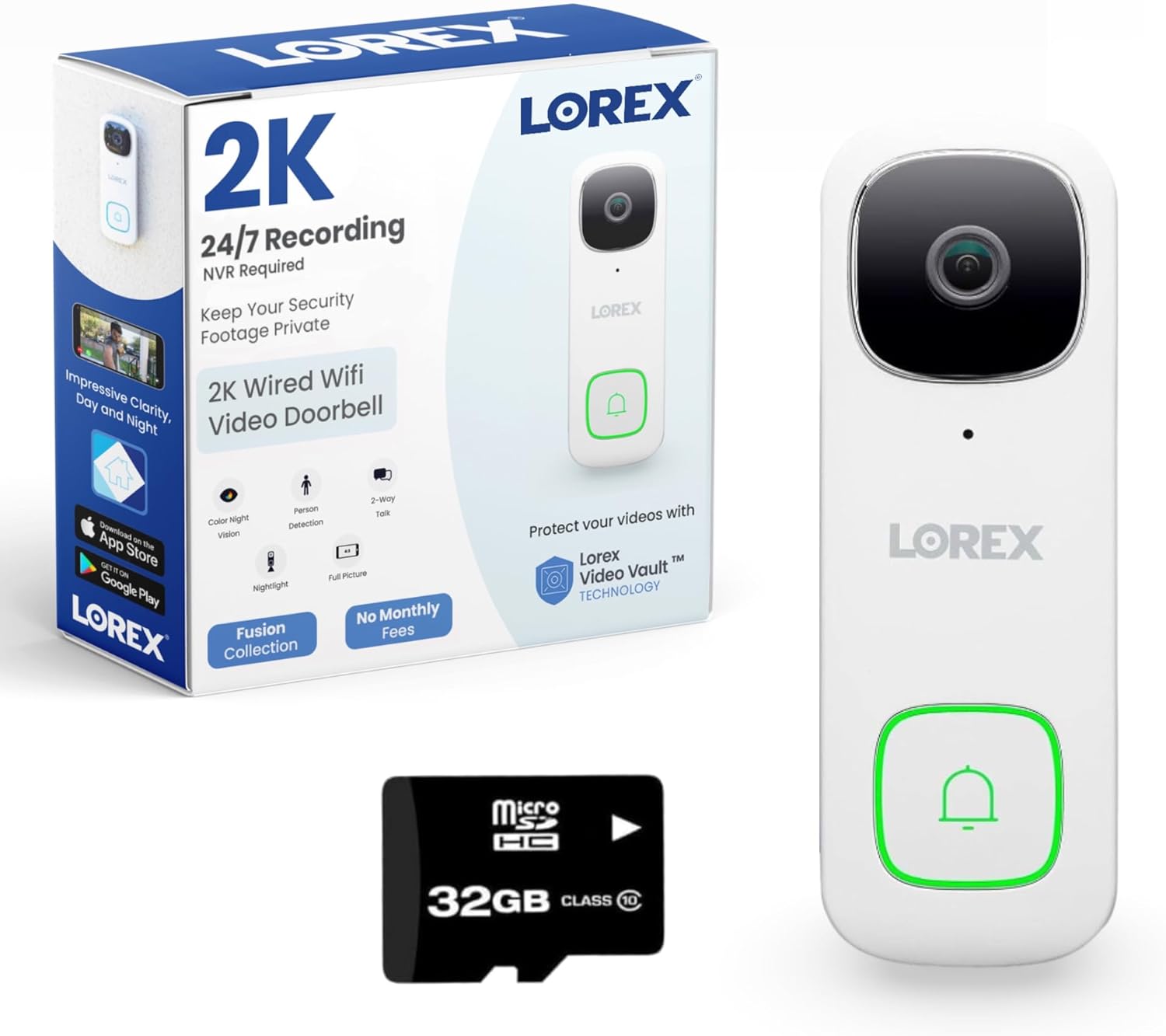
In 2026, the Lorex 2K Wired Smart Video Doorbell—the most comprehensive option that doesn’t require a subscription—is the greatest alternative to Ring.There isn’t a single doorbell on this list that doesn’t require an SD card. Our products come with Lorex pre-installed.The 32GB microSD card comes with everything you need to start recording right away; there’s no need to worry about third-party cloud storage or additional purchases.Second: smart security lighting — built-in white LEDs trigger color night vision automatically when motion is detected.
Color video shot crisply about 2 in the morning Third: 2K QHD with 164° field of view — sharper than Ring’s 1080p models and wider, so nothing on your porch goes unseen.Cons: wired only — needs existing 16-24V doorbell wiring. App is less polished than Google or Apple.Currently low stock — order before they’re gone.Best for: homeowners with doorbell wiring who want the no-compromise replacement. Not for: renters without wiring.
Things to Consider Before Buying a Ring Doorbell Alternative:
Doorbell cameras enhance home security and convenience. As you explore alternatives to Ring, evaluate features, installation ease, and compatibility with existing smart home systems. Understanding these factors will help you make an informed decision that suits your specific needs.
Wired vs. Battery-Powered Models
Wired models provide a steady power source, ensuring no interruptions, while battery-powered models offer flexibility in installation. Your choice will depend on your home’s setup and preferred convenience.
Local Storage vs. Cloud-Based Systems
Local storage solutions save footage on a physical device, while cloud-based systems store video data online. Choose based on your storage preferences and data accessibility needs.
Local storage tends to offer a one-time purchase option, which can be cost-effective over time. However, cloud-based systems often come with subscription services that provide ease of use, remote access, and automatic updates. Evaluating your storage capacity, budget, and convenience can greatly influence your decision.
Integration with Google Assistant and Apple HomeKit
Check if the device can connect with Google Assistant or Apple HomeKit. This integration allows for voice control and streamlined management of your smart home, enhancing convenience and accessibility.
Connectivity with Third-Party Automation Hubs
Explore whether the doorbell alternative works with third-party automation hubs. These hubs often connect multiple devices and can simplify your smart home experience by allowing coordinated actions.
Choosing a doorbell that connects with third-party automation hubs can significantly expand its functionality. Hubs like SmartThings or Hubitat can unify various smart devices, enabling you to set automated routines or triggers that enhance security and convenience. This compatibility often extends your control over connected devices, providing a more integrated environment.
Auditing Existing Doorbell Wiring and Wi-Fi Strength
Assessing the current doorbell wiring and Wi-Fi signal is vital. Check if your home has compatible wiring for the alternative and ensure that your Wi-Fi signal is strong enough to support video streaming and notifications without interruption.
Determining Budget for Upfront Costs and Monthly Plans
Setting a budget is necessary to understand your financial commitment. Consider both the initial purchase price and any potential subscription fees for cloud storage or additional features.
Calculating your budget involves evaluating the upfront costs of the device and weighing the options for monthly service plans. Examine features that may require additional fees, such as video storage or advanced alert systems, to ensure you choose a plan that fits your long-term needs without unnecessary expenditure.
Strategic Placement for Maximum Coverage
Selecting the right location for your device significantly impacts its effectiveness. Aim for a spot that captures the most activity, ideally about four to five feet off the ground for optimal viewing and detection.
Configuring Motion Zones to Reduce False Alerts
Adjust motion settings to eliminate unnecessary notifications from irrelevant activity. Customize the detection zones to focus on key areas, minimizing alerts from passing cars or pedestrians.
Fine-tuning these settings allows you to prioritize areas of interest, such as your front porch and driveway, while reducing disturbances from background movements. You should frequently review and adjust the zones to adapt to changes in your environment, ensuring that the alerts remain relevant and manageable.
Final Words
To wrap up, consider factors like compatibility, features, subscription costs, and user reviews before choosing a Ring Doorbell alternative. Assessing these elements ensures you select a device that meets your security needs and fits your lifestyle, providing you with peace of mind and efficient monitoring.
Leave a Reply