
Finding the best smart lock for front door security doesn’t have to be a confusing struggle. Stop fumbling with heavy keys or worrying if you locked the house before leaving. A modern keyless entry system provides ultimate peace of mind and true freedom for your family. We compared the top-rated models to help you strengthen your home security with confidence. Let’s explore the best options to upgrade your entryway today.
Contents
- Top 7 Smart Lock For Front Door:
- 7: eufy Security Smart Lock C220
- 6: Yale Assure Lock 2 Deadbolt
- 5: ULTRALOQ U-Bolt Pro WiFi
- 4: ULTRALOQ Bolt Fingerprint Wi-Fi
- 3: eufy Video Smart Lock E330
- 2: Schlage Encode Plus
- 1: Aqara Smart Lock U400
- Things to Consider Before Buying a Smart Lock For Front Door:
- Door Compatibility and Hardware Requirements
- Connectivity Protocols: Wi-Fi, Bluetooth, and Z-Wave
- Full Deadbolt Replacements vs. Retrofit Models
- Biometric, Keypad, and Proximity Entry Methods
- Physical Mounting and Component Alignment
- App Configuration and User Permission Management
- Managing Battery Life and Emergency Power Solutions
- Ensuring Network Security and Regular Firmware Updates
- To wrap up
Top 7 Smart Lock For Front Door:
7: eufy Security Smart Lock C220

One of the greatest options for first-time purchasers and renters on a tight budget is the eufy Security Smart Lock C220.The fingerprint reader that recognized you a month ago stops working, and most inexpensive smart locks require an additional hub. Thanks to the C220, both issues are resolved.To start, there is built-in Wi-Fi that doesn’t need a bridge. Access your lock from any location without spending a dime.The next step is an artificial intelligence fingerprint that improves its accuracy with repeated use. It unlocks more quickly the longer you possess it.
At last: No proprietary battery, no cord for charging.Negatives: The keypad is plastic, there is no support for Apple Home or Matter, and the IP53 rating is only good for doors that are quite exposed.Ideal for: homebuyers, students, and tenants. Avoid using in homes with Apple HomeKit or with completely open doors.
6: Yale Assure Lock 2 Deadbolt

For a name-brand deadbolt that looks expensive but doesn’t break the bank, go no further than the Yale Assure Lock 2.Plastic keypad locks appear just as their name suggests. Hardware that doesn’t scream “cheap” is what homeowners who care about their door’s appearance want.First, a digital touchscreen keypad with illumination and wake-on-tap functionality. Nothing to wear out on the smooth glass.Next, have the Yale Access app pop the lock before you even reach the door for auto-unlocking.
Lastly, we have bespoke visitor codes that may be scheduled by the hour, day, or used once for services like cleaning or dog walking.Cons: Built-in Bluetooth, however if you prefer Wi-Fi, you’ll need to purchase an additional module. Not a fingerprint scanner.The ideal users are parents giving their children a code and design-conscious homes. The target audience does not include those looking for an integrated Wi-Fi and fingerprint sensor.
5: ULTRALOQ U-Bolt Pro WiFi
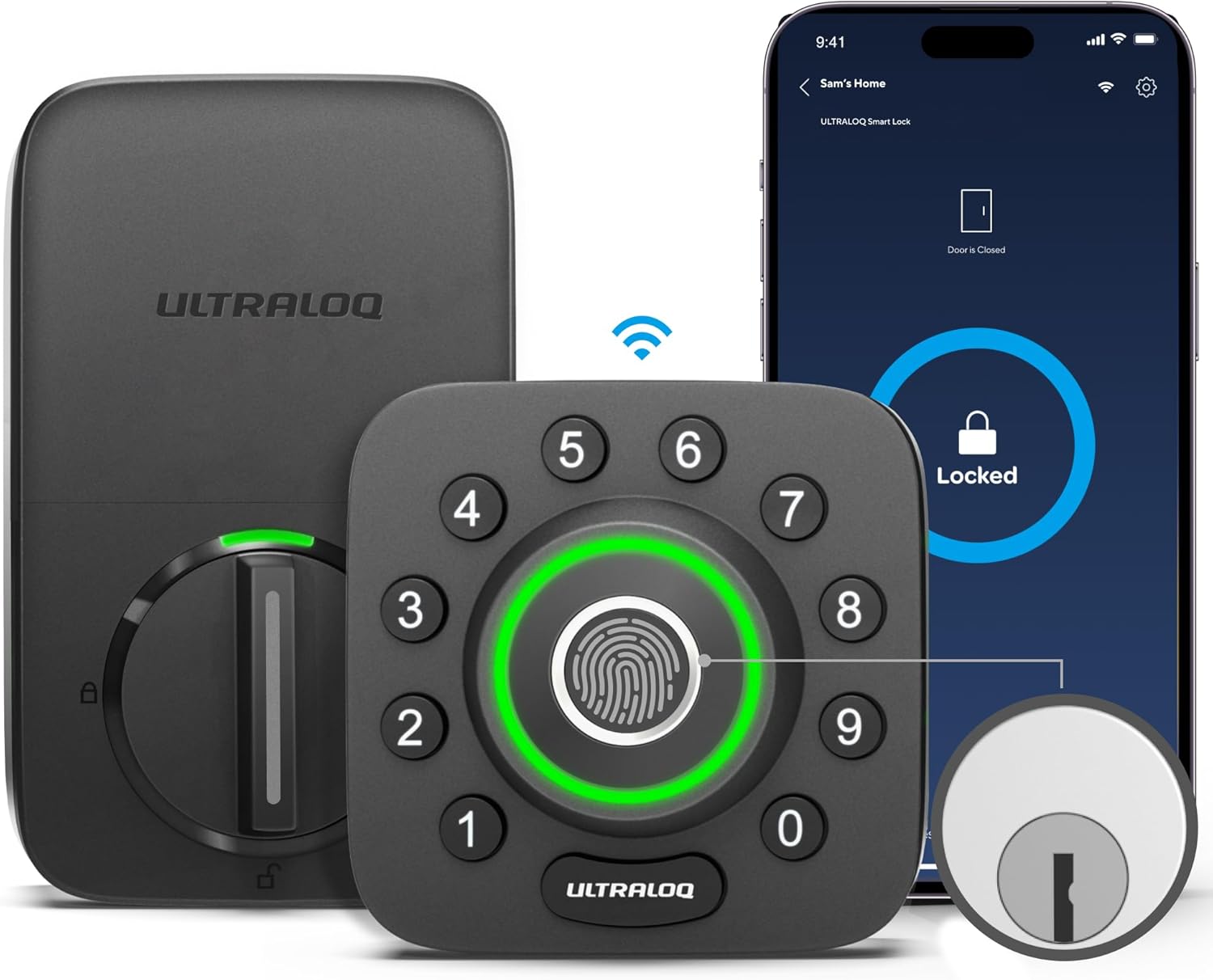
The ULTRALOQ U-Bolt Pro WiFi is an excellent choice for those on a budget who are looking for a deadbolt with all the necessary unlock methods.Choose between a fingerprint or keypad, an app or Wi-Fi, and weatherproof or cheap when shopping for a smart lock. U-Bolt Pro just won’t make a decision.To begin, there is an 8-in-1 entry system that combines a physical key with a fingerprint scanner, keypad, app, auto-unlock, and magic shake. No matter what you grab onto, it will work.The following section will go over the features of the product, including its waterproofing, which is ANSI Grade 1 + IP65, the highest certification for a home and capable of withstanding both daylight and precipitation.
Last but not least: integrated Wi-Fi and a door sensor—the lock can detect when the door is truly closed before locking itself. There will be no more “locked bolt” or “open door” type surprises.Negatives: Not compatible with Apple HomeKit, feels gimmicky, and is bulkier than a regular deadbolt.Ideal for: open-air porches and families with children of varying ages. Not recommended for: purely minimalist homes or households that rely solely on Apple products.
4: ULTRALOQ Bolt Fingerprint Wi-Fi

When looking for a fingerprint scanner that doesn’t break the bank, the ULTRALOQ Bolt Fingerprint is the way to go for Apple families.Cheap smart locks don’t take Apple HomeKit into consideration. Opt for a costly flagship model or make do with a lock that isn’t Siri-compatible if you’re an iPhone user.Just say “hey Siri, lock the front door” from anywhere in the house—that’s the first feature. It’s compatible with Apple Home and Siri. Not a bridge, not any optional gear.The following features are identical to those of the U-Bolt Pro, except now they are native to Apple: fingerprint, passcode, app, and auto-unlock.
Lastly, a deadbolt that is BHMA-certified and can be installed by a DIYer in only ten minutes—all you need is a single screwdriver to replace your old one.Downsides: it’s not as weatherproof as the U-Bolt Pro, it still uses 8 AA batteries instead of rechargeable ones, and there’s no door sensor.Users who have upgraded from a basic keypad to an iPhone will find this the best option. Those looking for a rechargeable battery or an integrated door sensor should look elsewhere.
3: eufy Video Smart Lock E330

The eufy Video Smart Lock E330 — the best 3-in-1 pick for homeowners worried about porch pirates and missed deliveries.With three distinct devices—a doorbell, a camera, and a lock—you’ll need three different subscriptions, batteries, and applications. This trio is consolidated into a single unit by the E330.First: a built-in 2K camera with two-way talk — see who’s at the door and reply from anywhere.Along with the doorbell and camera, there’s a lock.Next: fingerprint plus keypad plus app plus auto-lock — full smart-lock entry, not a stripped-down version.
Lastly, there is 8 GB of internal storage—the clips remain on the device. No monthly cloud subscription, ever.Cons: bigger and heavier than a regular deadbolt, the battery needs charging every few months, and no Apple Home support.Best for: porch-pirate-worried homeowners, anyone tired of camera subscriptions. Not suitable for: homes with solely Apple products or doorbell cameras.
2: Schlage Encode Plus

The Schlage Encode Plus — the best premium pick for iPhone households who want Schlage’s hardware with built-in Apple home keys.Premium smart locks skip the feature iPhone owners actually want — silent tap-to-unlock with Apple Home Key. The Encode Plus solves it.First: Apple HomeKit and Apple home keys — hold your iPhone or Apple Watch to the lock and you’re in. No app, no fingerprint, no code.
Next: built-in Wi-Fi with Snap ‘n Stay screwdriver install — no hub, no hardwiring. Replace your old deadbolt in about ten minutes.Finally: a customizable door-movement alarm — chirps and notifications fire if someone forces the lock from outside.Cons: heavy and bulky on thin doors, only 100 access codes, and the body looks utilitarian compared to flagship rivals.Best for: iPhone homeowners who want a name brand. Not for: Android-only households or tight budgets.
1: Aqara Smart Lock U400

The number one best smart lock for your front door in 2026 is the Aqara Smart Lock U400 — the most advanced option here, built for people done touching their door.Every other lock asks something of you — tap, type, or pull out a phone. The U400 doesn’t.First: UWB hands-free unlock. Ultra-Wideband in your iPhone broadcasts your exact distance — door unlocks as you arrive. No app, no tap, no fingerprint.Second: Apple Home Key plus Matter over Thread — works with Apple Home, Alexa, Google Home, SmartThings, and Home Assistant. Most ecosystem-flexible lock here.
Third: a rechargeable lithium battery that lasts months on a charge. Plug it in once, no AA drain.Cons: most expensive here. Full UWB needs an Apple Thread-enabled HomePod or Apple TV. App has a learning curve.Best for: Apple Home power users, multi-ecosystem households, anyone done touching the door. Not for: Android-only homes.
Things to Consider Before Buying a Smart Lock For Front Door:
This guide will help you understand key factors to evaluate before purchasing a smart lock for your front door. Assess security features, compatibility with your existing systems, installation process, and your lifestyle needs to make an informed decision.
Door Compatibility and Hardware Requirements
Assessing door compatibility is key when selecting a smart lock. Different locks fit various door types and sizes, so check the lock’s specifications against your front door’s measurements and existing hardware. Ensure your door can accommodate the installation without modifications.
Connectivity Protocols: Wi-Fi, Bluetooth, and Z-Wave
Connectivity protocols impact how you interact with your smart lock. Wi-Fi allows remote access via the internet, Bluetooth provides proximity-based unlocking, while Z-Wave offers a low-power alternative for smart home networks. Each comes with distinct advantages and limitations.
Wi-Fi smart locks enable features like remote monitoring and control from anywhere, which is ideal for those who travel frequently. Bluetooth provides a straightforward, battery-efficient method for unlocking but requires you to be close by. Z-Wave locks integrate smoothly with compatible smart home systems, ensuring reduced energy consumption. Understanding these options helps you decide which connectivity method aligns best with your lifestyle and needs.
Full Deadbolt Replacements vs. Retrofit Models
Opting for a full deadbolt replacement enhances security through upgraded design and features, while retrofit models allow you to utilize existing hardware for an easier, less invasive installation.
Biometric, Keypad, and Proximity Entry Methods
Various entry methods offer tailored convenience and security. Biometric locks recognize fingerprints, keypad locks rely on numerical codes, and proximity systems unlock doors as you approach with your smartphone. Biometric systems utilize advanced technology for quick, secure access. Keypad options allow customizable access codes, perfect for family or guests, but must be managed carefully. Proximity sensors enhance ease of use as you can simply approach the door; however, ensure your smartphone is always charged and nearby for reliable operation.
Physical Mounting and Component Alignment
Aligning the smart lock components with precision is vital for effective operation. Ensure the deadbolt engages smoothly with the strike plate to avoid jamming or misalignment. Follow manufacturer guidelines closely for mounting to guarantee a secure fit.
App Configuration and User Permission Management
Configuring the app is the next significant step after installation. Connect the smart lock to your home Wi-Fi and create user profiles for additional members. Adjust permissions to control who can access the lock and when, enhancing your security.
Managing user permissions allows you to tailor access to specific individuals, helping maintain security levels suitable for your household. Different users can be granted temporary or permanent access, making it ideal for guests or service workers. Regularly monitor and adjust these permissions through the app to ensure safety and convenience.
Managing Battery Life and Emergency Power Solutions
Battery management is necessary. Regularly check battery levels and replace them as needed to ensure your smart lock functions without interruptions. Some models offer backup charging options, such as a key or a power bank, for emergencies.
Ensuring Network Security and Regular Firmware Updates
Security measures play a significant role. Change default passwords and enable two-factor authentication on your smart lock. Regular firmware updates help patch vulnerabilities, keeping your device secure from potential threats.
Update your firmware as soon as notices are available to protect against emerging cybersecurity threats. Stay informed about updates from the manufacturer and monitor your network’s security settings. Always ensure the lock connects to a secure home network rather than a public one, enhancing your protection against unauthorized access.
To wrap up
With this in mind, consider your needs, the lock’s compatibility with your home, security features, and ease of use before purchasing a smart lock. Evaluating these factors ensures you choose a reliable solution that enhances your security without compromising convenience.
Leave a Reply