
Struggling to stay active while working? Finding the best under desk treadmills can transform your workday from sluggish to vibrant. Stop letting a sedentary lifestyle crush your health and drain your focus. A sleek walking pad lets you burn calories while managing emails, giving you the freedom to stay fit without sacrificing productivity. We’ve tested the top models to help you find your perfect match. Here are the best options for your office.
Contents
- Top 5 Under Desk Treadmills:
- 1. UREVO CyberPad Smart Walking Pad
- 2. EGOFIT Walker Pro M1
- 3. WALKINGPAD P1 Foldable Walking Pad
- 4. GOYOUTH 2-in-1 Under Desk Treadmill
- 5. AKLUER Walking Pad
- Things to Consider Before Buying a Under Desk Treadmill:
- Manual vs. Electric
- Compact vs. Standard
- Size and Design
- Weight Capacity
- Benefits for Health and Productivity
- Potential Drawbacks
- Brand Research
- User Reviews
- Assembly Instructions
- Safety Considerations
- Troubleshooting Common Issues
- Final Words
Top 5 Under Desk Treadmills:
1. UREVO CyberPad Smart Walking Pad
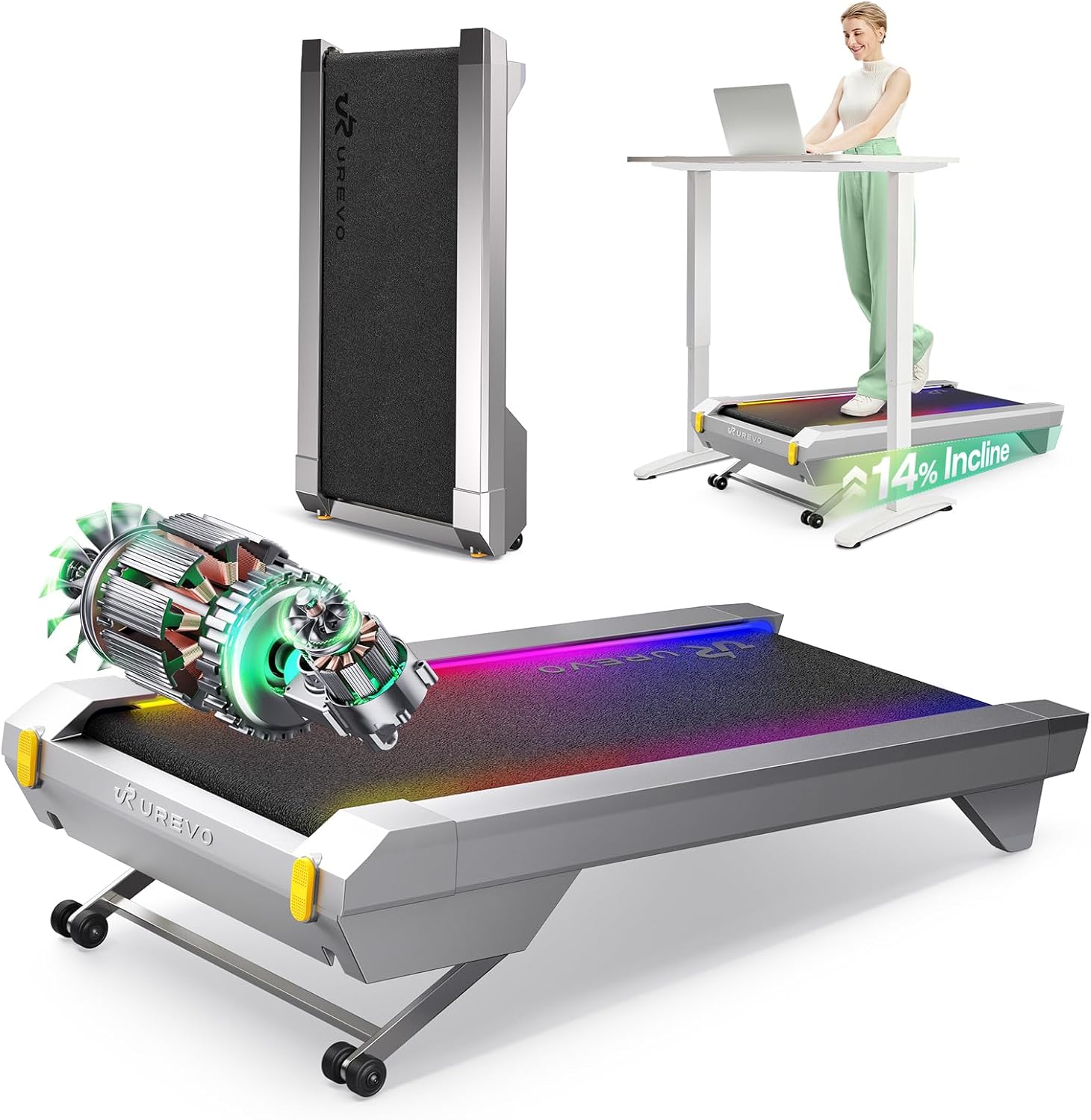
If you’re looking for an under-desk treadmill that can withstand regular use and will last for years to come, the UREVO CyberPad Smart Walking Pad is an excellent choice. You can expect more consistent performance with significantly less maintenance required thanks to its sealed brushless motor, which is designed to minimize wear caused by friction. Are you sick of walking pads that stutter after a few months? This one claims to last 6,000 hours or more, so it’s a good choice.
You will find the auto-incline option particularly useful when your schedule is cramped. By allowing you to inclines of up to 14%, even brief exercises can be transformed into effective calorie burners—all without the need to step up your pace—compared to flat walking. That way, you can more easily include productive movement into brief interludes between calls or jobs.
Plus, there are intelligent tools that help you maintain consistency. Without having to manually log your mileage, time, speed, or calories, you can easily review your progress with the UREVO app. With features like route-style experiences, goal-setting, and rankings, it provides additional motivation—which is great if you find that seeing streaks and milestones helps you remain on track.
Keeping the noise level below 35 dB, which is close to the sound level of typing, allows you to wander around while working without disturbing coworkers or meetings, which is especially important in shared settings. The CyberPad provides a more premium, work-friendly experience for those who desire a walking pad that can seamlessly integrate into their working while still achieving their goals.
2. EGOFIT Walker Pro M1

The EGOFIT Walker Pro M1 is designed to be space-efficient without compromising daily consistency, making it an ideal under-desk treadmill for compact apartments or home offices. So that you don’t see exercise as a chore and instead walk often, its small footprint makes it easy to put under a standing desk and keep close.
During work hours, you can move steadily and with minimal impact by using this walking pad. A top speed of 3.1 mph allows you to add significant steps to your day while maintaining a comfortable pace for typing, emails, and calls. Consistent daily exercise, as opposed to infrequent high-intensity workouts, can be easier to keep if supporting weight management and energy levels is your primary aim.
Another major advantage is how long it lasts. With a sturdy steel frame that can hold up to 220 lbs, this set is perfect for those hard days at the office or at home. That is important to consider if you intend to incorporate it into your regular regimen, rather than viewing it as a temporary fitness experiment.
With its 5% inclination design, you may enhance the intensity of your workout without having to increase the speed, allowing you to get more done in the same period of time. That allows you to walk comfortably and efficiently while burning more calories and challenging your legs.
3. WALKINGPAD P1 Foldable Walking Pad

The WALKINGPAD P1 comes with a fold-in-half design that makes it easier to live with in a tiny space if you’re looking for an under-desk treadmill. To make storage easier, it folds in half, reducing its footprint by half. This means you can put it under a bed, sofa, or desk without having to lift a finger. Which is important if you intend to fold and unfold it frequently because the folding mechanism is designed for frequent use.
A sturdy, hygienic construction is also yours. This unisex walking shoe has a luxury, long-lasting feel thanks to its unibody design and lightweight aluminum frame, making it ideal for daily use. The understated appearance of the P1 is ideal if you prefer that it not stand out like a sore thumb in your living room.
If you like more space when walking or if you tend to drift a bit, the wider 16.5-inch walking belt will provide you with the comfort and confidence you need by providing more width from side to side. When you’re switching between activities, you’ll appreciate how easy it is to get on and off thanks to the low-profile deck.
The speed control is versatile enough to accommodate various routines. No matter if you’re working at a leisurely pace or working out vigorously while watching TV, the speed may be adjusted between half a mile and three and a half miles per hour. If you’re aiming to establish a regular routine, that range will let you tailor your walk to your available energy and time.
4. GOYOUTH 2-in-1 Under Desk Treadmill

With its versatile design, the GOYOUTH 2-in-1 walking pad is the perfect under-desk treadmill for both home workouts and brief office breaks. It won’t take much setup to keep you moving. The 2.25 HP motor provides consistent power without making too much noise, and the multi-layer construction of the sturdy steel frame helps to dampen vibration, making your walks more comfortable and less annoying, which is particularly helpful in crowded apartments.
A large 15.75″ x 41.34″ non-slip running belt is yours to keep you steady and comfortable as you run. If you intend to use it frequently, you should know that the integrated shock reduction mechanism helps to minimize impact on your knees and joints. In addition to being more dependable for regular usage, its 300 lb maximum weight capability speaks for itself.
It is easy to keep track of your sessions. You can keep constant and observe progress without extra apps thanks to the LED display that shows time, calories, steps, speed, and distance in real time. The ability to link your phone through Bluetooth and listen to music while you walk makes for a more enjoyable workout.
Using the provided remote, controlling the speed is a breeze. Set a constant speed between 0.5 and 6 km/h, add intensity with preset “P” programs that have varied speeds to support fat-burning intervals, or choose from a variety of steady-state options. The remote is built to withstand everyday usage, has a long battery life, and is comfortable to hold.
5. AKLUER Walking Pad

The AKLUER Walking Pad is a great choice for those who want a treadmill that fits under a desk and still gives the impression of a true workout, even when you have a busy schedule. If you want to burn more calories and have a better feel for walking uphill, you may use the adjustable inclination mode to make even a leisurely stroll feel more strenuous. Another option is to keep it flat so you can work with minimal effect.
You may use it during meetings, calls, or late-night walks without disturbing anyone else thanks to the enhanced 2.5HP motor’s smooth and consistent performance and low noise rating (under 45 dB). You can go at a leisurely pace or a quick gallop depending on your mood and time constraints; the speed range is 0.6 to 4.0 MPH. You can use it every day with peace of mind because to its 330 lb weight capability.
With the multifunction LED display, you can keep track of time, distance, calories, and speed in real time, which will keep you motivated. The 15.75″ x 35.43″ belt provides a roomy stride space, and the 6-layer anti-slip running technology keeps you steady, so comfort is also important.
You can lessen the strain on your muscles, joints, and knees as well as the noise and vibration caused by the ride thanks to a shock reduction system that includes two cushioning pads and ten silicone absorbers. It weighs only 33.5 lbs, so it’s not too heavy to transport or store after use.
Things to Consider Before Buying a Under Desk Treadmill:
Over your buying process, you should evaluate motor power, belt length and width, speed range, noise levels, and stability to ensure comfortable, sustainable use; check weight capacity, desk compatibility and adjustability, portability and storage, safety features like automatic shutoff, warranty and support, and real-user reviews so you select a reliable model that fits your workspace, fitness goals, and budget.
Manual vs. Electric
You’ll find manual under‑desk treadmills are simpler, often topping out near 3 mph and costing several hundred dollars less, while electric models give precise speed control (0.5-4 mph) and motors around 1.0-2.0 CHP for consistent walking. Manual units are lighter and nearly maintenance‑free, but electric units handle sustained daily use better and commonly include consoles or Bluetooth tracking that help you log steps and time.
Compact vs. Standard
If your workspace is tight, compact models with 40-48″ decks and 16-20″ belts let you fit a treadmill under a sit‑stand desk and weigh 40-80 lb; standard models usually offer 50-55″ decks, wider belts, and support heavier loads for more stable longer strides. Choose based on how much stride length you need and how often you’ll store the unit.
For more depth, if you’re 6′ or taller you should target at least a 48-55″ deck to avoid stepping off; belts under 18″ feel restrictive for wider gaits, and standard models often provide 300-350 lb weight capacity versus 200-250 lb on many compact units, so match belt length, width, and capacity to your height and walking style.
Recognizing how speed range, belt size, motor type, and footprint interact will help you pick the type that fits your height, desk setup, and daily use.
Size and Design
You’ll want a deck at least 44 inches long if you’re over 5’9″, while most compact under-desk units run 36-43 inches for short strides. Check desk clearance-many standing desks are 28-30 in high-so a treadmill height under 6 in and footprint around 50 x 24 in works best. Foldable designs shrink to 22-30 in width and usually weigh 40-90 lb, affecting portability and storage.
Weight Capacity
Choose a treadmill with a capacity at least 20-30% above your body weight; common consumer ratings are 220, 250, 300, 350, and 400 lb. Higher capacity typically indicates a stronger frame and motor longevity, and models rated 350-400 lb often pair with reinforced steel frames and longer warranties. You should verify both static and dynamic load ratings if you plan to use brisk paces.
For example, if you weigh 180 lb, target a 250-300 lb rating; users over 260 lb should look at 350-400 lb machines that usually feature 2.5+ CHP motors and thicker belts (1.8-3.0 mm). Expect heavier-capacity units to weigh more (70-100+ lb) and cost 20-40% more, so balance durability, budget, and how often you’ll move the treadmill.
Benefits for Health and Productivity
You’ll reduce sedentary time and boost daily energy by adding 20-60 minutes of walking, which can raise step counts by thousands and contribute toward the 150 minutes/week activity guideline; employees who use under-desk walking often report clearer thinking during afternoon slumps and steady task focus during light cognitive work.
Potential Drawbacks
You may face distractions and ergonomic trade-offs: typing accuracy often drops at first, desk setup requires careful height and monitor adjustments, and ambient noise (40-60 dB) can interfere with meetings; plus, many units cost and have weight limits you must confirm.
Adaptation typically takes days to a few weeks-start at 0.6-1.0 mph for single-task work and reserve 1.5-2.5 mph for light multitasking; check motor duty cycles and warranty details, budget for periodic belt or motor service , and always use the emergency stop and a stable desk to minimize trip and posture risks.
Brand Research
Check company history, warranty terms, and service footprint-brands offering 2-3 year motor/parts coverage and accessible support (24-48 hour response) reduce downtime. Compare stated specs against independent tests; for example, models under $300 often use less robust motors and have shorter warranties. Scan for firmware updates or safety notices and verify return policies so you can test the unit at home without long-term commitment.
User Reviews
Use aggregate ratings as a starting point-favor models with average ratings ≥4.0 across 100+ reviews and watch for recurring complaints like belt drift, motor hum, or inaccurate speed. Pay special attention to reviews that include user weight and session length, since many failures occur after 3-6 months under heavier loads. Prioritize verified purchases and recent feedback when comparing similar models.
When digging deeper, filter reviews by “verified purchase” and sort by most recent and lowest-rated to spot persistent issues. Seek out long-term reports (6-12 months) and video demos showing noise and belt stability; YouTube and Reddit threads often reveal how a model performs after extended use. Also tally comments about customer service response time and replacement turnaround-brands that report replacing units within 30 days tend to have fewer unresolved complaints.
Assembly Instructions
Follow the manufacturer diagram step-by-step, finger-tightening all bolts first, then torque to specs with the supplied wrench; expect 20-40 minutes, and get a second person for lifting parts over 18 kg (40 lb). Align electrical connectors fully and secure cable ties, test the console before final tightening, and keep packaging for returns for at least 30 days.
Safety Considerations
Verify your model’s weight capacity (commonly 250-350 lb) and ensure desk clearance of at least 3 inches (7.5 cm) under the desk surface; attach the emergency stop/key and test it at low speed, use a non-slip mat, and wear proper walking shoes when you first use the treadmill.
Also plan cable management and anchoring: route the power cord away from walkways, use a surge protector, and secure the desk so it won’t shift when you step on. Inspect the belt and rollers monthly for fraying or noise, follow the manual’s belt-tracking and lubrication procedures, and keep children and pets out of the setup area while the unit is powered.
Troubleshooting Common Issues
If the belt slips, squeaks, or speed fluctuates, power down and inspect for debris, then check belt tension and alignment and apply lubricant if dry. When the motor overheats or shuts off after ~10 minutes, verify ventilation and that your weight load doesn’t exceed the rated limit (often 220-300 lb). Record any error codes shown on the console.
For no-power faults, test the outlet and reset the circuit breaker, then inspect the machine’s fuse; for intermittent speed issues, recalibrate per the manual and tighten the rear adjustment bolts in quarter-turn increments until the belt centers; if overheating persists, run shorter sessions and clean fan housings. Keep photos, model and serial numbers ready when contacting support for parts or warranty service.
Final Words
Presently you should weigh motor strength, belt length, and speed range to match your stride and pace, confirm desk height and stability for ergonomic posture, check noise levels and weight capacity for your space, evaluate portability and storage options, and compare warranty and safety features against your budget; choosing an under-desk treadmill that aligns with your workflow and fitness goals ensures consistent, comfortable use.
Leave a Reply