
Looking for the Best Webcams to upgrade your video calls? If blurry images and poor lighting have been holding you back, our guide offers the ultimate solution. Discover high-quality HD and USB options that deliver stunning clarity and boost your confidence during remote meetings. We’ve researched and tested these top picks for reliability and performance so you can impress every audience. Ready to transform your digital communication? Let’s dive into your next upgrade.
Contents
- Top 5 Webcams:
- 1. Logitech MX Brio – Best Webcam Overall
- 2. Razer Kiyo Pro Ultra – Best Webcam for Content Creators
- 3. OBSBOT Tiny 2 – Best Webcam for Low-Light
- 4. Logitech C920x HD Pro – Best Proven Workhorse Webcam
- 5. NexiGo N60 – Best Budget Webcam
- Things to Consider Before Buying a Webcam:
- Resolution and Frame Rate: Finding Your Sweet Spot
- Sensor Types: CMOS vs. CCD and Their Impact on Quality
- Integrated Microphones: Sound Quality vs. Noise Cancellation
- External Audio Solutions: When to Consider a Separate Microphone
- USB Versus Wireless: Which Option Fits Your Needs?
- Ensuring Compatibility with Your Operating System and Software
- Form Factor: Desktop vs. Laptop Webcams
- Features that Enhance User Experience: Mounting Options and Adjustability
- Assessing Price Ranges: What You Get for Your Investment
- To wrap up
Top 5 Webcams:
1. Logitech MX Brio – Best Webcam Overall

The Logitech MX Brio is known as one of the best webcams out there that can take your video calls and streaming to premium levels. Do you want to stand out online? The MX Brio allows for you to connect in beautiful Ultra HD 4K or 1080p Full HD at 60fps, so the person to whom you are speaking will always see you in perfect clarity.
Thanks to the 70% larger pixels on its sensor, the quality of your image is better in any condition, particularly low light. Your face will be well-lit regardless of the time of the day (or night) thanks to AI-powered features such as auto-exposure and noise reduction, which let you show your face in dark environments.
Does how you look on camera worry you? Thoughtfully, the MX Brio does feature fine controls for lighting and white balance: you have the freedom to curate your image in real time. You’ll be able to control settings like ISO, shutter speed, tint, vibrance, and have the ability of an Auto mode for a hassle free time.
Communication is also prominent, and the built-in dual beamforming microphones work to reduce background noise. This ensures your words are heard clearly and not to be missed making your conversations smooth and frustration free.
It can also tilt down to share notes or sketches on the table for an improved collaboration during calls with the Show Mode feature. Present yourself confidently with the Logitech MX Brio, This HD webcam is a device that you can trust to provide top quality video conversation in your personal and professional life.
2. Razer Kiyo Pro Ultra – Best Webcam for Content Creators

Are you content creator who need more quality video? It records and streams in high-quality 4K at 30fps or 1080p at 60fps – your audience will definitely appreciate. Equipped with 1/1.2 inch Sony STARVIS 2 Sensor, this webcam records more light and achieves more details in each pixel of your content.
Achieve perfect clarity with the custom tuned F/1.7 Aperture lens that enables more light to reach the sensor. Regardless if you are in a brightly lit room or a dimly lit space, you can stream and record up to 1080P and always be seen in clarity and detail. You’ll look sharp and well-lit, because the video imaging technology powered by AI tracks your face and adjusts the light levels automatically so you’re perfectly exposed!
The Kiyo Pro Ultra also offers a nice portrait mode that stylishly blurs the background while keeping you perfectly in focus without any software nudging required. This for capture follows your content’s mile-a-minute pace, bringing true-to-life colors, richer textures and unprecedented visual quality to your audience, so they get more of what you want to share.
What’s more, this webcam’s state-of-the-art 4K processor ensures uncompressed 4K 30 FPS video streaming together with customization settings to adjust to your preference. A built-in memory saves your configuration, so you’re ready to shoot wherever and whenever creativity hits. Elevate your content creation like never before using the Razer Kiyo Pro Ultra!
3. OBSBOT Tiny 2 – Best Webcam for Low-Light

Had it with poor quality video on your online meetings and streaming viewing? The OUSBOT Tiny 2 webcam is an ideal choice to take your video calling experience to next level in a low-light environment. With an impressive video capture resolution of 4K and a large 1/1.5 inch CMOS sensor, this webcam greatly improves image quality and light sensitivity making you look your best at all times, no matter the lighting conditions.
The OBSBOT Tiny 2 is more than a standard webcam thanks to its intelligent AI tracking features. There are four different tracking modes such as the Upper Body Mode, Close-Up Mode, Hand Tracking, and Zone-Tracking for advanced movement capture. Rest assured that the webcam will keep you perfectly in focus with its true 5 MP high-definition optical sensor.
And the Tiny 2 comes with new voice and gesture control so you can use your webcam without lifting a finger. Just command TINY as simply as saying “Hi, TINY” or “Track Me” to let it operate your camera, without even reaching for your device! Responsive Gesture Control Technology The advanced gesture control technology helps make you more responsive.
With its full home of features, including up to 4K videoing recording, PixGain HDR, multiple AI-tracking and all-pixel auto-focusing, the OBSBOT Tiny 2 is your ideal choice for remote work, video conference, live broadcasting and anything that needs impressive video. Enter the next generation of webcams and change the way you communicate with the world.
4. Logitech C920x HD Pro – Best Proven Workhorse Webcam

Are you looking for a dependable webcam with great picture quality for your online sessions, video calls or stream? The Logitech C920x HD Pro is universally respected as the best option available for anyone in the market for a reliable webcam. This webcam is the most superior and creative eye, and it opens up a new world for your video chat recording, lets you capture full 1080P HD video at 30fps and vivid and the clear stereo audio, your best choice for video calling, blog conference and social gaming.
Enhance the image quality of your video calls and recordings with automatic HD lighting adjustment and autofocus from the Logitech C270 webcam even in low light. No matter how bright or dark it is in the room, you get a sharp image with high resolution so you can be seen in the best light.
Powered by advanced capture software and a superior Logitech webcam, its easy to create and share content; its ideal for desktop or as a monitor webcam. And then there’s the stereo audio with dual microphones, a feature designed in a way that it records sound naturally, meaning clear sound during calls and recordings—an important tool for effective conversation.
Full HD 1080p video that’s faster, smoother and works on more computers. The Logitech C920x HD Pro USB webcam is loaded with features that everyone will enjoy, including compatibility with your favorite applications like the Nintendo Switch 2 Console, so you can be as flexible as you want to be, whether gaming or at work. The right choice for your video needs with this reliable, high-quality webcam that doesn’t just keep you connected, it keeps you looking great.
5. NexiGo N60 – Best Budget Webcam
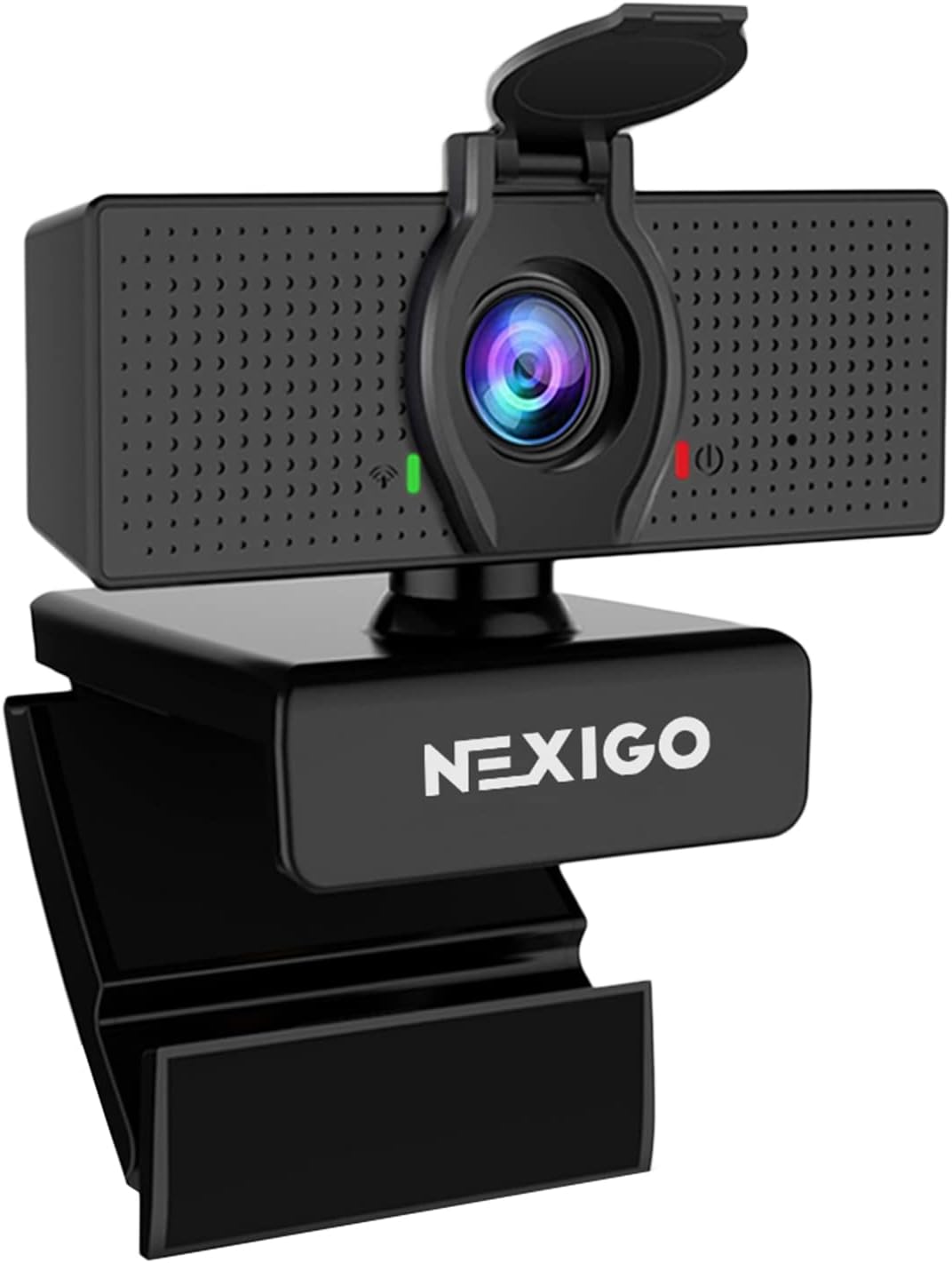
Here’s your best all-around option if you want to keep the cost down but not the quality: the NexiGo N60. Built with full HD 1080P resolution to work perfectly with a 2.2 megapixel CMOS sensor to yield crystal clear video quality at 1920 x 1080 and 30 frames per second. It means your online meetings, streaming sessions and virtual get-togethers will appear sharp and professional.
This raises the question of whether you are flexible? The N60 supports an angle of view adjustable by 110 degrees with a fixed focal length lens so it can easily capture all attendees during presentations or group calls. With the NexiGo software, the field of view and exposure can also be adjusted to adapt to your workspace, so you don’t have to worry about suitable positioning. Installation is fast and easy — just plug the USB cord into your computer, and you’re ready to go.
With the MP3, WAV, and AAC files supported, the camera allows you to enjoy a high-quality audio during your video calls. And with the internal flash memory, you never have to worry about extra storage space.
Being the perfect tool to communicate without trade-offs, the NexiGo N60 is the way to make digital interactions become truly effortless and enjoyable, and it’s a meeting and personal life ally you can rely upon for an always professional and empowering virtual presence. Enjoy the ease and convenience as this webcam brings to your everyday setup.
Things to Consider Before Buying a Webcam:
Most people assume all webcams are the same, but your choice can significantly impact your video quality and overall experience. When choosing a webcam, you need to evaluate factors such as resolution, frame rate, compatibility with your devices, and built-in features like microphones or autofocus. Understanding your specific needs—whether it’s for professional meetings, streaming, or casual chats—will help you make an informed decision and avoid unnecessary expenses. In this guide, you’ll find crucial insights to ensure your new webcam meets your expectations and enhances your online interactions.
Resolution and Frame Rate: Finding Your Sweet Spot
Your webcam’s resolution determines image sharpness, with common choices ranging from 720p HD to 4K Ultra HD. While 1080p at 30fps provides smooth, clear video suitable for most users, professionals might opt for higher frame rates like 60fps for motion-intensive tasks. Higher resolutions offer detailed visuals but demand more bandwidth and processing power. This balance influences how polished your video output looks on different platforms and how well it performs under various lighting conditions.
Sensor Types: CMOS vs. CCD and Their Impact on Quality
Most webcams use CMOS sensors due to their cost-efficiency and low power consumption, delivering good image quality suitable for everyday use. CCD sensors, while rarer and pricier, excel in low-light environments and offer higher color accuracy, often preferred in professional contexts. This difference can significantly affect your video clarity, especially if you often record in dim settings or require true-to-life colors.
Integrated Microphones: Sound Quality vs. Noise Cancellation
Integrated webcams usually feature built-in microphones engineered to capture your voice with moderate clarity, but their noise-cancellation effectiveness varies widely between models. Some webcams employ dual-mic arrays and digital signal processing that suppress ambient noise like keyboard clicks or fan hum, while others deliver tinny or flat audio quality. Testing different brands reveals that investing in one with advanced noise reduction enhances your virtual presence without requiring extra equipment, especially in busy or echo-prone rooms.
External Audio Solutions: When to Consider a Separate Microphone
Using a dedicated external microphone becomes advantageous if your webcam’s mic fails to deliver crisp, consistent audio or struggles in noisy settings. Professionals relying on podcasts, webinars, or streaming often choose USB or XLR microphones with superior sensitivity and customizable sound profiles. These devices allow you to control gain, adjust pickup patterns, and minimize latency, resulting in cleaner, richer sound reproduction that built-in mics typically cannot match.
External audio solutions can dramatically improve sound quality by isolating your voice from surroundings and offering more flexibility in placement; clip-on lavalier mics, shotgun mics, or desktop condensers serve different needs and budgets. While this requires additional investment and setup time, prioritizing clear audio can elevate your virtual communication to meet professional standards or optimize content creation workflows.
USB Versus Wireless: Which Option Fits Your Needs?
USB webcams offer plug-and-play simplicity with reliable, consistent connection speeds and power, ideal for stationary setups like desks. Conversely, wireless webcams provide greater flexibility in placement, letting you move around freely within range, but may face latency or interference in crowded Wi-Fi environments. Your choice depends on whether stability or mobility holds higher priority; for instance, streamers often favor USB for low-latency video, whereas remote presentations benefit from the convenience of wireless models.
Ensuring Compatibility with Your Operating System and Software
Webcams supporting universal standards such as UVC ensure broad compatibility across Windows, macOS, and Linux without extra drivers. Prioritize models explicitly tested with your preferred video conferencing or streaming software; for example, Logitech’s C920 is widely certified for platforms like Zoom and Microsoft Teams. Sometimes, advanced features like facial tracking or background removal require proprietary drivers or apps, which might be OS-specific, limiting your choice if you switch systems frequently.
Delving deeper, you should verify if your operating system offers native support or needs third-party driver installation. Some advanced imaging features hinge on manufacturer-supplied software that may not have timely updates for the latest OS versions, potentially causing glitches. Investigate user forums and reviews to identify potential compatibility pitfalls specific to your system configuration, such as macOS Ventura users reporting issues with certain webcams. Confirming that the webcam’s software ecosystem is actively maintained can save you from post-purchase hassles and optimize the quality and functionality delivered during your video sessions.
Form Factor: Desktop vs. Laptop Webcams
Deciding between a desktop and a laptop webcam depends on your setup and needs. Desktop webcams usually offer superior resolution and sensor quality, ideal for gaming or content creation, while laptop webcams prioritize integration and portability. If your laptop’s built-in camera falls short, an external desktop webcam can drastically improve video quality without sacrificing convenience. Look for slim designs that don’t obstruct your screen when perched atop monitors, and weigh the trade-offs between image enhancement and device portability to suit your usage patterns effectively.
Features that Enhance User Experience: Mounting Options and Adjustability
Mount versatility and angle adjustability determine how easily you achieve optimal framing in calls or recordings. Webcams offering flexible clip mounts or tripod compatibility allow you to position the camera at eye level, reducing unflattering angles and neck strain. Tilt, swivel, and rotation controls enable you to fine-tune the shot without moving your entire setup. After all, comfort and precision in positioning lead to a more professional appearance and less fatigue during extended use.
Diving deeper, webcams equipped with 360-degree swivel and multi-axis tilting mechanisms enable seamless adjustments whether you’re sitting or standing. Some models include weighted bases for steady placement on flat surfaces, while others provide extension arms compatible with various attachment points. These features prove especially valuable in dynamic work environments or while streaming, letting you customize the camera’s direction effortlessly without interrupting your flow. The ability to lock the camera angle prevents shifting during use, maintaining consistency during important presentations or live recordings.
Assessing Price Ranges: What You Get for Your Investment
Webcams under $50 generally cover fundamental video calls but lack advanced optics or audio capabilities. Mid-range models offer sharper images and better microphone arrays, suitable for streaming or professional meetings where appearance matters. Premium webcams include advanced sensors, wider field of view, and sometimes AI-based features like auto-framing or background noise suppression. Understanding these distinctions lets you align your expenditure with your usage needs, making sure that every dollar contributes to a meaningful upgrade.
To wrap up
Conclusively, when selecting a webcam, you should evaluate your specific needs such as resolution, frame rate, and compatibility with your devices. Consider factors like low-light performance, microphone quality, and ease of setup to ensure it complements your use case. Your budget and the webcam’s design should also align with your workspace and connectivity preferences. By carefully weighing these elements, you can make an informed decision that enhances your video communication experience effectively.
Leave a Reply