
Best Wireless Charger picks cut cord clutter and fix slow charging for your phone fast. Tired of waiting and messy cables? We tested top Qi chargers and evaluated fast charging, safety, and value so you get reliable, speedy power. You’ll love the effortless, game-changing convenience these expert-picked chargers deliver. Read on to find the right charging pad for your needs.
Contents
- Top 7 Wireless Charger:
- 7: Belkin Magnetic Wireless Charging Pad Qi2 15W w/Kickstand
- 6: INIU Magnetic Wireless Charger Qi2 15W Cooling Pad
- 5: Belkin MagSafe-Compatible 2-in-1 Magnetic Foldable Charger 15W
- 4: Apple MagSafe Charger 25W (2m)
- 3: Anker MagGo 2-in-1 MagSafe Qi2 15W Charging Stand
- 2: Belkin Qi2.2 25W Magnetic 3-in-1 Foldable Charging Station
- 1: Anker 3-in-1 Cube with MagSafe (15W Foldable)
- Things to Consider Before Buying a Wireless Charger:
- Standard Qi-Certified Charging Pads
- Magnetic and MagSafe Ecosystems
- Benefits of Convenience and Reduced Port Wear
- Limitations in Charging Speed and Energy Loss
- Auditing Your Device’s Power Requirements
- Choosing the Right Form Factor for Your Space
- Achieving Precise Coil Alignment
- Managing Phone Case Thickness and Materials
- Final Words
Top 7 Wireless Charger:
7: Belkin Magnetic Wireless Charging Pad Qi2 15W w/Kickstand

The Belkin BoostCharge Pro Qi2 Pad — the best ultra-budget wireless charger for iPhone in 2026.You’re done stabbing at the charging port in the dark. Just drop your phone and go.First: 15W Qi2 charging snaps your iPhone into perfect magnetic alignment — full MagSafe speed, zero guesswork.Next: a built-in pop-up kickstand props the phone upright, so StandBy turns it into a bedside clock.
Finally: an integrated 6.6-foot USB-C cable reaches any nightstand — no separate cord to lose.Cons: it caps at 15 watts, so the newest iPhones won’t hit 25. No adapter included. One device only.Best for: first-time buyers and nightstand charging. Not for: iPhone 16 or 17 owners chasing top speed.
6: INIU Magnetic Wireless Charger Qi2 15W Cooling Pad

The INIU Qi2 Magnetic Charger — the best wireless charger for mobile gamers.Long gaming sessions cook your phone, and heat is what quietly kills a battery.First: a 23-blade turbo cooling fan runs under the pad, keeping it about 8 degrees cooler so your phone never throttles.Next: 15W Qi2 charging pairs with a strong 12.5-newton magnet that holds firm even in landscape.
Finally: a 20-watt adapter is included, so it hits full speed the moment you unwrap it.Cons: the fan adds a faint whir in a quiet room. It tops out at 15 watts. Glossy surface shows fingerprints.Best for: mobile gamers and heavy streamers. Not for: anyone wanting total silence at bedside.
5: Belkin MagSafe-Compatible 2-in-1 Magnetic Foldable Charger 15W

The Belkin 2-in-1 Foldable — the best travel charger for iPhone and AirPods.A rigid desk stand is dead weight in a suitcase. You need one that folds up and travels tangle-free.First: 15W Qi2 charging snaps your iPhone in place while a base pad tops up your AirPods.Next: it folds flat into a slim slab for your bag, then props open into a stand.
Finally: a 36-watt adapter and cable are included, and StandBy makes the propped phone a bedside clock.Cons: no Apple Watch charging. It caps at 15 watts. The hinge feels less sturdy than a fixed stand.Best for: light packers and two-device travelers. Not for: Apple Watch owners wanting a rigid desk stand.
4: Apple MagSafe Charger 25W (2m)

The Apple MagSafe Charger — the best native pick for zero compatibility guesswork.Third-party pads sometimes fight your case or throttle without warning. Apple’s own puck never argues.First: Apple’s genuine 25-watt MagSafe refills an iPhone 16 to about 50 percent in 30 minutes with a 30-watt brick.Next: magnets tuned by Apple grip dead-on every time, and the same puck tops up your AirPods.
Finally: a 2-meter integrated USB-C cable gives real reach, and firmware updates keep it current.Cons: no adapter in the box. It’s a bare puck — no stand, no second coil. Pricier than faster rivals.Best for: Apple purists and case-swappers. Not for: anyone wanting a stand or multi-device charging.
3: Anker MagGo 2-in-1 MagSafe Qi2 15W Charging Stand

The Anker MagGo 2-in-1 Stand — the best desk charger for clearing two cables at once.Your phone and earbuds each need a cord, and your desk is a knot. The MagGo fixes it.First: a magnetic 15W Qi2 stand holds your iPhone at eye level while a base pad charges AirPods below.Next: the head tilts 45 degrees and spins 360, flipping between portrait and landscape instantly.
Finally: dual status LEDs show each device’s charge at a glance — no guessing if the AirPods connected.Cons: the base pad won’t charge an Apple Watch. It caps at 15 watts. It needs more room than a flat pad.Best for: desk workers and video callers. Not for: Apple Watch owners or travel-pad seekers.
2: Belkin Qi2.2 25W Magnetic 3-in-1 Foldable Charging Station
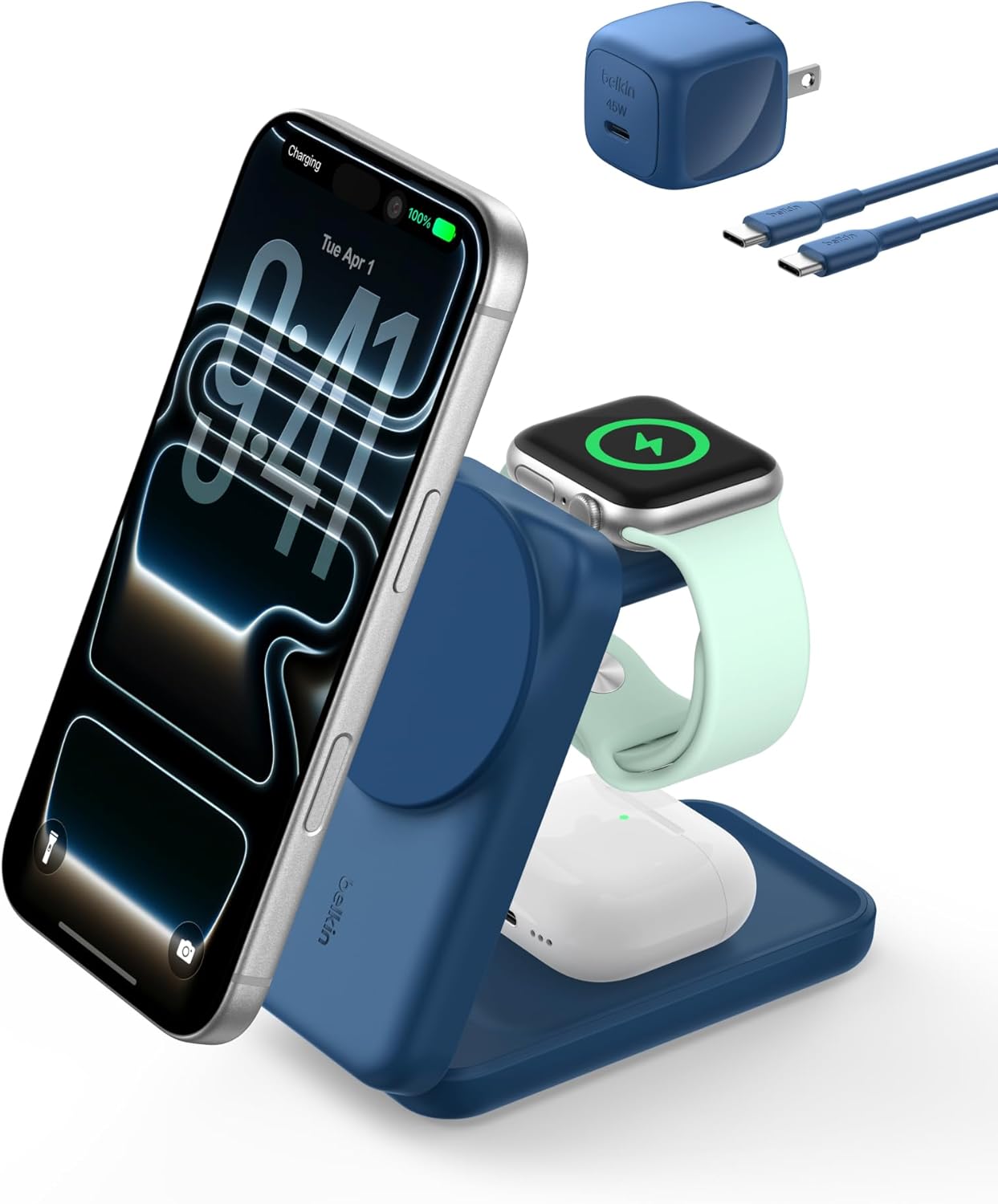
The Belkin 3-in-1 Qi2.2 Station — the best full-power charger for your entire Apple kit.You don’t own just an iPhone. There’s an Apple Watch and AirPods too, each begging for an outlet.First: true Qi2.2 25-watt charging hits your iPhone at the fastest wireless speed Apple allows, while Watch and AirPods charge alongside.Next: it powers an Apple Watch to 80 percent in about 30 minutes, then folds flat for any bag.
Finally: ChillBoost cooling holds peak speed, StandBy keeps the phone glanceable, and a 45-watt adapter is included.Cons: it’s the priciest pick here. AirPods top out at 5 watts. It’s larger and heavier than a single pad.Best for: all-in Apple households and travelers. Not for: anyone who only charges a phone.
1: Anker 3-in-1 Cube with MagSafe (15W Foldable)

The number one best wireless charger for iPhone in 2026 is the Anker 3-in-1 Cube — the only all-in-one that shrinks into your pocket.Every other multi-device charger is a fixed slab chained to your nightstand. The Cube comes with you.First: it folds into a cube barely bigger than a golf ball, then opens into a full stand.Second: unfolded, it charges all three Apple devices at once — iPhone at 15 watts, Watch, and AirPods.
Third: the iPhone arm tilts up to 60 degrees, so StandBy works in a hotel just like at home.Fourth: a 30-watt adapter is included, so it runs full speed out of the box.Cons: iPhone stays at 15 watts, not 25. The small pads need careful lining up. It’s heavier than it looks.Best for: frequent travelers and minimalists. Not for: anyone chasing the fastest 25-watt speed at home.
Things to Consider Before Buying a Wireless Charger:
Many people overlook the details when selecting a wireless charger, yet choosing the right one can significantly enhance your charging experience. Consider factors like compatibility, speed, and design to ensure your investment meets your needs effectively.
Standard Qi-Certified Charging Pads
Standard Qi-certified pads provide a universal solution for wireless charging. Most devices support this standard, making it convenient for users with various smartphones. These pads typically deliver a power output of up to 10W, depending on both the charger and the device specifications.
Magnetic and MagSafe Ecosystems
Magnetic charging utilizes a system of magnets to facilitate alignment between the charger and the device. MagSafe, developed by Apple, offers enhanced efficiency and charging speed by ensuring devices connect perfectly every time.
MagSafe technology incorporates a series of magnets within the charger and compatible devices, enhancing the experience for users of Apple products. Improved efficiency translates to faster charging times, often reaching up to 15W. Accessories like MagSafe-compatible cases can also optimize the connectivity range, ensuring convenient use without misalignment issues. This ecosystem is designed specifically for a streamlined interaction, simplifying the charging process.
Benefits of Convenience and Reduced Port Wear
A key advantage of wireless chargers lies in their convenience; simply placing your device on the pad initiates charging. This approach not only enhances ease of use but also minimizes wear on the charging ports, extending the lifespan of your devices.
Limitations in Charging Speed and Energy Loss
Charging speed can be a significant downside, as wireless options generally charge devices more slowly than traditional methods. Energy loss also occurs during the transfer, leading to inefficient charging.
Charging speed varies among devices, which can create frustrating experiences, especially for users accustomed to rapid charging through wired connections. Consider that while the convenience is appealing, users may find that a fully depleted battery takes considerably longer to charge wirelessly. Additionally, energy loss translates to longer charging times and potentially increased electricity costs, particularly if devices are frequently placed on charging pads without immediate need.
Auditing Your Device’s Power Requirements
Review the specifications for your device to identify its charging needs. Most smartphones require a minimum of 5W, but newer models may benefit from higher outputs of 10W or 15W for faster charging. Knowing this information will guide your selection process.
Choosing the Right Form Factor for Your Space
Select a design that fits your environment, as form factors vary widely. Options include flat pads, stands that allow for easy viewing, or multi-device solutions that can charge several gadgets simultaneously. Each style serves different needs in terms of usability and space management.
Form factors can significantly influence convenience and aesthetics. For a bedside table, a sleek stand may offer both visibility and style, while a flat pad can easily blend into any workspace. Multi-device chargers can efficiently declutter by consolidating charging stations, allowing for a more organized setup. Your choice should align with daily habits and available space.
Achieving Precise Coil Alignment
Precise coil alignment between your device and the charger boosts efficiency. Aim to have your phone centered on the charging pad, as even slight misalignment can reduce power transfer.
Managing Phone Case Thickness and Materials
Thin cases work best with wireless chargers. If your case is thick or made from certain materials, it might impede charging. Testing different cases can reveal optimal combinations.
Choosing the right phone case is necessary for effective wireless charging. Materials like metal or certain thick plastics can obstruct the charging signal, leading to inefficiencies. Consider using cases specifically designed to support wireless charging, often labeled as “wireless charging compatible.” Testing multiple thicknesses can help you identify what works best, ensuring your device charges swiftly and effectively.
Final Words
Considering compatibility, charging speed, and safety features will ensure a satisfying wireless charging experience. Brand reputation and warranty options also provide peace of mind during your purchase. Assessing your specific needs alongside these factors will lead to a more informed decision when selecting the right wireless charger for your devices.
Leave a Reply